Control your HomeWizard products (not the Link or Smart Switch.)
Stable: v3.17.3 Test/beta: v3.19.5
Nederlands forum topic hier, maar meeste info zal in dit engelse gedeelte te vinden zijn omdat dit al langer loopt.
→ [APP][Pro][NL] Homewizard 🧙♂️
HOMEWIZARD ENERGY PRODUCTS NOTES
Wifi P1 dongle support is only working when dongle has firmware 2.09! Please check firmware before you try to add it. This firmware support mDNS (auto discovery) hence easier to add. It is the same technique used as ChromeCast (Google). So if you face issues with your wifi network and struggle with the devices not found you can check you wifi vendor support pages on ChromeCast issues as it the same discovery method. Wait for the dongle to get this firmware from the cloud before you try to add it.
kwh1 & kwh3 (SDM230 & SDM630), energy sockets and the watermeter (~August 2022) before you try to add them you MUST enable Local API in your Homewizard Energy app. This is disabled by default and will not allow a discovery to work (mDNS method).
Make sure your wifi devices are getting a reserved ip address in your DHCP scope of your Wifi / Router dhcp.
PLUGIN BATTERY
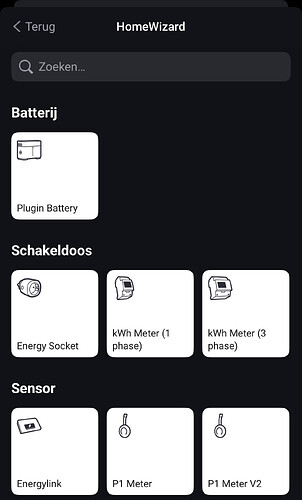
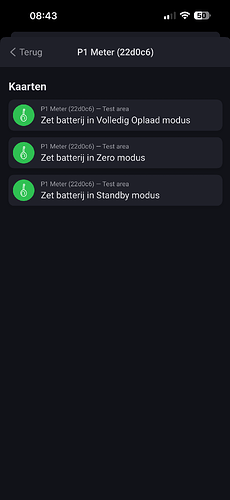
If you want to control your Plugin Battery via Homey you have to add the P1 as a APIv2 device.
You can have it next to your existing P1api1 and disable the Homey Energy include to avoid double energy tracking. Or you remove the old one but do note that historical data for this P1 will be lost.
Steps:
Add P1 as APIv2 (during the pairing process you have to press the P1 button on the device so be sure you near your P1 within 30 sec.
Make sure devices are not on a Guest wifi SSID or AP client isolation is turned on (must be off!)
Make sure multicast is enabled on all your access points and routers
(unifi?) Disable Multicast enhancement
Reboot homey (mDNS discovery might be stuck)
Reboot your wifi accesspoints/routers (unifi / ubiquiti common issues)
Power cycle your device P1, KWH, watermeter or socket(s)
Verify “LOCAL API” is on in Homewizard Energy app for the device(s)
Watermeter does not work when on battery only (must be usb powered to enable LOCAL API mode)
Install mDNS discovery app on your iphone/android and check for _hwenergy._tcp and see you can see your devices there.
Toggle the LOCAL API in the official HomeWizard Energy app and restart the HW app on Homey to discover again
Or
Pihole and Adguard users:
For those users that have Homewizard device issues (! Icon) or devices that wont move to available is a tip related to Pihole and/or Adguard.
Multicast DNS isnt handled properly via these DNS sinkholes. You should install AVAHI service on your Pihole and/or Adguard linux server that picks up these queries and resolves these queries locally.
For Homewizard Energy devices my suggestion is reserve static ip’s in the dhcp server scope of your router (when possible). Some routers and dhcpserver keep cycle their dhcp scope.
More advanced tip(and those who are knowledgeable enough to implement): separate your IoT devices from your local LAN. Most of these IoT devices are cheap China tech and not known to proper firmware updates. When you separate these you need mdns repeater/proxy/relay on your router. But only if you know how to do it as its very complex to implement and requires a high level of network understanding (vlans & firewall rules).
HOMEWIZARD (legacy, yeah the old appliance)
Upon first deployment you need add the HomeWizard unit first,
then you can add the related/connected components
from HomeWizard to your Homey (ie. Heatlink, Energylink etc.
Get your local Homewizard IP address and local password (not the Homewizard Online account!)
If trying to add this in the Homey GUI and get a quick flash of this screen and blank after, please use the webinterface of Homey GUI https://my.homey.app.
Homey does not support Heatlink and Energylink directly without the Homewizard unit.
Homewizard have protected their 868mhz communication with Energylink and Heatlink so you still need the Homewizard unit to make this work.
Supports: Energylink, Heatlink, Windmeter, Rainmeter, Temperature sensors, Smoke & Motion sensors
Does not support: Light bulbs & Power sockets (use KlikAanKlikUit or Smartwares app to control these).
Note on Motion sensor: There is a 10 seconds delay (use KlikAanKlikUit or Smartwares app if you need direct response).
### Internal Cleanup: Deduplicated Code and Removed Unused Settings (v3.19.4)
* **No behaviour change.** Merged three duplicated blocks in the planner, policy and explanation code into shared functions (identical logic, now maintained in one place instead of two or three). Also removed 6 functions and 1 setting (“Weather Update Interval”) confirmed to have zero call sites anywhere in the app — dead code left over from earlier changes.
### New Setting: Atmospheric Clear-Sky Formula for Day Typing (v3.19.1, off by default)
* **Added a setting that fixes the app mistaking clear winter days for dull ones.** Each day is typed clear, mixed or overcast, and that type nudges the whole solar forecast up or down. The type comes from dividing the radiation actually measured by the radiation a cloudless sky would have delivered — and that second number is calculated from how high the sun stands, not measured. The existing calculation only accounts for sunlight arriving at an angle and spreading over more ground. It ignores the second thing a low sun does: the light crosses far more atmosphere and loses part of itself on the way, roughly ten times the air at 5° above the horizon compared with straight overhead. So the bar is set too high exactly where the sun is low — 174 against 137 W/m² at 10°, 87 against 50 W/m² at 5°. In summer those hours carry about 5% of the day and nothing changes. In winter the sun never leaves that range, so the whole day is measured against a bar that is too high and scores too low. Checked against two years of reanalysis data: the clearest days of each month score 0.687 in December against 0.952 in April on the current scale, and 0.836 against 0.974 on the new one. April skies are not clearer than December skies, so that dip is the formula, not the weather. Because the threshold for “clear” is a fixed number, in December almost no day can reach it — a genuinely bright winter day gets typed mixed and the forecast is nudged the wrong way on exactly the days with the most solar to plan around. On 120 real winter days, 19% land in a different type with the new formula, always a brighter one; in summer, 2 days out of 69. It ships **off**, and while off a log line reports both values and whether the type would have changed. Switching it on also shifts two other checks that read the same clearness figure, and the learned per-type correction factors need time to re-learn on the new typing.
### Charging Limit Now Uses the Same Maths as the Planner (v3.19.1)
* **Fixed the app refusing a charge the planner had already decided was profitable.** Two separate places worked out the highest price worth paying to fill the battery, and they disagreed. The planner asked what a stored kilowatt-hour is worth: tonight’s peak price, minus what round-trip losses eat, minus battery wear counted on the energy going in. The runtime limit used the configured efficiency figure rather than the efficiency actually measured on your battery, counted wear against the energy coming out, and then subtracted a further one-cent safety margin. On 2 September that was €0.254 against the planner’s €0.245 on the very same slot, so the runtime could veto a charge the plan depended on. Both now use one calculation and the measured efficiency — €0.244 at the 73.2% round-trip efficiency measured here. Note this makes the limit stricter, not looser: it is the planner’s own break-even, with no hidden margin on top.
* **Corrected the description of the “battery cycle cost” setting.** It said the cost applies per kilowatt-hour discharged, while every calculation in the app applies it to the energy going into the battery. The formula and the example figure are unchanged — only the wording was wrong.
### Planning Chart No Longer Shows the Battery Filling While the Battery Is Idle (v3.19.1)
* **Fixed the planning table promising a rise in battery level that never happened.** Deciding to top the battery up from the grid when it is nearly empty and power is cheap was worked out in three separate places: the planner, the live runtime, and the planning chart. The two copies outside the planner applied an extra condition the planner does not — they skipped the top-up whenever tomorrow’s solar forecast looked strong enough to refill the battery for free. When that condition flipped between two runs on 2 September, those copies dropped the top-up while the planner’s battery line kept climbing, so the chart showed the battery idle and gaining 7.4 percentage points per quarter-hour at the same time. The chart promised a rise from 18% to 33% that never arrived, and the evening discharge then started from a much emptier battery. The planner now owns that decision outright and the other two follow it. A safety net was added as well: whenever the chart would draw the battery filling under a mode that cannot charge, it re-simulates instead of publishing the planner’s line, and records that it did so.
### Battery Now Charges Ahead of a Profitable Peak on Sunny Days (v3.19.1)
* **Fixed the planner refusing to buy cheap power before an expensive evening, on any day solar was expected to refill the battery.** When enough sun is forecast, the planner treats every battery level as equally good, reasoning that solar will top the pack up regardless of where it starts. That shortcut is what lets the battery discharge freely overnight instead of hoarding for a single best hour — but it also erased the value of being fuller, so buying cheap power before a pricey evening scored no better than doing nothing, and the battery simply sat there. Seen live on 31 August: the battery held at 67% while power cost €0.13 and that evening’s peak paid €0.38, well clear of the wear cost of a charge/discharge cycle. The planner now keeps the value of a fuller battery intact whenever the price gap ahead beats that wear cost, and falls back on the shortcut the rest of the time. Replaying 53 recorded planning runs both ways, the change was better on 14 of the 15 where it made any difference (one was worse by €0.0006). Nothing to set — it is on by default; whether a real difference between battery levels may be ignored is a matter of the planner being right, not a preference.
### PV Curtailment Trigger No Longer Fires With the Setting Off (v3.19.1)
* **Fixed the “PV curtailment target changed” flow trigger firing even when the “Enable PV curtailment” setting was left off.** That setting exists so the app only asks your inverter to throttle solar production if you actually have a flow set up to act on it — leave it off and the app is supposed to never send that request. But the trigger card only checked whether exporting had gone negative-value (worth less than nothing), not whether you had turned the setting on. Under standard net metering this never showed up, because export can’t go negative there. It became visible once export pricing that can turn negative was in use: the trigger fired, and any flow already listening on it acted on a request the setting said was off. The capability that shows the calculated target still updates regardless of the setting — that part is just for checking the number — but the trigger itself now only fires when the setting is switched on.
### New Setting: Weigh a Weak Solar Surplus Against Exporting (v3.19.1, off by default)
* **Added a setting that lets the planner decide what to do with a small solar surplus, instead of always exporting it.** When solar produces only a little more than the house uses — roughly under 400 W — the planner treats staying idle and holding the battery as the same thing and never asks whether storing that surplus would be worth more than sending it to the grid. The new “Weigh weak solar surplus against export” setting makes it ask. It ships **off**: while net metering applies, exported energy is credited at the full slot price, so exporting a weak surplus is worth more than storing it (storing loses round-trip efficiency and battery wear). The setting exists for when net metering ends and export is paid less than consumption, and for anyone who prefers to bank every kilowatt-hour. Turning it on does not change what the battery earns on a normal sunny day: strong-sun behaviour is untouched.
### Battery No Longer Stops Discharging While Prices Are Still High (v3.19.1)
* **Fixed a near-empty battery going idle at a profitable price whenever a little solar was forecast.** When the planner compared “stay idle and let solar export” against “keep discharging”, it credited the export revenue to the idle option only. In reality the battery does not give that revenue up by discharging: it covers the house load while solar exports the surplus at the same time, so the revenue is earned either way. Counting it on one side made idling look better than it was. The error was small in absolute terms, so it only tipped the decision when there was little left to discharge — which is exactly why it showed up on a nearly empty battery, leaving it parked at 1–3% while prices were still well above the discharge threshold. Both options are now valued on what actually distinguishes them. Behaviour at negative prices is unchanged.
### Dynamic Prices Now Come From Power by the Hour (v3.19.1)
* **Replaced the built-in price scrapers with the Power by the Hour app as the price source.** Dynamic prices used to be fetched by two scrapers maintained inside this app, which broke whenever a supplier changed their website. Instead, the app now reads the day-ahead prices from a device in the Power by the Hour app (`com.gruijter.powerhour`) — select which device to use in the battery policy settings. That app already supports a long list of suppliers and keeps them working, including quarter-hourly prices where the supplier publishes them. If those prices are unavailable for any reason, the app falls back to ENTSO-E day-ahead data as before, so planning keeps running. One thing worth checking after updating: the import markup is configured in both apps, and the price the planner uses comes from Power by the Hour. If the two don’t match, the prices shown in the charts won’t line up with the ones the battery plans on. Power by the Hour shows the markup including VAT; this app’s “Import Markup” setting expects it excluding VAT (divide by 1.21).
### Elapsed Hours and the Current Hour Now Priced Correctly (v3.19.1)
* **Fixed today’s earlier hours disappearing from the price chart, and the current hour’s price being slightly off.** The new price source only serves slots from now onwards, which caused two problems. First, the hours that had already passed today vanished from the price table after a refresh and stayed gone until midnight, leaving the chart starting halfway through the day. Those hours are now filled in from the ENTSO-E data, which covers whole days. Second, the hour currently in progress was averaged over only the quarter-hours still remaining in it rather than all four, so its price could read a few cents too high or too low depending on how the hour was shaped. The complete average is now used. Neither issue affected the battery’s decisions — those are made on quarter-hourly prices and on hours still ahead — but both were visible in the chart.
### Evening Safety Check No Longer Blocks Waiting for Cheaper Solar (v3.19.1)
* **Fixed the planner buying from the grid instead of waiting for solar that was still coming, on batteries smaller than an evening’s consumption.** When the plan sees cheaper solar ahead it can defer a grid charge, and a safety check is supposed to override that whenever waiting would leave too little in the battery for the evening. That check compared what the battery can hold against the full learned evening consumption — so on any battery too small to cover a whole evening on its own, it was true no matter what, and the deferral was cancelled every single time. Measured over 24 real planning runs: 198 deferrals attempted, 182 overruled. The check now asks whether the remaining solar still fills the battery, which is the question it was meant to ask.
### Correct Total Current on Three-Phase P1 Meters (v3.19.1)
* **Fixed the total current reading showing the L1 phase value instead of the actual total on three-phase installations.** The `measure_current` capability simply mirrored phase 1, so on a three-phase meter it under-reported whenever the load wasn’t evenly spread. It now uses the meter’s own total-current reading, falling back to adding up the three phases when the meter doesn’t publish a total. Single-phase installations were never affected.
### Water Meter Daily Total Now Resets at Local Midnight (v3.19.1)
* **Fixed the daily water total rolling over at 2:00 in the morning instead of midnight during summer time.** The reset compared dates in UTC rather than local time, so the “today” total kept counting for the first two hours of each new day (one hour in winter). It now uses the Amsterdam local date.
### Tomorrow’s Plan No Longer Falls Back to Flat Hourly Prices (v3.19.1)
* **Fixed the battery planning tomorrow on averaged hourly prices instead of the real quarter-hourly ones.** Once the hourly price table ran through the end of tomorrow, the app treated its price data as complete and stopped fetching for the rest of the day. But a complete hourly table says nothing about the quarter-hourly one: on days where hourly prices for tomorrow arrived first and quarter-hourly prices were only published later in the afternoon, the app never went back for them. Tomorrow then stayed on four identical prices per hour until midnight, hiding exactly the within-the-hour price differences the planner uses to pick charge and discharge moments. Price refreshes now check the quarter-hourly horizon as well, and re-open a fetch when it stops short — at most once an hour, so this adds no meaningful load. Setups running on hourly prices are unaffected. Separately, quarter-hourly prices from the ENTSO-E fallback source are now kept across an app restart instead of being dropped and re-fetched.
* **Replaced three overlapping checkboxes with a single, clearer choice.** The settings page used to have separate toggles for “Use satellite in DP optimizer” and “Satellite replaces Solcast”, plus a Solcast enable checkbox — with unwritten precedence rules deciding what happened when more than one was switched on. These are now one setting: blend Open-Meteo’s forecast with nothing extra, with a satellite-based nowcast, or with Solcast. Only one secondary source can be active at a time, so there’s no longer a hidden “which one wins” question. The satellite option no longer requires a Solcast account to use — previously the satellite blend only worked at all when Solcast was also configured, which wasn’t intentional and just wasn’t caught until now. Existing configurations are migrated automatically on the first restart after updating; nothing needs to be re-entered. Satellite nowcast images captured in the few minutes just before sunrise carry no usable signal but were previously blended in anyway, dragging the near-term PV forecast down to near-zero for the following, already-sunlit hour — those images are now ignored.
### Peak Shaving No Longer Silently Downgrades to Standby (v3.19.0)
* **Fixed peak shaving occasionally doing nothing when it should have discharged.** Peak shaving is meant to be a hard, price-blind safety cap that discharges the battery whenever grid import threatens to exceed your configured limit — but a shared internal profitability check could veto that discharge and drop it back to standby whenever the electricity price sat below your minimum discharge price, with nothing logged to explain why. Peak-shaving discharges now bypass that price check entirely, as intended; normal price-driven discharging is unaffected.
* **Fixed the minimum state of charge the planner protects near the end of a discharge window sometimes being computed from the wrong time slot.** The per-slot floor that keeps a reserve in the battery could end up flat, or based on the first slot of the forecast instead of the slot actually being planned, occasionally letting the plan aim closer to empty than intended.
### Corrected Battery Wear Cost in Store-vs-Export Decisions (v3.19.0)
* **Fixed the cost of battery wear (charge/discharge cycling) not being weighed in some cases when deciding whether to store surplus solar or export it.** The same decision made through the low-PV “trickle” path used a separate piece of code that had been missed the first time this was fixed. Both now consistently account for cycle cost, so the plan no longer stores PV in the battery when exporting it would actually have been more profitable.
### Fixed an Underestimate in Learned Standby Consumption (v3.19.0)
* **Fixed nights that were only partially measured (for example due to a restart) being able to win selection as one of the “lowest consumption” reference nights used to learn your household’s standby power.** A partial night’s total looks artificially low, so it could pull the learned baseline down and understate your real overnight consumption. Incomplete nights are now excluded from that selection.
### Corrected a Timezone Bug in a Dynamic Price Window (v3.19.0)
* **Fixed a price-release time window that was reading the clock in local time on a server that actually runs in UTC, shifting the window two hours later than intended in winter (one hour in summer).** Also stopped the price fetcher from unnecessarily re-downloading and re-parsing the full day-ahead price page on every policy run when the cached prices already covered the full stretch through tomorrow.
### CDP Debug Inspector Off by Default (v3.19.0)
* **Closed a debug-only network listener that could be left open unintentionally.** A Chrome DevTools inspector port used for live performance profiling during development now stays off unless explicitly enabled by a developer-only flag.
### Reduced Background Memory Usage (v3.19.0)
* **Moved several large internal buffers (PV accuracy samples, debug logs, price-provider caches) out of the app’s settings storage and into local files.** Every settings write ships the app’s entire settings data over an internal channel, so unrelated data sitting in that storage was being re-sent on every single write regardless of what actually changed. This measurably reduced background memory and CPU use, and lowers the chance of hitting Homey’s memory-warning limit on setups with many HomeWizard devices.
### Battery Plan No Longer Collapses After a Charge-Rate Calibration (v3.17.11)
* **Fixed a case where the planner could get stuck aiming for a much lower state of charge than it should, after the battery briefly recalibrated its maximum charge rate.** Batteries occasionally report a temporary, very low charge-rate ceiling while calibrating internally. Normally this self-corrects within moments, but on some systems the reported value could stay stuck at that low figure for the rest of the day. Because the planner trusted that reported ceiling, it believed far less solar could be stored than actually could, and planned around a much emptier battery than necessary. The planner now always works from the battery’s nominal charge capability instead of the moment-to-moment reported ceiling. That reported figure is only ever a planning input — the actual charge rate is enforced by the battery hardware itself — so a temporary calibration figure (or the natural tapering as the battery nears full) should never shape a forecast that spans a full day of charging and discharging. This closes the gap left by the earlier version of this fix, which could only recover once the battery was already charging hard enough to visibly contradict its own reported ceiling, and so did nothing while the battery sat idle.
### Corrected Payback and Profit Figures on the Expansion Tab (v3.17.11)
* **Fixed the payback figures on the expansion tab, which were several times too short for anyone running more than one battery.** The purchase price you enter is per battery, but the measured payback time and the “earned back so far” percentage were comparing that single price against the earnings of your entire set — so with three batteries, payback looked three times shorter than it really is. Both now account for how many batteries you actually have, and the investment total is spelled out so you can check it. The progress bar underneath showed an annual return rate while being labelled as payback time, which meant it never moved as you earned the investment back; it now tracks actual progress towards break-even. Finally, each comparison card used to lead with a euro amount presented as a profit per day, which it never was — it was an internal planning value covering a window longer than a day, including energy still sitting in the battery. The cards now lead with the share of your household consumption covered without drawing from the grid, which is what the underlying calculation genuinely measures, alongside the capacity, power and any shortfall during discharge. The estimated yearly gain and payback time for adding a battery are still shown, now marked as a rough model indication. Those estimates are also ranked correctly again: the underlying figure used to credit whatever charge happened to be in the battery at the moment of calculation, which grows with pack size, so a larger battery could be scored below a smaller one and the comparison shifted as the state of charge moved through the day. Scenarios are now compared on what each pack can earn starting from empty, which depends only on prices, solar and consumption. Your measured earnings, based on completed charge/discharge cycles, remain the figure to trust for real returns.
### Battery No Longer Makes Tiny Pointless Charges Around Sunset (v3.17.11)
* **Fixed a case where the battery would briefly charge a little when solar production was roughly equal to house consumption (typically as the sun faded).** With no real surplus to store, that small charge had to be given back later at a round-trip efficiency loss — a guaranteed waste with no benefit. The battery now simply stays idle in that situation and lets any solar go to the grid, matching what the planning chart already showed. This mainly affects days with variable cloud and the hour around sunset.
### Energy Socket Polling Interval and Thermometer Offset Now Apply Immediately (v3.17.10)
* **Fixed a bug where changing the polling interval on Energy Socket devices, or the temperature/humidity offset on Thermometer devices, silently had no effect until the app was restarted.** The settings screen saved the new value, but the running device kept using the old one — so, for example, lowering the polling interval from 10 to 5 seconds appeared to save successfully while the device kept polling every 10 seconds until the next app restart. Changes to these settings now take effect immediately.
### More Reliable Device Updates During App Restarts (v3.17.8)
* **Fixed a rare connection error during app shutdown or restart.** Energy meters, smart plugs, batteries and the water meter could briefly try to update their values while the app was already shutting down, which showed up as a connection error in diagnostic reports. Those updates are now cleanly skipped while the app is stopping. The water meter additionally received the same protection against overlapping reads piling up that the smart plugs already had, keeping it responsive even when a meter is temporarily unreachable.
### Battery Efficiency Now Broken Down by Charge/Discharge Workload (v3.17.7)
* **New insight into how the battery’s round-trip efficiency depends on how hard it is charged or discharged.** Each completed charge/discharge cycle now records how much of its energy moved at low, medium and high power, so the app can compare efficiency between gentle and high-power usage instead of relying on a single session average. This reveals whether short high-power bursts — for example covering a large household spike — cost efficiency, helping you tune when to charge and discharge for the least loss. The comparison fills in over the coming days as new cycles complete.
## Latest Updates (v3.15.63–v3.17.6)
### Cheap Solar Now Stored at the Best Moment Instead of Exported (v3.17.6)
* **Fixed a case where the battery could export cheap solar surplus now and top up later at a less favorable moment.** On systems that use time-varying discharge thresholds, an internal check that reserves enough energy for the evening was being skipped, so the planner sometimes preferred exporting over storing during strong, low-priced solar. Solar surplus is now stored at the cheapest available moment as intended.
### Battery Wear Cost Now Applied Consistently Across All Charging Paths (v3.17.5)
* **Fixed an inconsistency where storing energy via one internal path was valued as slightly cheaper than an economically identical path, with no physical basis for the difference** — the battery’s wear cost now applies uniformly no matter how the energy enters the battery, removing a small bias in charging-timing decisions.
### Battery Startup Reliability for Multi-Battery Setups (v3.17.5)
* **Fixed a startup crash that could occur on setups with several batteries** — connections to each battery now start with a brief stagger instead of all at once, avoiding a CPU-limit trip during initialization.
### Satellite Solar Forecast Improvements (v3.17.5)
* **Extended the near-term cloud-dip detection look-ahead** for earlier warning of an approaching solar dip.
* **Fixed a regression in the satellite-based solar yield calculation** that had crept back in from an earlier change.
* **Fixed a day-boundary issue where yesterday’s cloud data could leak into today’s calculation** right after midnight.
### Camera Chart & PV Accuracy Display Fixes (v3.17.5)
* **The camera solar chart now shows the same corrected forecast used for accuracy tracking**, instead of an older, less accurate calculation.
* **PV accuracy indicators now only appear once satellite data is actually available**, instead of showing before there’s anything to compare against.
* **The camera chart now plots the same forecast curve used elsewhere in the app**, instead of a separate, unblended one.
### Cloud-Cover Forecast Accuracy (v3.17.5)
* **The solar-output discount applied during heavy cloud cover now cross-checks against ground-based measurements before applying** — reduces cases where a temporary cloud-model disagreement caused an unnecessarily large forecast cut.
* **Cloud-cover data now blends multiple weather models instead of relying on a single one**, for a steadier forecast input.
### Performance Improvements (v3.17.4)
* **Reduced CPU overhead in price-fetching and policy evaluation**, and staggered related network calls to avoid short bursts.
### Solar Ensemble Accuracy (v3.17.4)
* **Aligned additional weather signals across forecast models** for a more consistent blended solar forecast.
* **Added a log line that shows whether the optimizer’s overnight PV-abundance logic actually reached the current battery level, and what the underlying algorithm would choose there before later adjustment steps run** — helps confirm whether an unexpected hold-vs-discharge decision came from the core planning logic or a later adjustment, without needing a separate reproduction script. `lib/optimization-engine.js`, `lib/policy-engine.js`
* **Re-enabled a shadow measurement for the discharge-timing safety margin that was disabled earlier for lack of a working before/after comparison** — the safety margin (which makes overnight discharge more cautious when weather models disagree with each other) now logs its estimated profit and battery-level effect for comparison, without changing what the battery actually does. Counts persist across app restarts. `drivers/battery-policy/device.js`
* **The battery could stay near-empty through a whole morning of PV surplus on certain price-curve shapes** — planning logic that decides when to wait for a better charging moment could keep deferring longer than intended, missing the practical charging window. Tightened so deferral only happens when genuinely worthwhile.
* **Added a safeguard so waiting for a better price can no longer leave the evening’s own energy need uncovered** — planning now checks that enough charging opportunity remains before deferring further.
* **Fixed a case where a favorable price later in the schedule could block charging today even when it wouldn’t actually be reachable in time.**
* **Stopped the battery from rapidly switching between charging and idle when solar output was present but below household demand** — the surplus-vs-grid decision now only runs when there is genuine surplus (solar actually exceeding the home’s own use), avoiding needless mode changes.
The power sensor from homewizard adds up to the total usage in homey energy. But the watcher should be the overall power usage. And all the other devices a slice of that. Now I have more usage then the watcher says.
Hi all, Homewizard app is not compatible yet with Homey 3.0. It was just released (final) and I have it installed today myself so I can start development/update on the Homewizard app to make it work properly with Homey 3.0.
That problem is related to your Homewizard wifi connectivity. I have no problems with the beta app myself (still running and getting Energylink data). Another one could be Homewizard and Energylink distance. Not sure how your units are placed and configured but it sounds like you have to check it first.
I noticed the same thing (before the beta version), but like Jeroen said it’s a Homewizard issue.
What i did , i connect Homewizard to a KAKU switch and connect the switch to Homey.
At 00:05 Homey checks with Energylink if the values are not greater then 1kwh.
If they are greater Homey switch the KAKU off and after 30 sec on , to reset Homewizard.
And the problem is fixed
Yes correct. Another problem what could cause this is if you have other integrations (domoticz or HASS etc) talking to your Homewizard unit. The Homewizard unit gets overloaded (high cpu or open connections) which eventually make the Homewizard unresponsive for a while. Not sure if you have other http gets getting data from Homewizard?
No I only use HomeWizard with Energylink at the moment. Maybe I’am switching tot Youless in the near future so I can switch off Homewizard. But for now I’am happy with your app and investigate the connection with Homey as you mention.




 Latest Updates (v3.15.63–v3.17.6)
 Full Changelog


