Control your HomeWizard products (not the Link or Smart Switch.)
Stable: v3.17.3 Test/beta: v3.17.11
Nederlands forum topic hier, maar meeste info zal in dit engelse gedeelte te vinden zijn omdat dit al langer loopt.
→ [APP][Pro][NL] Homewizard 🧙♂️
HOMEWIZARD ENERGY PRODUCTS NOTES
Wifi P1 dongle support is only working when dongle has firmware 2.09! Please check firmware before you try to add it. This firmware support mDNS (auto discovery) hence easier to add. It is the same technique used as ChromeCast (Google). So if you face issues with your wifi network and struggle with the devices not found you can check you wifi vendor support pages on ChromeCast issues as it the same discovery method. Wait for the dongle to get this firmware from the cloud before you try to add it.
kwh1 & kwh3 (SDM230 & SDM630), energy sockets and the watermeter (~August 2022) before you try to add them you MUST enable Local API in your Homewizard Energy app. This is disabled by default and will not allow a discovery to work (mDNS method).
Make sure your wifi devices are getting a reserved ip address in your DHCP scope of your Wifi / Router dhcp.
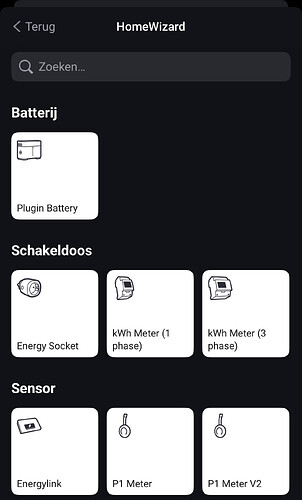
PLUGIN BATTERY
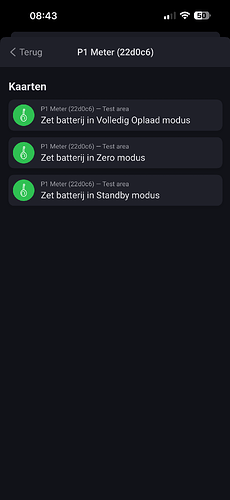
If you want to control your Plugin Battery via Homey you have to add the P1 as a APIv2 device.
You can have it next to your existing P1api1 and disable the Homey Energy include to avoid double energy tracking. Or you remove the old one but do note that historical data for this P1 will be lost.
Steps:
Add P1 as APIv2 (during the pairing process you have to press the P1 button on the device so be sure you near your P1 within 30 sec.
Make sure devices are not on a Guest wifi SSID or AP client isolation is turned on (must be off!)
Make sure multicast is enabled on all your access points and routers
(unifi?) Disable Multicast enhancement
Reboot homey (mDNS discovery might be stuck)
Reboot your wifi accesspoints/routers (unifi / ubiquiti common issues)
Power cycle your device P1, KWH, watermeter or socket(s)
Verify “LOCAL API” is on in Homewizard Energy app for the device(s)
Watermeter does not work when on battery only (must be usb powered to enable LOCAL API mode)
Install mDNS discovery app on your iphone/android and check for _hwenergy._tcp and see you can see your devices there.
Toggle the LOCAL API in the official HomeWizard Energy app and restart the HW app on Homey to discover again
Or
Pihole and Adguard users:
For those users that have Homewizard device issues (! Icon) or devices that wont move to available is a tip related to Pihole and/or Adguard.
Multicast DNS isnt handled properly via these DNS sinkholes. You should install AVAHI service on your Pihole and/or Adguard linux server that picks up these queries and resolves these queries locally.
For Homewizard Energy devices my suggestion is reserve static ip’s in the dhcp server scope of your router (when possible). Some routers and dhcpserver keep cycle their dhcp scope.
More advanced tip(and those who are knowledgeable enough to implement): separate your IoT devices from your local LAN. Most of these IoT devices are cheap China tech and not known to proper firmware updates. When you separate these you need mdns repeater/proxy/relay on your router. But only if you know how to do it as its very complex to implement and requires a high level of network understanding (vlans & firewall rules).
HOMEWIZARD (legacy, yeah the old appliance)
Upon first deployment you need add the HomeWizard unit first,
then you can add the related/connected components
from HomeWizard to your Homey (ie. Heatlink, Energylink etc.
Get your local Homewizard IP address and local password (not the Homewizard Online account!)
If trying to add this in the Homey GUI and get a quick flash of this screen and blank after, please use the webinterface of Homey GUI https://my.homey.app.
Homey does not support Heatlink and Energylink directly without the Homewizard unit.
Homewizard have protected their 868mhz communication with Energylink and Heatlink so you still need the Homewizard unit to make this work.
Supports: Energylink, Heatlink, Windmeter, Rainmeter, Temperature sensors, Smoke & Motion sensors
Does not support: Light bulbs & Power sockets (use KlikAanKlikUit or Smartwares app to control these).
Note on Motion sensor: There is a 10 seconds delay (use KlikAanKlikUit or Smartwares app if you need direct response).
### Cheap Solar Now Stored at the Best Moment Instead of Exported (v3.17.6)
* **Fixed a case where the battery could export cheap solar surplus now and top up later at a less favorable moment.** On systems that use time-varying discharge thresholds, an internal check that reserves enough energy for the evening was being skipped, so the planner sometimes preferred exporting over storing during strong, low-priced solar. Solar surplus is now stored at the cheapest available moment as intended.
### Battery Wear Cost Now Applied Consistently Across All Charging Paths (v3.17.5)
* **Fixed an inconsistency where storing energy via one internal path was valued as slightly cheaper than an economically identical path, with no physical basis for the difference** — the battery’s wear cost now applies uniformly no matter how the energy enters the battery, removing a small bias in charging-timing decisions.
### Battery Startup Reliability for Multi-Battery Setups (v3.17.5)
* **Fixed a startup crash that could occur on setups with several batteries** — connections to each battery now start with a brief stagger instead of all at once, avoiding a CPU-limit trip during initialization.
### Satellite Solar Forecast Improvements (v3.17.5)
* **Extended the near-term cloud-dip detection look-ahead** for earlier warning of an approaching solar dip.
* **Fixed a regression in the satellite-based solar yield calculation** that had crept back in from an earlier change.
* **Fixed a day-boundary issue where yesterday’s cloud data could leak into today’s calculation** right after midnight.
### Camera Chart & PV Accuracy Display Fixes (v3.17.5)
* **The camera solar chart now shows the same corrected forecast used for accuracy tracking**, instead of an older, less accurate calculation.
* **PV accuracy indicators now only appear once satellite data is actually available**, instead of showing before there’s anything to compare against.
* **The camera chart now plots the same forecast curve used elsewhere in the app**, instead of a separate, unblended one.
### Cloud-Cover Forecast Accuracy (v3.17.5)
* **The solar-output discount applied during heavy cloud cover now cross-checks against ground-based measurements before applying** — reduces cases where a temporary cloud-model disagreement caused an unnecessarily large forecast cut.
* **Cloud-cover data now blends multiple weather models instead of relying on a single one**, for a steadier forecast input.
### Performance Improvements (v3.17.4)
* **Reduced CPU overhead in price-fetching and policy evaluation**, and staggered related network calls to avoid short bursts.
### Solar Ensemble Accuracy (v3.17.4)
* **Aligned additional weather signals across forecast models** for a more consistent blended solar forecast.
* **Added a log line that shows whether the optimizer’s overnight PV-abundance logic actually reached the current battery level, and what the underlying algorithm would choose there before later adjustment steps run** — helps confirm whether an unexpected hold-vs-discharge decision came from the core planning logic or a later adjustment, without needing a separate reproduction script. `lib/optimization-engine.js`, `lib/policy-engine.js`
* **Re-enabled a shadow measurement for the discharge-timing safety margin that was disabled earlier for lack of a working before/after comparison** — the safety margin (which makes overnight discharge more cautious when weather models disagree with each other) now logs its estimated profit and battery-level effect for comparison, without changing what the battery actually does. Counts persist across app restarts. `drivers/battery-policy/device.js`
* **The battery could stay near-empty through a whole morning of PV surplus on certain price-curve shapes** — planning logic that decides when to wait for a better charging moment could keep deferring longer than intended, missing the practical charging window. Tightened so deferral only happens when genuinely worthwhile.
* **Added a safeguard so waiting for a better price can no longer leave the evening’s own energy need uncovered** — planning now checks that enough charging opportunity remains before deferring further.
* **Fixed a case where a favorable price later in the schedule could block charging today even when it wouldn’t actually be reachable in time.**
* **Stopped the battery from rapidly switching between charging and idle when solar output was present but below household demand** — the surplus-vs-grid decision now only runs when there is genuine surplus (solar actually exceeding the home’s own use), avoiding needless mode changes.
* **Overnight discharge slots are now evaluated priciest-first instead of chronologically** — The optimizer built its list of candidate night-window discharge slots and filled them earliest-to-latest. When total available SoC fell short of covering every candidate, the cheapest slot got filled while the most valuable one sat idle. The reorder block now sorts by slot price descending and fills from the top, so the highest-price export opportunity captures capacity first. `optimization-engine.js`
* **Reorder budget now correctly uses the DP terminal-SoC target when `wEnd = N`** — When the optimizer targets a non-zero end SoC (e.g. a morning reserve), the reorder block was drawing from the full battery capacity instead of only the headroom above the target floor. On a night requiring 20% reserve at 06:00 it could schedule discharges totalling more SoC than was actually available, leaving later plan slots without energy to deliver. The budget is now `soc − wEnd_target`. Property tests in `test/optimizer-properties.test.js` cover both the sort invariant and the budget constraint.
* **The solar forecast was systematically shifted 1 hour late — now corrected** — Open-Meteo’s hourly irradiance values use the *preceding-hour* convention: the value timestamped 14:00 represents the average from 13:00–14:00. The app was treating them as current-hour values, causing the OM-derived PV forecast to lead one hour. On a rising morning or a falling evening the optimizer was planning charge/discharge decisions 1 slot too early. The ingestion code now indexes each irradiance value to the hour it covers (13:00 for a 14:00 stamp). Existing learned solar yield factors were migrated −1 h UTC to stay consistent with the corrected timestamps. `lib/weather-forecaster.js`, `lib/learning-engine.js`
### Upwind Cloud Signal via KNMI Wind (v3.17.0)
* **The app now reads live KNMI wind speed and direction from the nearest home station** — A keep-alive KNMI wind poller (10-min cadence) pulls the closest measured wind. Wind speed, direction, and WMO weather icon are shown in settings; the widget carries a compass bearing. `lib/knmi-wind.js`, `drivers/battery-policy/device.js`
* **Upwind COT modulates the DP PV forecast and is surfaced in explainability** — The cloud optical thickness at a point ~50 km upwind (derived from live KNMI wind direction and speed) is compared to the local COT. A higher upwind value signals incoming cloud cover with a 20–40 min lead; the DP reduces pvForecast for the next 1–2 slots proportionally. The explainability engine surfaces this as a named reason when it fires. `drivers/battery-policy/device.js`, `lib/explainability-engine.js`
* **Satellite GHI→panel-W yield factors are now learned per UTC hour from live measurements** — Each 15-min PV production bucket is recorded against the simultaneous satellite GHI reading; an exponential moving average (α = 1.0 first sample, α = 0.10 thereafter) converges the per-hour conversion factor from live data. The hardcoded `SAT_YIELD_FACTORS` table in `weather-forecaster.js` remains as a cold-start fallback for hours that have no EMA data yet. The table was calibrated from a 6-day SDM230 measurement run (Jun 23–29, n = 79 hourly samples, clear-day MAE ≈ 78–118 W); h = 06/07 and h = 15/16/17 were corrected by 5–12%. `lib/learning-engine.js`, `lib/weather-forecaster.js`
* **Satellite DP override defaults to off (`satellite_dp_active = false`)** — The nowcast feature is experimental and the yield-factor bootstrap is per-installation. The toggle must be explicitly enabled in settings; other users are unaffected.
* **`getSat15minCurve` + `getNextSatDip` + `[SAT DIP]` policy log** — The 15-min satellite GHI curve is held in memory; the app can locate the next expected cloud dip and log it at policy time. `lib/weather-forecaster.js`
* **A new `battery_error_resolved` flow trigger fires when the battery SoC starts moving again after a detected stall** — The companion to the existing `battery_error_detected` card. Enables automations that notify on recovery or reset external state. Works per unit for multi-battery setups. `drivers/energy_v2/device.js`
* **Hourly consumption learning is now winsorized to resist appliance spikes** — High P1 readings from short-duration loads (oven, washing machine) entered the EMA directly and inflated the learned baseline for that hour, persisting for weeks. Samples above a 95th-percentile fence are clipped before the EMA update so transient spikes no longer corrupt the consumption profile used for DP planning. `lib/learning-engine.js`
### Daily Planned vs Actual Profit Tracking (v3.17.0)
* **At midnight the app records yesterday’s DP-planned profit against the actual metered outcome** — The delta is logged and exposed via the diagnostics API, providing a day-by-day economic accuracy signal. `drivers/battery-policy/device.js`
### ENTSOE Price Cross-Validation (v3.17.0)
* **ENTSOE prices are now cross-checked against the primary price source on the overlapping window** — A divergence above 5 ct/kWh on three or more slots logs a warning, catching provider feed issues early without automatic source switching. `lib/entsoe-prices.js`
### Minor Fixes and Performance (v3.17.0)
* **`trickle` policy maps to `standby` when no PV surplus exists** — Without surplus, the battery was held in a light-charge state on evening and night slots, consuming home-load budget unnecessarily. Standby is now commanded when PV surplus is absent. `drivers/battery-policy/device.js`
* **PV surplus forecast no longer overcounts when the battery is nearly full** — A near-full battery cannot absorb the full projected surplus; the overcounted portion was inflating discharge decisions. A capacity cap is applied at planning time. `drivers/battery-policy/device.js`
* **Panel geometry change auto-resets yield factors** — When tilt, azimuth, or panel count changes in settings the learned solar yield factors are cleared so the new geometry converges from scratch rather than inheriting calibration from the old orientation. `drivers/battery-policy/device.js`
* **P1 poll loop: settings and date-format calls cached across the 15-second cycle** — Eliminates repeated property lookups and `toLocaleString` allocations on every tick. `drivers/battery-policy/device.js`
* **Dynamic OM/Solcast blend weights via brute-force optimisation on the last 50 measured slots** — The blend weights are re-optimised each policy run against recent forecast-vs-actual pairs, replacing the fixed 50/50 default for installations with enough history. `lib/learning-engine.js`
* **HTTP agents hardened and app lifecycle cleanup** — Keep-alive agents reused across weather and satellite fetches; teardown hooks cancel pollers on app uninit. `lib/weather-forecaster.js`
### PV Forecast Comparison Curves Now Show Corrected Forecasts (v3.17.0)
* **The raw weather-model comparison curves no longer sit structurally below the “Werkelijk” (actual) line** — Several diagnostic curves plotted raw NWP output, while the operational forecast that actually drives planning receives the daily-bias factor, the accuracy-conservatism factor and the live intraday actual-vs-forecast ratio. NWP models systematically over-forecast cloud over the Netherlands and so under-forecast irradiance; without those corrections the comparison curves were consistently low, making the charts misleading (most visible on a clear day, where *all* models showed the same gap). The same correction (daily-bias × accuracy-conservatism, plus the intraday ratio for today’s slots, capped at the panel’s rated capacity) is now applied to: the per-model accuracy chart (Météo-France / GFS / ICON / KNMI, `_recordPvAccuracySample`), and the PV Opwek camera’s Open-Meteo, satellite and day-start overlay lines (`policy_pv_forecast_om` / `_sat`, `_correctedDayStartForChart`). Live-verified: a 1.43× intraday correction lifted MF/GFS/ICON/KNMI to ~2120–2268 W against an actual of 2206 W. Display-only — these are comparison curves, not the operational line that feeds the DP optimizer. The day-start reference array stays raw internally (it is the `predictedW` baseline the intraday ratio is computed against); only a scaled copy is plotted, avoiding a self-feeding correction. Solcast keeps its own provider calibration. `drivers/battery-policy/device.js`.
### Solar Forecast Pipeline Simplified — Removed Stale Correction Layers (v3.16.0)
* **Solar (PV) forecast accuracy improved by removing several correction layers that had drifted out of sync with the underlying yield-learning** — Three changes: (1) the daily PV bias factor (a correction learned from past forecast-vs-actual ratios) no longer applies once the per-slot solar yield factors have converged (≥10 learned slots) — previously it kept multiplying an already-corrected forecast by up to 1.54×, double-counting the correction (`learning-engine.js`, `getDailyPvBiasFactor`); (2) the “clear-sky ceiling” — a separate hard radiation-based cap on the PV forecast — has been removed entirely; the forecast is now radiation × learned yield factor, capped only by the panel’s rated capacity; (3) an abandoned experimental “Cabauw decorrelation” scaffold (unused nowcast correction, never enabled) has been stripped from `weather-forecaster.js` and `learning-engine.js`. Together these collapse a stack of stacking correction layers into a single traceable pipeline (radiation → yield-learning → daily-bias gate → DP forecast), with the *same* forecast feeding the DP optimizer, the planning chart, and the explainability text — verified by code-trace, no separate snapshots.
* **Overnight battery reserve now also reacts to forecast model disagreement, not just historical accuracy** — The refill-reserve floor (which holds back charge overnight when next-day PV is uncertain) previously based its confidence only on past forecast accuracy and bias-corrected delivery ratio. It now also folds in the *forward* spread between weather-model ensembles (MF/GFS/ICON/KNMI) for the upcoming day — wide model disagreement raises the reserve floor even when historical accuracy looks fine, since past accuracy can’t see that tomorrow’s forecast is unusually uncertain. `optimization-engine.js`, `refillConfidenceFromForecast`.
* New economic-dominance regression test: lifting the PV forecast for any slot can never *decrease* the optimizer’s projected profit under net-metering (more free PV input is always neutral-or-better). `test/optimizer-properties.test.js`
### Planning Chart No Longer Projects a Grid Charge the Runtime Won’t Make (v3.15.97)
* **The planning table no longer shows `to_full` (grid charge) on a low-SoC slot when the PV forecast is strong** — On a cheap, low-SoC slot where the forecast PV roughly cancels forecast consumption (net surplus ≈ 0), the planning mapper’s low-SoC grid top-up fired and projected `to_full`, while the live runtime peak-shaved from PV and never pulled from the grid. The chart over-promised a grid charge that reality skips. The planning top-up is now suppressed whenever PV is strong (≥ 400 W), mirroring the runtime — which suppresses top-up via its real `estimatedNetPvSurplusW` signal whenever PV is producing. Strong PV now projects PV-only charging (`pv_trickle` / `zero_charge_only`); the top-up still fires when PV is genuinely weak or absent and no peak-shave is possible. Economically sound too: when PV refills the battery for free, a grid top-up is pure cycle-cost loss. Regression tests in `test/policy-planning.test.js`
### SoC-Drift False Positive on Planned Charge from Empty (v3.15.97)
* **A planned `to_full` charge from an empty battery is no longer flagged as a BMS-calibration drift** — When the battery legitimately starts the day at 0% (drained overnight by the planned evening discharge) and the plan commands a normal `to_full` grid charge, the SoC-drift detector fired a false ` SoC drift detected` the instant charging began. Cause: the drift timer was anchored to when SoC *last changed*, which for an empty+idle battery was hours earlier overnight — so the “20 minutes stuck while charging” threshold was already satisfied before a single minute of real charging had elapsed. The detector now anchors to when *charging-while-stuck began* (new `computeChargeStuckAnchor` helper, reset whenever the battery is idle or SoC leaves 0%), so the delta measures sustained charging duration. A fresh `to_full` stays silent; a battery that genuinely won’t take charge for 20+ min still fires correctly, and the real BMS-calibration two-phase signature (75 W → 800 W) is unchanged. Regression tests in `test/battery-soc-drift.test.js`
### Overnight Reserve Now Reacts to PV-Forecast Bias (v3.15.97)
* **The battery holds an overnight reserve when the PV forecast has been over-optimistic, not just when it is volatile** — The refill-reserve floor (which keeps the battery from draining to empty before an uncertain next-day PV refill) was driven only by forecast *volatility* (CV). A *consistently* over-optimistic forecast — low CV but PV delivering only ~half of what was predicted — produced full confidence and no reserve, so the battery drained to 0% overnight and was forced into a thin-margin morning grid top-up. The reserve confidence now also folds in the bias-corrected delivery ratio (`refillConfidenceFromForecast` in `optimization-engine.js`): when PV under-delivers versus the forecast the DP actually uses, confidence drops proportionally and the floor engages. Over-delivery is upside and is ignored. Scales by SoC-span fraction, so 1–4 battery setups behave consistently. Unit tests in `test/refill-confidence.test.js`
### Explainability Tells You Why the Battery Holds Reserve (v3.15.97)
* **The decision reason now explains an overnight reserve hold** — When the refill-reserve floor holds charge back on a slot where the price would normally allow discharging, the explainability panel previously showed only the generic “DP gepland: bewaren”. It now shows a dedicated reason (“ Reserve aangehouden voor morgenochtend — PV-voorspelling onzeker …”) whenever the reserve is the reason discharge is withheld. New branch in `explainability-engine.js`, tests in `test/explainability-refill-reserve.test.js`
### Planning Chart Battery Power No Longer Shows Impossible Values (v3.15.97)
* **The planning table’s `Batt(W)` column is clamped to the hardware charge/discharge limit** — On the leading partial-hour row the per-slot SoC is stepwise (held per DP slot, then jumps), so dividing a full-slot SoC delta by a shorter collapsed group implied a charge power above the physical maximum (e.g. 1602 W on an 800 W unit). The optimizer itself always respects `maxChargePowerW`; this is a display-only clamp so the diagnostic never shows a physically impossible power
### Weak-PV Surplus No Longer Exported Before a Reachable Peak (v3.15.97)
* **A cloudy-afternoon slot with a small PV surplus now charges the battery instead of dumping it to the grid** — Observed live (2026-06-01 14:00): a strong ~2 kW PV surplus was exported (−1.7 kWh to grid) while the battery sat at 57% with room to spare and an evening price peak of €0.52 ahead. Cause: the PV-uncertainty/cloud haircut (`pvCloudFactor ≈ 0.60`) pushed the slot’s `pvCoverage` just under the `pvStrongCoverage` threshold (0.5), blocking the `pvStoreWins` path; simultaneously the next hour was a strong-PV slot, which resets `trickleSuffixMaxPrice` to 0 (the cap assumes that refill saturates the battery, making a later peak unreachable), blocking the `pvTrickle` path. With both blocked the slot fell through to `pvExportWins` and the surplus was exported — even though the uncapped store value (€0.374) beat the price (€0.25) and the battery never saturated (the plan peaked at 85%). `optimization-engine.js` now stores a weak-slot surplus when the battery still has room and the uncapped store value beats the price, treating the later peak as reachable. The trickle cap is unchanged for strong-PV slots, so genuine export-wins cases (a peak that PV truly refills) still export. Regression test `test/dp-pvstrong-cap-export.test.js`
* **The planning chart projected PV charging too low** — The chart’s SoC projection multiplied the PV-charge step by the round-trip efficiency (`rte ≈ 0.74`), so 1.6 kWh of PV into a 5.376 kWh battery drew as +22% instead of +30% of state-of-charge. Round-trip efficiency belongs in the *value* math (`storeValue = price × rte`), not in the SoC *state*: the battery physically gains the charged kWh. Every other projection path already tracked raw kWh — the grid-charge branch in the same function and the optimizer forward-sim in `optimization-engine.js` — so only the PV-charge branch was inconsistent. Removed the stray `* rte` in `buildPlanningSchedule` (`policy-engine.js`); display-only, no runtime decision effect
### Planning Chart Matches Real Export Decisions (v3.15.97)
* **The planning chart no longer projects the battery filling on slots the optimizer actually exports** — On variable/cloudy days the chart could show the battery charging up to full from PV while the live policy was exporting that surplus to the grid (plan ≠ reality). Cause: the chart’s SoC projection valued storing PV with the *uncapped* maximum future price, while the runtime mapper uses the *trickle-capped* store value — a far evening peak that tomorrow’s PV will refill anyway should not make storing today worthwhile. When a future peak sits beyond a strong-PV refill, the uncapped value over-stated storing and the chart drew a fill that never happened. Both projections (the optimizer forward-sim in `optimization-engine.js` and the re-mapper `_mapActionToHwModeForPlanning` in `policy-engine.js`, which drives the drawn SoC line) now gate PV charging on the same capped *store-beats-export* test the runtime uses: when exporting wins, the slot is shown as `standby` with a flat SoC. Verified live — `export more profitable → standby, no override`, `drift 0.0pp`
### PV Forecast Cap at Inverter Peak (v3.15.97)
* **PV forecast can no longer exceed the system’s physical peak** — On clear days where actual PV ran well above the morning model, the intraday correction ratio (e.g. ×2) multiplied the forecast above `pv_capacity_w`, producing impossible values (e.g. 5.8 kW on a 3.57 kWp system) on the “Batterij Vandaag” and “PV Opwek” charts — and, worse, made the DP over-estimate PV recharge (risking premature discharge stop). The blended/bias/intraday-corrected forecast is now capped at the inverter peak as the final step before the optimizer, the chart forecast line, and the stored hourly forecast consume it. Solcast values are additionally clamped at the source (`solcast-provider.js`), since a misconfigured Solcast resource capacity can report above the physical system limit
### EV Charging Gate (v3.15.94)
* **New flow action `Set EV charging state` (v3.15.94)** — Tell the policy engine when an electric vehicle starts or stops charging. While EV charging is active the battery is forced to `zero_charge_only` (`standby` when SoC ≥ max): the EV draws from grid and PV instead of cycling the home battery, but PV surplus may still top up the battery. The flag auto-clears after 8 hours as a safety net in case the “stop” trigger is missed, and is persisted to settings so it survives app restarts. Implemented as an early-return gate in `_mapPolicyToHwMode` so it overrides discharge for any policy mode (`balanced`, `eco`, `aggressive`, `balanced-dynamic`). Logged as `[MAPPING][EV]` for diagnostics
### Internationalisation (v3.15.94)
* **7 new languages added** — Driver compose, capabilities, flow cards, and locale strings now include German (de), Danish (da), French (fr), Swedish (sv), Norwegian (no), Finnish (fi), and Hungarian (hu)
### UI Text Fix (v3.15.94)
* **“Standby” spelling normalized** — `Stand-by` (with hyphen, including non-breaking hyphen variant) replaced by `Standby` in `driver.settings.compose.json` and `explainability-engine.js`
TCP ping socket-destroy on error path (v3.15.93) — tcpPing in both includes/legacy/homewizard.js and drivers/energy_socket/device.js previously closed the socket only on connect and timeout events, not on error. While Node usually auto-closes sockets on error, edge cases (e.g. EHOSTUNREACH with retained native references) could accumulate file descriptors over days. Error handler now calls socket.destroy() explicitly
SHARED_SOCKET_AGENT.maxSockets scales with device count (v3.15.93) — The shared HTTP agent for energy_socket devices was hard-capped at maxSockets: 4. With 15+ devices the agent became a bottleneck: failing devices held slots up to ~17s on the timeout/retry path, starving healthy devices. maxSockets is now set to max(4, ceil(deviceCount / 3)) on each device init (idempotent — last writer wins). A user with 19 energy sockets now gets 7 slots instead of 4
Recovery poller jitter (v3.15.93) — When multiple energy_socket devices go offline simultaneously (e.g. WiFi access-point hiccup), all their 10-second TCP-ping recovery pollers would fire in lockstep, producing a thundering herd on the AP during recovery. Each recovery poller now starts after a random 0-10s delay before its setInterval begins, spreading the load
EHOSTUNREACH / ENETUNREACH backoff (v3.15.93) — On hard network errors (host unreachable / route down), the device now skips polling for 60 seconds instead of retrying every 10s. The backoff is reset on successful poll or any discovery callback (available, address-changed, last-seen). Saves CPU and log noise when a device is genuinely offline
Open-Meteo retry on transient failures (v3.15.93) — weather-forecaster.js now uses fetchWithRetry for the three Open-Meteo endpoints (ensemble radiation, standard hourly, tilted irradiance). On TIMEOUT or 5xx response the request is retried once after 3s. Open-Meteo overloads at peak times occasionally caused stale weather cache for up to an hour; the retry catches most transient failures
Xadi price endpoints fetched in parallel (v3.15.93) — The Xadi provider previously fetched /today, /next24h, and /day/tomorrow sequentially (each with a 10s timeout, worst case ~30s). Now all three are fetched in parallel via Promise.allSettled, reducing worst case to ~10s. Deduplication via seenTimestamps Set is preserved
kWhPrice page-structure-change detection (v3.15.93) — When the kwhprice.eu HTML scraper returned 0 slots, the provider silently returned an empty array — even if the HTML was large (indicating the page loaded but the CSS selector no longer matched). The provider now throws an explicit “page structure may have changed” error when html.length > 2000 and 0 slots are parsed, engaging the stale-cache fallback and surfacing the issue in the logs
Drop [MEM][socket] init log spam (v3.15.93) — Each energy_socket device wrote two [MEM][socket] heap-stats log lines on init. With 19 devices that’s 38 noise lines per app restart with no operational value. Removed
The power sensor from homewizard adds up to the total usage in homey energy. But the watcher should be the overall power usage. And all the other devices a slice of that. Now I have more usage then the watcher says.
Hi all, Homewizard app is not compatible yet with Homey 3.0. It was just released (final) and I have it installed today myself so I can start development/update on the Homewizard app to make it work properly with Homey 3.0.
That problem is related to your Homewizard wifi connectivity. I have no problems with the beta app myself (still running and getting Energylink data). Another one could be Homewizard and Energylink distance. Not sure how your units are placed and configured but it sounds like you have to check it first.
I noticed the same thing (before the beta version), but like Jeroen said it’s a Homewizard issue.
What i did , i connect Homewizard to a KAKU switch and connect the switch to Homey.
At 00:05 Homey checks with Energylink if the values are not greater then 1kwh.
If they are greater Homey switch the KAKU off and after 30 sec on , to reset Homewizard.
And the problem is fixed
Yes correct. Another problem what could cause this is if you have other integrations (domoticz or HASS etc) talking to your Homewizard unit. The Homewizard unit gets overloaded (high cpu or open connections) which eventually make the Homewizard unresponsive for a while. Not sure if you have other http gets getting data from Homewizard?
No I only use HomeWizard with Energylink at the moment. Maybe I’am switching tot Youless in the near future so I can switch off Homewizard. But for now I’am happy with your app and investigate the connection with Homey as you mention.




 Latest Updates (v3.15.63–v3.17.6)
 SoC drift detected` the instant charging began. Cause: the drift timer was anchored to when SoC *last changed*, which for an empty+idle battery was hours earlier overnight — so the “20 minutes stuck while charging” threshold was already satisfied before a single minute of real charging had elapsed. The detector now anchors to when *charging-while-stuck began* (new `computeChargeStuckAnchor` helper, reset whenever the battery is idle or SoC leaves 0%), so the delta measures sustained charging duration. A fresh `to_full` stays silent; a battery that genuinely won’t take charge for 20+ min still fires correctly, and the real BMS-calibration two-phase signature (75 W → 800 W) is unchanged. Regression tests in `test/battery-soc-drift.test.js`
 Reserve aangehouden voor morgenochtend — PV-voorspelling onzeker …”) whenever the reserve is the reason discharge is withheld. New branch in `explainability-engine.js`, tests in `test/explainability-refill-reserve.test.js`
 Full Changelog


