I’m using this one:
This would be a serious issue. I hope they tested the dongle well 
What you say, I also hope that this has been tested well because I get completely different values.
The first picture is from Homey (Sunday, Monday, Tuesday and today) and the second picture is from HomeWizard and Zonneplan (I only have insight into them on Tuesday and today because the Homey Dongle is now also connected).
That is why I have my question, can the P1 Dongle from HomeWizard and that of Homey remain on next to each other and transmit energy? Do I have to exclude the Homey Dongle from Energy on? Or are there other settings that I have to adjust?
As you can see, the value is higher now that the Homey Dongle is connected. I have not yet tested to remove it again, see what it does then?!
Zondag:
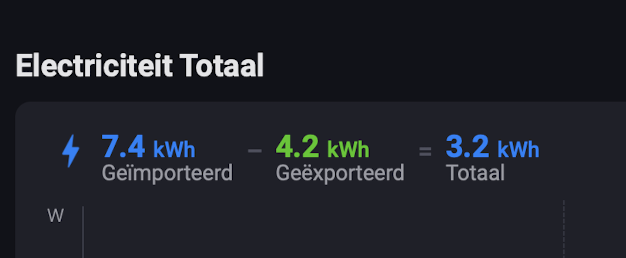

Maandag:


Dinsdag:
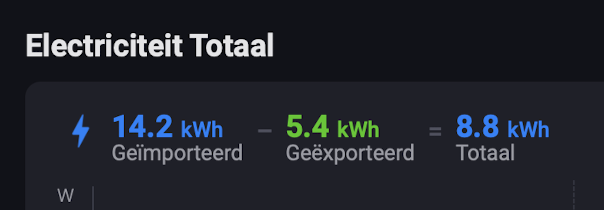

Woensdag, vandaag:

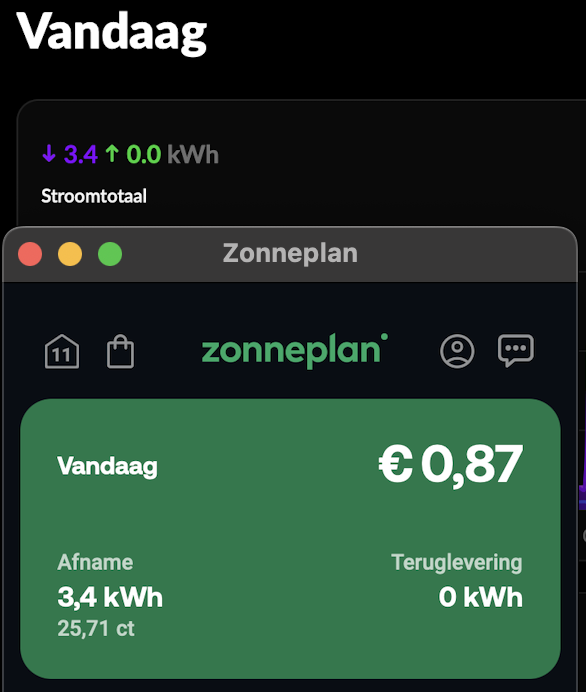
I do think you can use only 1 meter in energy so you need to exclude for example the Hw from energy if you use the homey. I assume. Maybe homey is seeing the Hw as a energy device which uses that much energy. Af least that is what i am thinking since its almost twice the amount of kw on homey
I think you are right. In the Homey Energy you have “tag” only one of those for tracking “overall” usage of the house and disable/exclude the other.
I think you are right and will exclude HomeWizard (power P1 dongle) from Energy OFF in advanced settings (so set to YES). And I will also put the total energy consumption of the house or NO in Measure.
Of course, that can no longer be checked today because it has already saved the measurements and if I delete it, I will delete the entire day and that makes no sense. I will have to see tomorrow.
If anyone from Althon (Homey) is present and reads this, they can of course also respond.
In any case, thanks @Elmar and @Jeroen_Tebbens , I will get back to you 

Exact same problem here! With the splitter it is working now!
Thnx!
Today I received the Energy dongle.
I managed to connect to homey and to the internet
An updated started
After that it went from bad to worse.
Update ran for 30 minutes, nothing happened it was constantly swithcin between bleu purple and red.
I rebooted the dongle, now the led is constantly ‘breating’ red.
Tried to factory reset, this did not work, kept the reset button pressed for 30 seconds, 1 minute, 5 minutes, but the led keeps ‘breathing’ red. No blinking, no reset.
Does anyone have any idea how to get it up and running? Is my dongle bricked?
I finally received the pre-order dongle today. I understand that launching something new can cause issues and delays, but communication is key.
If something is delayed or any other problems occur the least you can do is inform the customers that put thrust in you.
I think in this process mistake after mistake has been made by misinforming the customers. I also contacted the support last week and I got reply;
‘Your order has been shipped on 04-04-2025 - 17:58.
Please note that it can take up to a couple of work days before your order arrives at its destination. It will be delivered through your regular mailbox, which means that your order doesn’t come with a T&T link this time around.’
A few days later I received an email containing an apology and right after that an email that the dongle had been shipped without a link to track & traces…
I really like the Homey products but the handling of this is very sad. And the thing that surprised me the most is that you offer the product at the Mediamarkt while your pre-orders were still waiting without any information about the exact date that they would receive it.
Life goes on without the dongle but I think you should review your logistics and marketing department regarding these issues.
Woke up to a lovely email (thanks @ChefsSlaad ) and just now the dongle landed in my postbox
Install was a breeze—even with a newer meter, the dongle did not do everything right out of the box. Initially ran into an “unable to read data” error, which turned out to be a power issue. Plugged it into a stable power source and voilà—no reboot, no reset needed, just smooth sailing from there.
I’ll be over here, procrastinating gloriously instead of working 
Great @Stas_H I’m happy to see your energy dongle is working.
For everyone who gets a “unable to read data” error, this could be because during initial boot and configuration, the Energy Dongle is using more power that the energy meter can provide on its own. Powering the energy dongle with a power adapter at least until boot is complete should solve that problem.
After it is setup you should be able to remove the power adapter
The dongle does have an IP address and can be pinged…
If I open http://IP_ADDRESS I get the following: Nothing matches the given URI
Doe this open opportunities to fix the issue?
This did not do the trick for me. I had a power adapter connected and that didn’t work. Only with the splitter it works fine. When i remove the splitter and put the dongle direct it doesn’t work. Only via the splitter it works.
A bit crazy I need to buy a €28 splitter to get a €39 dongle to work….

Hmm wondering one thing; Why does my Homey Energy Dongle say the Langcode is DE?
(For reference im living in Helmond, in the Netherlands)
I guess it’s related to some types of smart-meters.
Which do you have?
I have a Landis Gyr + smartmeter , but I use a old Samsung powerbrick to power the Homey dongel over USB. This way the Homewizard dongel gets also enough power.
Are they still trolling us or is it only me? Email yesterday “worked non-stop to repackage, relabel, and resend everything” “we can confirm all orders are now on their way”
According to tracking link, they printed my shipping label today. Ready to ship (not shipped).
