I;ve been struggling with keeping my HomeWizard devices online . Very regularly my devices go offline (P1, watermeter, sockets, all of them simultaneously), or at least unavailable showing the red alert-triangle.
Any thoughts on how this happens?
Can I send a diagnostic log or so?
I am using the HomeyPro (2023) and actually all my other devices (mix of wifi, zigbee, z-wave) experience no connection issues, so I’m curious on what is happening to my HomeWizard devices. Instead of giving you all kinds of details on the system, I thought perhaps you get way more info out this diagnostics then a textual overview from me
And what when this mDNS-app would work, what kind if IT-info would I get? I’m no programmer specialist, expecially not concerning networks&communications. Simply trying to get my devices up and running and since it seems only HomeWizard is experiencing these issues, so I thought it might be something on the HomeWizard-app side.
And this is solved by giving all HomeWizard devices a fixed IP? In that case I’ll just first try that solution, before diving into mDNS log files etc.
thanks again! Also thanks for the first quick response :d
I won’t shoot you :-). But it still leaves my question unanswered:
For you it is a known issue that the mDNS can get disrupted somehow, causing the disconnection, but what is then a possible solution to prevent this? The fixed ip’s, specific router settings, upgrading e.g. experiaBox10->12, …?
I wish I had an answer to that. There are so many variables that have influence. Starting with different wifi vendors and their own settings for multicast.
A bit of a rough call for me to have that covered and say what settings need to be enabled/disabled per vendor.
I even have a request to enter ip address manually in this app. But many people have DHCP and forget about that. Or not even able to find the ip. This whole mDNS is to make it easier for the biggest bunch of the users. And yes that can mean some still have challenges.
As said if this doesnt work then a Google Chromecast wont work either as it is using the same method of finding.
Nearly all of my diagnostic reports I get are wifi related issues (reachability, timeouts, multicast) and expect me to fix it for them.
Too bad there is no magic wand for this issue then
I will try the fixed IP’s and browse through all the router’s advanced settings to see if I discover anything that could cause this…
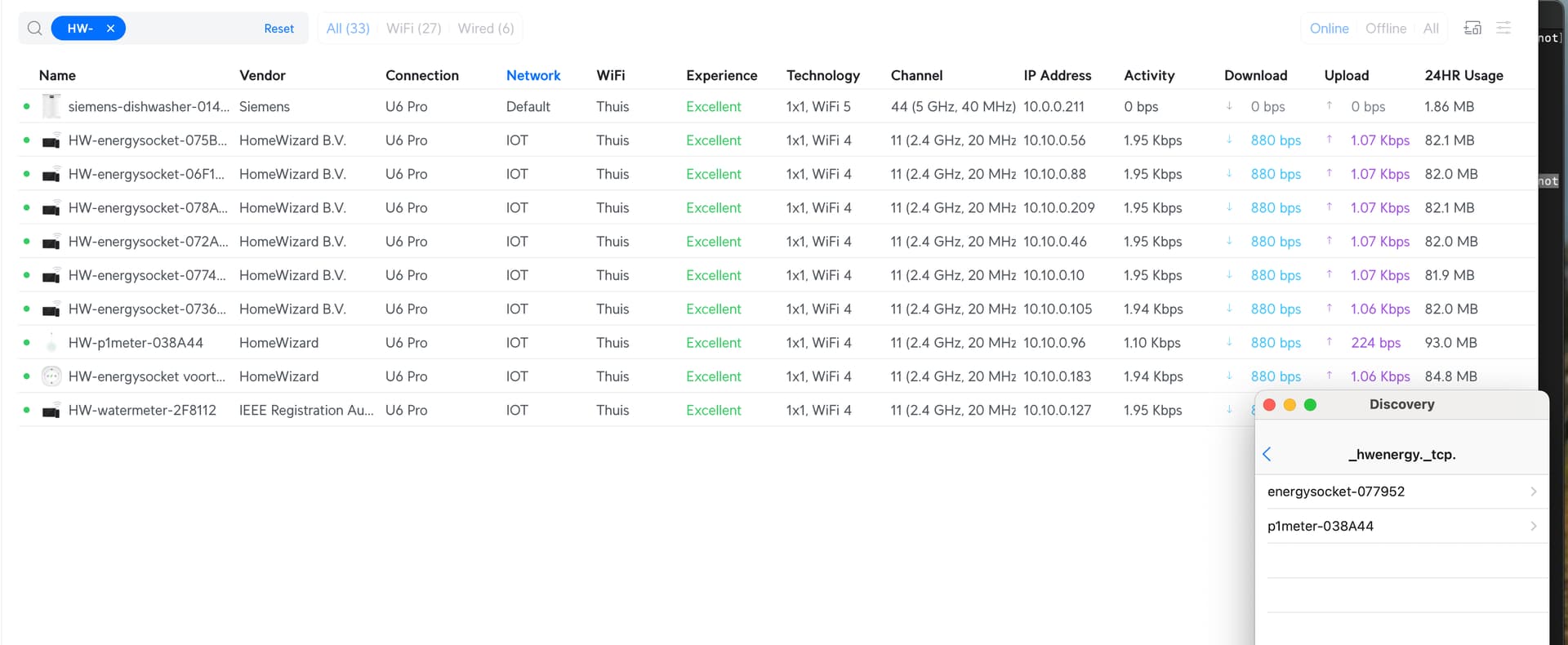
Bij mij is loopt het sinds de 25e met horten en stoten, gek genoeg zijn er maar 2 apparaten zichtbaar via mDNS, maar wel allemaal bereikbaar via hun IP. Eigen subnet waar Homey ook in zit, na uit/inpluggen van enerysockets verschijnen ze even in mDNS, daarna vallen ze stuk voor stuk weer weg.
Homey herstart, HW app herstart, Unifi herstart, maar geen idee wat er aan de hand is. Vooral omdat er dus wél een tweetal apparaten zichtbaar zijn (en communiceren met Homey), maar de rest niet verschijnt
Sorry english section here (please translate your post or move it to Dutch section if forum).
The mDNS problem you face is your local wifi problem (or socket firmware?). This has nothing to do with my app/code or Homey. Looking at your screenshot mDNS stopped for those missing sockets. So if they stop broadcasting their name (mdns discovery), Homey (and indirect my app) has no clue if the device dropped out /stopped/is removed.
My guess, based on your 2nd screenshot is that the sockets are having a very unstable wifi connection (even though they show as excellent, there are other external factors to impact this) and missing out mdns broadcasts. Try to migrate / move them to an other access point in your network and see if that starts the mdns broadcasts again.
I really cant fix this behavior as this is beyond my control. I do not have access to everyones wifi settings or mdns configuration.
I had similar issues in my unifi network where my P1 and watermeter devices connected to a (distant) living room access point with a bad dBm signal. They vanished from my mdns list. Then I moved them back to my “meterkast” accesspoint and the mdns problem resolved itself. So it really is a wifi reliability/stability/coverage issue and not an app/code problem.
For some reason homey can only find 2 homewizard energy socket while I have three installed. all three are visible and available in homewizard app but when restarting the homey homewizard app and trying to install that third missing socket it tells me there is nothing to be found.
someone able to give me a hint on how te resolve this?
life can be so easy sometimes. thanks I flipped both that setting as well as my brains.
for some reason only this socket had no API switched on and the other two had. that’s why I forgot to check that.
appreciated your swift reply, all set!
cheers, Henk
I know, it’s a bit premature, but will there also be support for the HomeWizard plug-in battery that will be introduced in the Netherlands at the end of this month? For now the API will be read only but probably more support later…




 life can be so easy sometimes. thanks I flipped both that setting as well as my brains.