Hi,
I am still having problems connecting Homewizard Basestation. The GUI interface still not working and tried webinterface without succes. The webinterface asks for IP & password and stops … nothing … no response anymore from the system. I’ve installed basestation before, removed it and now the installation does not work anymore. Installation of Homewizard thermometer and heatlink requires basestation installed (unfortunately). What am I doing wrong?? Is there any chance to install these devices without its basestation, it’s weird to have two home installations powered up.
Regards, Thon
Restart Homewizard app and try again. Sadly Homey GUI still flashes and does nothing.
For adding the Homewizard base station the only option is to add it Homey via the web interface as mentioned earlier in this topic.
Yes the base station is a must, the base station collects the data from your thermometers that are registered there. This is the only way to integrate the information to your Homey.
Jeroen thanks,
Followed your suggestions reinstalling app without succes, restarted Homey … still nothing. After providing IP-address and password of Homewizard basestation I am prompted “OPSLAAN” and nothing happens then. Basestation is operational as I can use the Homewizard app. What is the function of Ledring getting green or red??
Regards, Thon
Jeroen,
After a re-reset and another Reser it finally worked. Sorry to bolher you… thanks again.
Regards, Thon
Ok sorry it is this struggle for you. I think it maybe more related to when you “OPSLAAN” is pressed it tries to connect to your Homewizard main unit. If that fails due to wifi connectivity (timeout or bad connection) if fails. Sadly I cant change this. Homewizard main unit is a very old appliance, the wifi chip is bad and those that are still working show connectivity issues (connect responses that can take up to 10 seconds).
Led ring is/was an old feature that I will remove later as the Homey Pro 2023 doesnt allow to use it so you can ignore that one.
Alright, added this “optional” watt compensation.
Its in test version (see link first topic) v3.2.16
Go to advance settings (“geavanceerde instellingen”)
Then add the value you want to “add” to your measured watt’s.
In this case 1 watt which will be added to your realtime value.
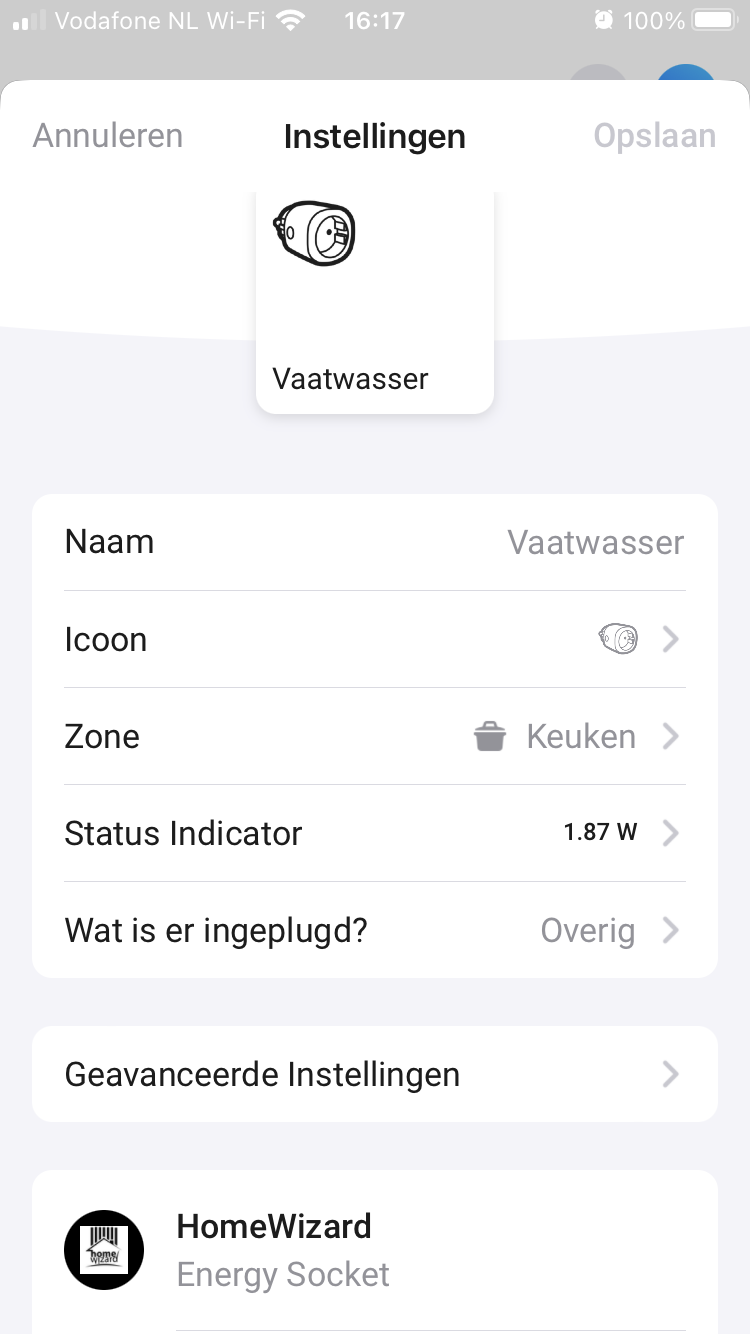


Strange, what version are you? Need more info. Could be wifi problem (mDNS).
V3.2.17 experimental
Can you hit diagnostics report for me in the settings for the app?
1bd52634-6122-4dd3-93f5-23df392a28b1
I see no errors but only 4 sockets and no P1 or watermeter…as if Homey lost all that info.
---- stdout ----
HomeWizard app ready!
HomeWizard has been inited
HomeWizard Heatlink has been inited
HomeWizard EnergyLink has been inited
HomeWizard Thermometer has been inited
HomeWizard Kakusensors has been inited
HomeWizard Windmeter has been inited
HomeWizard Wattcher has been inited
HomeWizard Rainmeter has been inited
2023-10-12T13:35:55.928Z [log] [ManagerDrivers] [Driver:energy_socket] [Device:877f91bf-03b9-4f61-98f1-d4b550edc6bf] URL: http://192.168.178.x:80/api/v1
2023-10-12T13:35:56.174Z [log] [ManagerDrivers] [Driver:energy_socket] [Device:606c6855-e3af-4e64-ae3f-3f4ab84388ad] URL: http://192.168.178.x:80/api/v1
2023-10-12T13:35:56.179Z [log] [ManagerDrivers] [Driver:energy_socket] [Device:c2d645bc-2726-4dde-a647-aab032c7659c] URL: http://192.168.178.x:80/api/v1
2023-10-12T13:35:56.184Z [log] [ManagerDrivers] [Driver:energy_socket] [Device:93651406-6098-4690-a478-45b391ab258e] URL: http://192.168.178.x:80/api/v1
---- stderr ----
But why loses Homey the connections and info?
No clue, expected errors there. Is this a HomeyPro2023? Or older? Cant tell as Homey firmware is 10.0.2.
Homey 2019.
The 4 recognized sockets (see above) were not connected directly to the Ziggo modem but to the smart wifi pods from Ziggo. . The other sockets, P1 meter and watermeter were directly connected to the modem. After a reset of the modem they are all recognized again. Strange. So I think it is an wifi connection issue.
Maybe the ziggo wifi mesh got quirky. No clue sorry.
Hope it is all back ok now then.
Yes it is. Thank you for your help.
Thanks! When it’s a stable version I will use it for sure!
I am trying to imagine an If/then/else flow for the following scenario:
the light on the bathroom is on and nobody is there for 10 minutes.
My motion sensor is a KlikAanKlikUit one, so the “If” is clear… for the “and” part, i want to make sure that nobody is taking a shower (motion sensor has a dead angle there) and has to finish the shower in the dark… i have a water meter from Homewizard, but it seems i can only use that in the “if” statement, not in the “and” one…
any idea?

