I have no issues in the HW ios app but could be. As soon as it happens I will and give a heads up here.
Dont compare HW Energy app with my app. Totally different way of update / data handling.
Mine works local. HW energy is cloud based.
I’m not comparing it. Just referring to possible WiFi issues on my end which might be visible in this app because it shows the device offline…
Anyway, it just happened
7e5210d4-1fb5-4ae6-817c-c32c8991deca
Yeah so definitely a wifi connection problem. I think its more your Homey itself that has wifi stability issues as it seems unable to reach your devices:
   stderr:
        at Socket.socketErrorListener (node:_http_client:574:5)
    at Socket.emit (node:events:519:28)
    at emitErrorNT (node:internal/streams/destroy:170:8)
    at emitErrorCloseNT (node:internal/streams/destroy:129:3)
    at process.processTicksAndRejections (node:internal/process/task_queues:90:21) {
  type: 'system',
  errno: 'ENETUNREACH',
  code: 'ENETUNREACH'
}
2025-11-20T04:01:46.313Z [err] [ManagerDrivers] [Driver:energy_v2] [Device:91153201-a819-4647-82e6-342a360b099c] ❌ Preflight check failed: request to https://192.168.50.252/api/system failed, reason: connect ENETUNREACH 192.168.50.252:443 - Local (0.0.0.0:0)
2025-11-20T04:01:54.187Z [err] [ManagerDrivers] [Driver:plugin_battery] [Device:79697e6c-e348-4753-8790-8ac93cf56086] ❌ Preflight check failed: request to https://192.168.50.251/api/system failed, reason: connect ENETUNREACH 192.168.50.251:443 - Local (0.0.0.0:0)
2025-11-20T04:01:55.978Z [err] [ManagerDrivers] [Driver:watermeter] [Device:fe0891da-1fba-4db9-8b7e-4be5e1d6ce7d] Polling failed: FetchError: request to http://192.168.50.66/api/v1/data failed, reason: connect ENETUNREACH 192.168.50.66:80 - Local (0.0.0.0:0)
    at ClientRequest.<anonymous> (/app/node_modules/node-fetch/lib/index.js:1501:11)
    at ClientRequest.emit (node:events:519:28)
    at emitErrorEvent (node:_http_client:107:11)
    at Socket.socketErrorListener (node:_http_client:574:5)
    at Socket.emit (node:events:519:28)
    at emitErrorNT (node:internal/streams/destroy:170:8)
    at emitErrorCloseNT (node:internal/streams/destroy:129:3)
    at process.processTicksAndRejections (node:internal/process/task_queues:90:21) {
  type: 'system',
  errno: 'ENETUNREACH',
  code: 'ENETUNREACH'
}
2025-11-20T04:02:06.001Z [err] [ManagerDrivers] [Driver:watermeter] [Device:fe0891da-1fba-4db9-8b7e-4be5e1d6ce7d] Polling failed: FetchError: request to http://192.168.50.66/api/v1/data failed, reason: connect ENETUNREACH 192.168.50.66:80 - Local (0.0.0.0:0)
    at ClientRequest.<anonymous> (/app/node_modules/node-fetch/lib/index.js:1501:11)
    at ClientRequest.emit (node:events:519:28)
    at emitErrorEvent (node:_http_client:107:11)
    at Socket.socketErrorListener (node:_http_client:574:5)
    at Socket.emit (node:events:519:28)
    at emitErrorNT (node:internal/streams/destroy:170:8)
    at emitErrorCloseNT (node:internal/streams/destroy:129:3)
    at process.processTicksAndRejections (node:internal/process/task_queues:90:21) {
  type: 'system',
  errno: 'ENETUNREACH',
  code: 'ENETUNREACH'
}
2025-11-20T04:02:11.299Z [err] [ManagerDrivers] [Driver:energy_v2] [Device:91153201-a819-4647-82e6-342a360b099c] ❌ Preflight check failed: request to https://192.168.50.252/api/system failed, reason: connect ENETUNREACH 192.168.50.252:443 - Local (0.0.0.0:0)
2025-11-20T04:02:16.078Z [err] [ManagerDrivers] [Driver:watermeter] [Device:fe0891da-1fba-4db9-8b7e-4be5e1d6ce7d] Polling failed: FetchError: request to http://192.168.50.66/api/v1/data failed, reason: connect ENETUNREACH 192.168.50.66:80 - Local (0.0.0.0:0)
    at ClientRequest.<anonymous> (/app/node_modules/node-fetch/lib/index.js:1501:11)
    at ClientRequest.emit (node:events:519:28)
    at emitErrorEvent (node:_http_client:107:11)
    at Socket.socketErrorListener (node:_http_client:574:5)
    at Socket.emit (node:events:519:28)
    at emitErrorNT (node:internal/streams/destroy:170:8)
    at emitErrorCloseNT (node:internal/streams/destroy:129:3)
    at process.processTicksAndRejections (node:internal/process/task_queues:90:21) {
  type: 'system',
  errno: 'ENETUNREACH',
  code: 'ENETUNREACH'
}
2025-11-20T04:02:24.218Z [err] [ManagerDrivers] [Driver:plugin_battery] [Device:79697e6c-e348-4753-8790-8ac93cf56086] ❌ Preflight check failed: request to https://192.168.50.251/api/system failed, reason: connect ENETUNREACH 192.168.50.251:443 - Local (0.0.0.0:0)
2025-11-20T04:02:26.019Z [err] [ManagerDrivers] [Driver:watermeter] [Device:fe0891da-1fba-4db9-8b7e-4be5e1d6ce7d] Polling failed: FetchError: request to http://192.168.50.66/api/v1/data failed, reason: connect ENETUNREACH 192.168.50.66:80 - Local (0.0.0.0:0)
    at ClientRequest.<anonymous> (/app/node_modules/node-fetch/lib/index.js:1501:11)
    at ClientRequest.emit (node:events:519:28)
    at emitErrorEvent (node:_http_client:107:11)
    at Socket.socketErrorListener (node:_http_client:574:5)
    at Socket.emit (node:events:519:28)
    at emitErrorNT (node:internal/streams/destroy:170:8)
    at emitErrorCloseNT (node:internal/streams/destroy:129:3)
    at process.processTicksAndRejections (node:internal/process/task_queues:90:21) {
  type: 'system',
  errno: 'ENETUNREACH',
  code: 'ENETUNREACH'
}
2025-11-20T04:04:31.125Z [err] [ManagerDrivers] [Driver:watermeter] [Device:fe0891da-1fba-4db9-8b7e-4be5e1d6ce7d] Polling failed: FetchError: request to http://192.168.50.66/api/v1/data failed, reason: read ECONNRESET
    at ClientRequest.<anonymous> (/app/node_modules/node-fetch/lib/index.js:1501:11)
    at ClientRequest.emit (node:events:519:28)
    at emitErrorEvent (node:_http_client:107:11)
    at Socket.socketErrorListener (node:_http_client:574:5)
    at Socket.emit (node:events:519:28)
    at emitErrorNT (node:internal/streams/destroy:170:8)
    at emitErrorCloseNT (node:internal/streams/destroy:129:3)
    at process.processTicksAndRejections (node:internal/process/task_queues:90:21) {
  type: 'system',
  errno: 'ECONNRESET',
  code: 'ECONNRESET'
}
20
Hi since yesterday the homewizard app keeps randomly saying there is no connection to any of my sockets, when checking in the energy app it’s clear that the sockets are still connected. Restarting the homey fixes it temporarily, anywhere from a minute to several hours. What can I do to fix this
Drop be me diagnostic report
79abd795-3847-4597-80f1-8571b549bcac
This is the code i got
You got a mDNS problem, probably also wifi stability related but somehow Homey doesnt get a proper url from the socket(s), I try to fallback to a backup I store in the settings. But when that even fails it is over. I suggest you restart the accesspoint that connects those sockets and see if that resolves the mDNS multicast traffic in your network:
025-11-20T12:10:10.096Z [log] [ManagerDrivers] [Driver:energy_socket] [Device:f02ab360-2cb5-4f34-ae5c-a50b0036fb31] URL: http://192.168.11.13:80/api/v1
2025-11-20T12:10:10.098Z [log] [ManagerDrivers] [Driver:energy_socket] [Device:f77d81fc-70f3-4fb7-82a8-7850970460b9] URL: http://192.168.11.94:80/api/v1
2025-11-20T12:10:19.588Z [log] [ManagerDrivers] [Driver:energy_socket] [Device:009c4c0a-08bd-4c1d-9fae-9d96e7287670] ℹ️ this.url was empty, restored from settings: http://192.168.10.3:80/api/v1
2025-11-20T12:10:19.593Z [log] [ManagerDrivers] [Driver:energy_socket] [Device:12c56454-3938-4e71-a748-5f99aad0aec4] ℹ️ this.url was empty, restored from settings: http://192.168.10.88:80/api/v1
2025-11-20T12:10:19.611Z [log] [ManagerDrivers] [Driver:energy_socket] [Device:326580c2-b59e-4bcf-882c-306c050c8995] ℹ️ this.url was empty, restored from settings: http://192.168.11.185:80/api/v1
2025-11-20T12:10:19.615Z [log] [ManagerDrivers] [Driver:energy_socket] [Device:3e5cd1f5-0bcf-4246-999c-da05140ca9a6] ℹ️ this.url was empty, restored from settings: http://192.168.9.168:80/api/v1
2025-11-20T12:10:19.645Z [log] [ManagerDrivers] [Driver:energy_socket] [Device:63d61d54-b242-4f1c-bf4d-032145c2e32d] ℹ️ this.url was empty, restored from settings: http://192.168.9.76:80/api/v1
2025-11-20T12:10:19.774Z [log] [ManagerDrivers] [Driver:energy_socket] [Device:930f5b7c-f482-4e7d-8cc9-05b939c79451] ℹ️ this.url was empty, restored from settings: http://192.168.10.111:80/api/v1
2025-11-20T12:10:19.847Z [log] [ManagerDrivers] [Driver:energy_socket] [Device:b3bf167f-9fd2-4373-81b3-a99f21dc8cba] ℹ️ this.url was empty, restored from settings: http://192.168.11.181:80/api/v1
2025-11-20T12:10:19.865Z [log] [ManagerDrivers] [Driver:energy_socket] [Device:cf4f6805-ef35-4883-8b71-12525bcd48d9] ℹ️ this.url was empty, restored from settings: http://192.168.8.208:80/api/v1
2025-11-20T12:13:09.654Z [log] [ManagerDrivers] [Driver:energy_socket] [Device:009c4c0a-08bd-4c1d-9fae-9d96e7287670] URL: http://192.168.10.3:80/api/v1
2025-11-20T12:14:57.037Z [log] [ManagerDrivers] [Driver:energy_socket] [Device:009c4c0a-08bd-4c1d-9fae-9d96e7287670] Socket - Connection was reset
2025-11-20T12:15:25.186Z [log] [ManagerDrivers] [Driver:energy_socket] [Device:009c4c0a-08bd-4c1d-9fae-9d96e7287670] ⚠️ Socket - Timeout detected, recreating HTTP agent
2025-11-20T12:17:35.235Z [log] [ManagerDrivers] [Driver:energy_socket] [Device:009c4c0a-08bd-4c1d-9fae-9d96e7287670] ⚠️ Socket - Timeout detected, recreating HTTP agent
2025-11-20T12:17:37.281Z [log] [ManagerDrivers] [Driver:energy_socket] [Device:009c4c0a-08bd-4c1d-9fae-9d96e7287670] ⚠️ Socket - Timeout detected, recreating HTTP agent

    stderr:
    2025-11-20T12:09:24.745Z [err] [ManagerDrivers] [Driver:energy_socket] [Device:169e03c4-7c4e-4118-b9b9-1fc4fc091ca7] ❌ this.url is empty and no fallback settings.url found — aborting poll
2025-11-20T12:09:24.746Z [err] [ManagerDrivers] [Driver:energy_socket] [Device:3378cc48-001a-4ad9-80cf-b8dcabb2e9be] ❌ this.url is empty and no fallback settings.url found — aborting poll
2025-11-20T12:09:34.749Z [err] [ManagerDrivers] [Driver:energy_socket] [Device:169e03c4-7c4e-4118-b9b9-1fc4fc091ca7] ❌ this.url is empty and no fallback settings.url found — aborting poll
2025-11-20T12:09:34.749Z [err] [ManagerDrivers] [Driver:energy_socket] [Device:3378cc48-001a-4ad9-80cf-b8dcabb2e9be] ❌ this.url is empty and no fallback settings.url found — aborting poll
2025-11-20T12:09:44.754Z [err] [ManagerDrivers] [Driver:energy_socket] [Device:169e03c4-7c4e-4118-b9b9-1fc4fc091ca7] ❌ this.url is empty and no fallback settings.url found — aborting poll
2025-11-20T12:09:44.754Z [err] [ManagerDrivers] [Driver:energy_socket] [Device:3378cc48-001a-4ad9-80cf-b8dcabb2e9be] ❌ this.url is empty and no fallback settings.url found — aborting poll
2025-11-20T12:09:54.772Z [err] [ManagerDrivers] [Driver:energy_socket] [Device:169e03c4-7c4e-4118-b9b9-1fc4fc091ca7] ❌ this.url is empty and no fallback settings.url found — aborting poll
2025-11-20T12:09:54.773Z [err] [ManagerDrivers] [Driver:energy_socket] [Device:3378cc48-001a-4ad9-80cf-b8dcabb2e9be] ❌ this.url is empty and no fallback settings.url found — aborting poll
2025-11-20T12:10:19.582Z [err] [ManagerDrivers] [Driver:energy_socket] [Device:169e03c4-7c4e-4118-b9b9-1fc4fc091ca7] ❌ this.url is empty and no fallback settings.url found — aborting poll
Thanks for analysing.
My Homey is connected to LAN so this seems strange. Could it be something else?
I would then suggest you venture in to your accesspoint(s) that handle those HW devices.
See if there are channel noise issues, conflicting channel(s) with neighbors.
Not sure if you are playing with VLAN’s see if there is bad port/cables in act.
I can share a latest test version that has some adjustments on fetching data.
I centralized it for all devices and use queuing to avoid burst calls. It’s a bit experimental approach so not a silver bullet.
test/beta
v3.8.19
- Websocket finetuning (energy_v2 and plugin battery)
- Centralized fetch queue for all fetch calls to spread all queries
- Removed interval check in onPoll loop
Go to homey.app store
search for homewizard
press green Install button
To install the test version (if present), just add the word test to the URL, like https://a.b/test
then press Install button
I have got exactly the same problems since about a week or 2. Restarting the Homewizard app on the Homey seems to fix it for a very short time, but actually it doesn’t. Nothing has changed in my network, my homey is connected via Ethernet. I’m running the Homewizard app version 3.8.18. I will test the .19 version
UPDATE: SOLVED PROBLEM!
Manually updated Homey (Early 2016) version 12.7.1 to 12.9
Zowel mobiel in app als in Homey HomeWizard | Homey geprobeerd en deze zegt “ … wordt op Homey geïnstalleerd “ maar versie blijft 3.8.4
Ook na herstarten app of herstarten homey.
Homey (Early 2016) versie 12.7.1
Hi, for the past few days we have had a problem where every homewizard smart plug is giving the error timed out after 10000ms, we have tried restarting homey, restarting the homewizard app, only reinstalling the homewizard app has helped and only temporary
What do you expect from me here?
As this is not an app problem. The 10000ms timeout means Homey does not receive a response from your socket(s) for 10 seconds.
Latest version has retries, timeout, fallback url for last success. I am really out of options to any worse case scenario for wifi. Give the accesspoint(s) a reboot as per first post as that is something you didnt mention in your last response. Something really isnt ok in your wifi and honestly for me impossible to solve (remotely).
With all the effort and suggestion I give and collected in the first post am pretty much lost what to do differently.
Hi, i have a question. I was looking for an app Enphase envoy bit it isn’t on homey. Checkt a lot of options and postings.
One of the option was to connect Enphase envoy to the homewizard app. So in homewizard should be data. Is this data also available in homey?
Or is it only possible through the kWh meter 3 fase?
Maikel

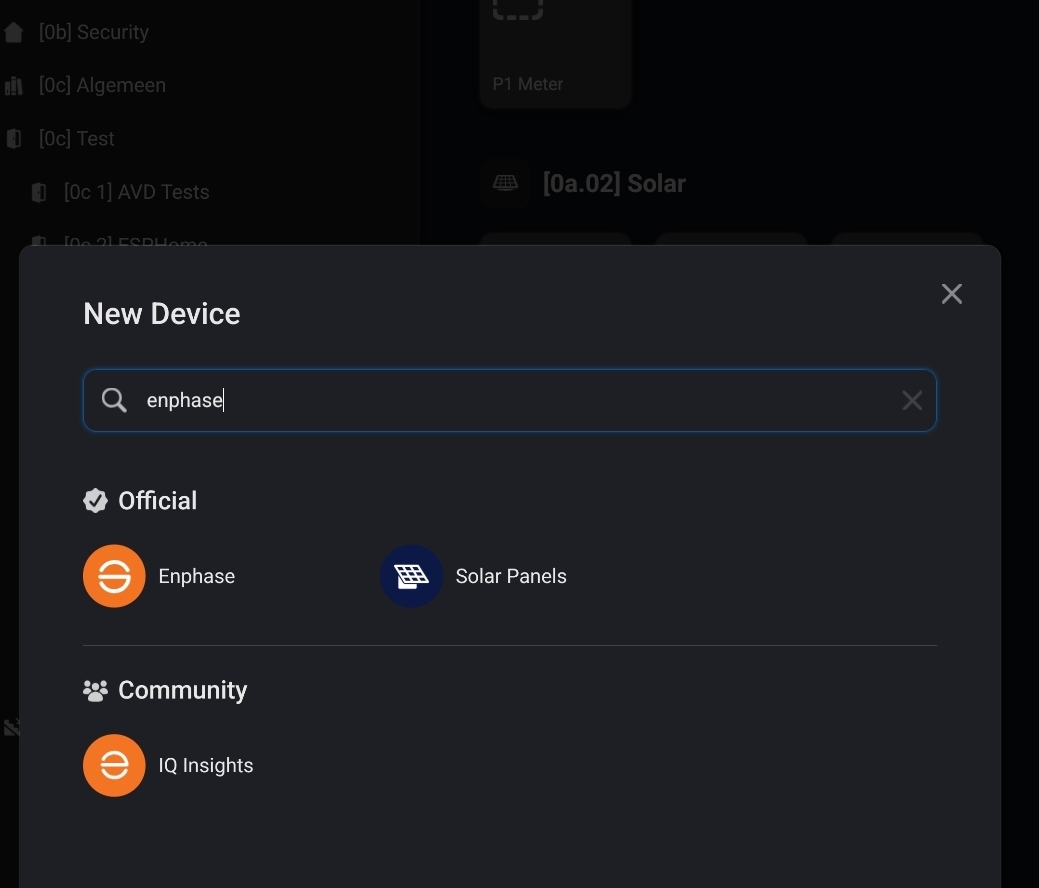
Thanks Peters, but that is all for sun panels. We get the Enphase battery with Enphase Envoy-S
Metered. Will the apps works too also homewizard?
I see. I missed the word ‘battery’ in your post 
I think you should inform with Homewizard about support for the Envoy battery first.
Question 2 will be, does Jeroen has any plans on adding it to the Homey Homewizard app.
