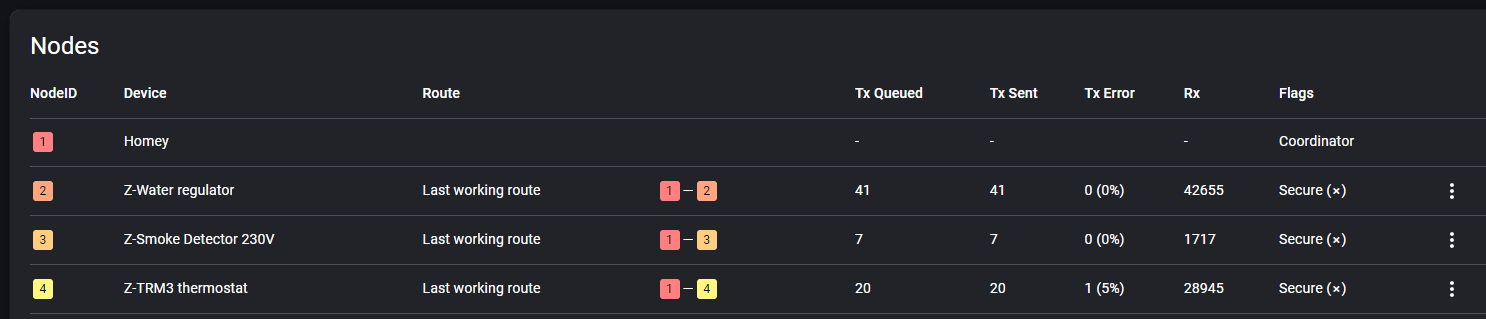
Heatit support came back to me with the following response, which I will follow up on:
On the TRM3 the meter report interval and temperature report interval is set quite low as default(60s). I reccoment to change these to 900(15min).
I can aslo see you have an unknown device. We have seen this cause problems, and i recoment using the remove unknown nodes button in the developer interface.
Defaults to reporting every 60 sec according to support, but when going over the thermostats I found that settings ranged from 3 (!) to 90 sec. Support recommends setting it to 900 sec.
So I adjusted all the thermostat settings to report every 900 sec (15 min), removed the unknown device, and so far it’s looking good, without any restarts/resets of the Homey.
I have the same issues as described by others.
My story, i had no issues before the installation of 10.0.1
Now nothing (z-wave) works. The messages error messages i get is related to “too much trafic” or “missing acknowledgement” and others.
I have around 120 z-wave nodes, and the ones with highest RX is Fibaro Wallplug 2 (10pcs), Aeotech multisensor 6 (16pcs) and heatit z-term2fx(4pcs). Did not see any improvement by disconnecting these.
Have been in contact with Athom support, reply is as already shared in this thread.
Really hope for a fix soon, nothing in my hose is working at the moment, and its becoming difficult to defend our smarthouse for my wife
But even when 2 or 3 thermostats would communicatie every 3 seconds, that shouldn’t make Homey go wild. I’m glad it seems to fix it for you but there’s a deeper problem that should be fixed. There’s no specific device that shows problems in my setup. The problem device changes all the time, even the ones with high intervals.
You are right. In my case 12 thermostats, but most had the setting to 300 sec, but either way that does not explain the issues, and my fix may very well prove to be temporary.
Which brings me back to one of my previous questions: When reading the dev console, does anyone know what does the column headers here mean, and what the time interval for these data is? Previous week, hour? Since startup?
I believe the TX and RX are since the latest restart. So, they can be very high when your Homey has been running for a long time. Most of the time the issue starts when RX numbers go up with 30-40 per second.
Indeed! Even if you used the Fibaro HC in my case :-(, No problems at all! But transferring a lot of devices still keeps me from going back for now. Hopefully it’s not a hardware issue.
You are correct: I restarted Homey and numbers reset to 0. Two unknown nodes appeared, that I removed. Should have noted how many nodes I had before the restart.
Very quickly though, within perhaps 30 seconds, one of the thermostats has Rx = 73, but then it slowed down. Most others have Rx = 10. Rx is higher for devices not directly connected to the Homey.
After the initial surge, I monitored for 30+ minutes, giving each termostat the time to report to Homey at least twice (report interval being 15 minutes). Now, Rx is at 20 on most of them, and 85 on the “chatty” one.
I got this error as well when updating to the “stable” version 10.0.0.
I found out that it is my Qubino switches that sends a lot of power updates even if they are not supposed to to that. Settings was:
Power report on power change: 5%
Power reporting interval: 300 sec
I changed them to 50% and 30000 sec then it stopped to flood the network. It took a while before the changes was accepted because of the high traffic.
I have not looked into if it affects other brands yet.
What is causing this? Is there a missing ACK from Homey that causes the switches to keep sending the power updates? Has the messages been ignored by Homey before? Something must gotten broken in one of the latest updates and should be an easy fix from Athom. Why is it taking so long?
Dear all, reality check, the too much traffic error is just temporary, just create an addidtional flow to handle it in case of an error. (in my case after 5 minutes)…, so in short use use a choronograph or like to retry in case of a failure.
please be patient untill athom releases a better fix.
Hi,
I had all the problems described above. Homey was very slow and Igot a lot of Network failed messages, Z Wave was completly unusable…
Did all the tricks, but when I removed a chatty device, others got chatty.
Then I removed the Homey Bridge and all went back to normal.
Had to replace nearly all my batteries and my Sensative Strips (build in battery) are dead.
After installing my Aeotec devices and testing for a few days, I saw some issues with devices not aways turning on / off (especially when turning all of my smart switch on / off at the same time). I updated my scripts to post the error messages to the time line so that I could understand what the problem is. The error messages were generally between “z wave too much traffic” or “no confirmation received”. In an attemt to minimize the zwave traffic, I added a 4 second delay in my flows for each smart switch (not ideal - but was trying to get a more reliable system) and also added a retry if the first attempt fails (also not ideal - but often the second attempt seemed to work). This makes the flows more complex. After discovering the z wave developer tools (https://tools.developer.homey.app/tools/zwave) in one of the posts here, I found one of the devices was more “chatty” than the others. I unpluged that smart switch and ran the “heal” process on the other devices to try to optimize the routes. These seems to have helped. I also logged a case with Aeotec, to understand why one of my devices is more “chatty” the others… reviewing the logs, each of the smart switches are sending multiple reports, but the one device is sending more. They suspect that the reason the device is sending multiple reports is that the device is not receiving an acknowledgement from Homey. Aeotec also suggested changing the frequency of the reporting.
Initially the Smart Switch were set to send a report every 60 seconds (parameter 111 on the Smart Switch). I have upped this to 300 (and may change it 600). I may change parameter 101 to 0 so that no reports are sent on a regular interval. Being new to Homey, this has been a learning experience!
How can a 1 minute report interval cause an overflow for homey at all ???
For me setting to 5 minutes does not help and i start to think its just a bandage to keep us busy.
I can imagine 100 times a second … but just ONCE a minute sending a just few values … to 2023 hardware
it also is just an extremely small amount of data … a few kb max …. And a modern 2023 device can not handle a couple of kb PER MINUTE ?
Even with 1000 device sending a few kb per second should not be causing issues. I mean imagine how much data is handled by mobile devices every second.
It think its homey not aswering the device like Aeotec suggested in an post above.
Let’s please make one thing clear; a set interval of 5 seconds, 10 seconds or one minute CANNOT overload Homey or it’s Z-Wave network. Unless it’s 150 devices doing it at the same time. My Homey 2019 had 240 devices, some with fast intervals, some with low intervals. It handled it without issues.
If your error is resolved by changing an interval you’re lucky and good for you. But the underlaying problem is not resolved and can return in another form or node. So please don’t generalize it and make it the solution for all.
Athom has already confirmed the problem with the chip and every solution meanwhile is just a temporary solution, specific for your setup.
Exactly what Martijn is saying. Back to 2019 pro, until I see a new firmware wit z wave fix. Also saw a first review on tweakers referring to this topic. Hopefully Athom can solve the issue before more reviewers raise it.
I am sorry if I not read this thread thoroughly. I had an experience with my Homey 2016 and Aeotec some years ago. When I included Aeotec with security they stopped work after a while and faulty devices tend to mess up the mesh.
After trying resetting and including again, at last I tried including without security (code 00000). After that all problems gone.
I am not saying this is the problem here, just asking if anyone tried including Aeotec devices without secure.
Btw, I have my 2023 since first delivery but only using it for experiments for now, waiting for a new major firmware release. My 2016 handles over 100 devices, 35 apps and hundreds of flows without restarts. For the moment there is no hurry to migrate.
Per advice in this thread I made a flow to reboot the Homey every two hours. The result is as expected, now Z-Wave doesn’t work at all anymore. I stopped the reboots after two days of no working Z-Wave and it hasn’t come back up since yesterday. Same error all the time, too much traffic.
I have requested a return for my order since the product is clearly defective.