
Can’t wait 
Still a lot of question marks there. Guess we have to wait a month.
Pushed for beta/testing:
v3.2.14
- P1 added Power failures, voltage sags & swell counts
I have two kwh meters (1phase), both are visible within the App Energy from HomeWizard.
But in Homey if I want to add the kwh Meters, it only shows one.
Does the Homewizard app in Homey, support multiple kwh meters (1 phase) ?
Yes it supports multiple units.
You probably have not enabled Local API for the missing one as you must enable it per unit in the Homewizard Energy app.
Thanks for the quick response, that solved the issue

Numbers are from your “Slimme meter” upon installed by your network operator.
Ok, thanks for the explanation. In my case this is from 6 years now, and in the beginning we hat a lot of “stroomstoringen”, new build area.
Do you now what the dips can course? Is this normal?
Dips are the fluctuations in the voltage/power of your energy network.
Could be those very very very very short blips in energy. Documentation is not very clear what I can find yet from Homewizard P1 but this is what take from it.
Voltage swells are important to track where some of the solarpanel invertors drop out and stop generating power and deliver back to grid.
@Jeroen_Tebbens My Heatlink is geting sometimes at night 1 or 2 times a new temperature so the heating can come on.
It is putting the temperature to 17 degrees. Not always on the same day and not on the same time.
This problem is since the last 2 or 3 updates I think.
Can you eventually see something in the log?
cb5bd9e2-e159-4dfb-98f4-f6a9c68850bc
The only flow I use for the heating is to turn it off at 15:00. And in the evening at 23:00. But depending the day. No heating on flows.
Hi Mike,
I’ve checked the log but it doesn’t state the timestamp when it changes only that it does change your Heatlink to 16 or 17c. So not really sure or how to crack your question.
The only thing that bothers me are the ERR settarget target_temperature → returned false and jsonData.status not ok which means that the communication between Homey and the main Homewizard unit (wifi) has some connection issues.
/hl/0/settarget/16
settarget target_temperature - returned true
/hl/0/settarget/17
jsonData.status not ok
ERR settarget target_temperature → returned false
/hl/0/settarget/17
jsonData.status not ok
ERR settarget target_temperature → returned false
/hl/0/settarget/17
settarget target_temperature - returned true
/hl/0/settarget/17
settarget target_temperature - returned true
/hl/0/settarget/16
settarget target_temperature - returned true
@Jeroen_Tebbens Ok, thank you.
As far as using the Homewizard, I’ve never actually experienced connection problems, but of course that doesn’t mean they aren’t there.
That temperature change to 16 degrees happens daily at 3:00 pm. And it also shows up in the Homey timeline and I get a notification when the Heatlink temperature has changed.
I have now also temporarily created a flow that automatically sets the Heatlink to 17 degrees at night between 0:00 and 8:00 when the temperature is changed.
And that flow has come in handy again since a few weeks.
And if the temperature changes it is always after 0:00, it is never by day.
But I will try to keep track that if the temperature is changed at night if it has changed at 15:00. Maybe it doesn’t come in until much later, no idea.
Hi @Jeroen_Tebbens Will there be support for the Princess Smart Tower Fan at some point?
Not sure, is there an API for it?
I don’t know. The only way to remote control is via the the HomeWizard Climate - it does support Alexa and Google Assistant…
Maybe something they (Homewizard) developed themselves to integrate with Alexa and Google. I really need an API that is open and usable for Homey nodejs/javascript. Moreover I dont have the device myself so hard to any development work at all against it.
Since a long time the measurement of my HomeWizard rain gauge has changed.
I made a flow that warns me when it rains, it sends me a Telegram message when the value is changed. It always started at 0,7mm. Since a lot of months the first message is 0.0mm. That first message is not a change? Can someone explain the first message to me?
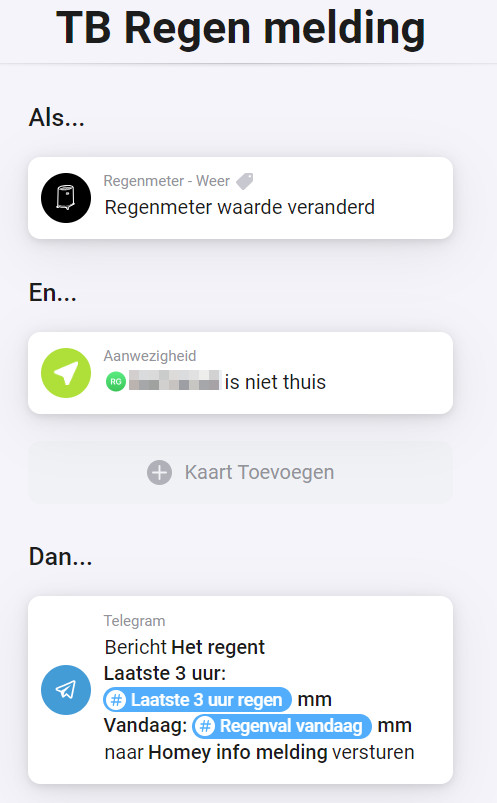

Sorry don’t understand your question. What first message? 3 hour rain? Or what?
Hi Jeroen,
The first message after it starts raining, it says that it rains and the value for today is 0.0mm. I think that it should be 0.7mm.
