[APP][Pro] Better Logic Library - For Users

If you’re an app developer and want to integrate Better Logic Library or support BLL coding in your app, see the Better Logic Library – For Developers topic.

Better Logic Library

Manage variables, add advanced logic to your Flows, and use reusable expressions in supported apps.

Install Better Logic Library · User manual · Source code

Better Logic Library manual & guides

New to BLL, or looking for a specific feature? Start with the official Wiki.

Find instructions for variables, Flow cards, devices, BLL coding, examples, formatting, settings and integrations.

:backhand_index_pointing_right: Open the Better Logic Library manual

New users: Getting started

What can you do with BLL?

  • Create and manage named variables, and use them in Flows.
  • Use Flow cards for variable triggers, conditions, actions and calculations.
  • Pair BitFlip, NumSlide and Trigger devices with BLL variables.
  • Use BLL expressions, custom functions and formatting tools.
  • Use libraries such as Math.js and Lodash in BLL expressions.
  • Export and format data, and provide temporary file downloads through the BLL File Server.
  • Use BLL APIs and shared libraries from other apps.

Getting started

  1. Install Better Logic Library.
  2. Open the app’s settings and create a variable.
  3. Add a BLL Flow card, such as Increment number variable, to a Flow.
  4. Save and run the Flow, then check the variable in app settings.

Follow the Getting started guide for a step-by-step example.

BLL coding

In a text field that explicitly supports BLL coding, put an expression inside {[ ]}. For example, this FTP Client filename adds the current date:

snapshot-{[ date("yyyy-MM-dd") ]}.jpg

BLL coding is field-specific: the app and the particular field must support decoding. It does not work automatically in every Homey text field. See BLL coding and the supported apps guide.

The FTP Client guide includes this community example of a BLL expression in a Save Image Token Flow:

Save Image Token Flow card with a BLL timestamp and a file destination

Community example: a BLL date expression is used in the filename.

The resulting image file.

Documentation & guides

What would you like to do? Guide
Create your first variable and Flow Getting started
Create, edit, export or restore variables Variables
Browse Flow cards Flows
Add a BitFlip, NumSlide or Trigger device Devices
Write expressions or dynamic text BLL coding
Find practical examples BLL examples
Format dates, times or numbers Formatting
Configure app settings and the File Server App settings
Check whether another app supports BLL coding Supported apps
Use BLL from another app or HomeyScript API · Developer guide
Troubleshoot a problem Troubleshooting

Support and feature requests

Questions and examples are welcome in this topic.

Please report bugs and submit feature requests on GitHub Issues.

Apps

Support development

Enjoying Better Logic Library? Donations and sponsorship help support continued development. Thank you!

App Settings

Here is a description about the new App Settings in the Better Logic Library App.

Variables

Here you can add, edit and delete variables.

To add a new variable, click on Add variable to open the new variable card.

Coding

Here you can see how to use coding and try examples.

Click on the Example (eye) to show the usages down below, which is also shown in Locale/TimeZone by default.

Locale/TimeZone

Here you can configure the locale or language and timezone to use by default for coding.

  • Within coding you can always define a locale or timezone.

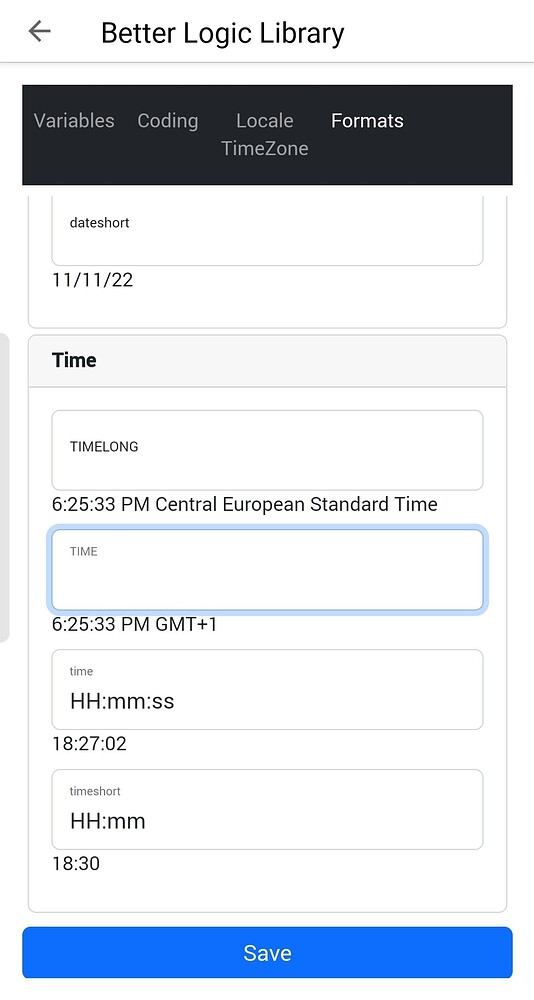
Formats

Here you can alter the definition of any default datetime formats for the default locale.
This will be applied to every app using the BLL coding or DateTime.

Functions

Here you can add functions that you can use in expressions and BLL coding.

BLL Coding

BLL codings are expressions within text-arguments in flowcards.
In every App that supports BLL coding, for each text-argument in flowcards that goes through the BLL decoder, you can use {[ expression ]} .

Within these expressions, you can use build-in modules, functions and your own customisable functions.

Modules

  • _
    Lodash 4.17.21
  • math
    Math.js 11.3.3

Example
The last one is: {[ _.last(["1", "2"]) ]}.
Result:
The last one is: 2.

Build-in functions

date(format, date?, locale?, timeZone?)
This method will return the current date(time) in the entered format, with respect to the user defined locale (language) en timezone.
Optionally you can supply the date(time), locale and/or timeZone.

Example
Today is a {[ date("dddd") ]}
Result:
Today is a donderdag

Date codings:


Apps that support BBL coding in (certain) flowcards:

Better Logic Library

BLL coding, see the App settings to get a better view on what that is and how to use it.

Device Capabilities

Device Capabilities supports BLL coding in Set Text and Set Status text-arguments, in the Set field to BLL Expression and ofc in AVD Reflection.

FTP Client

FTP client supports BLL coding in all it’s text-arguments, like saving an image to FTP:

Google Services

Google Services supports BLL coding in all it’s text-arguments, like Start saying […]:

Timey

You can use BLL coding to generate timestamps/moments.

Telegram

BLL coding can be used for multiple purposes, like escaping markdown characters.

The number method

Within BLL coding or expressions you can use the number method to convert numbers into text, based on your (or another) locale/language.
It supports overloading, and can be used the following ways:

  • number(number, decimals?, locale?)
  • number(number, style?, decimals?, locale?)
  • number(number, style?, styleOption1?, decimals?, locale?)
  • number(number, style?, styleOption1?, styleOption2?, locale?)
  • number(number, style?, styleOption1?, styleOption2?, decimals?, locale?)

There are 4 styles (decimal is the default):

  • decimal
  • currency
  • percent
  • unit

Decimal

Styleoption1:

  • standaard
  • scientific
  • engineering
  • compact_short
  • compact_long

Styleoption2:

  • standaard
  • noGrouping

Currency

StyleOption1:

  • Any valid currency, like USD or EUR

StyleOption2:

  • symbol
  • narrowSymbol
  • code
  • name

Percent

Has no styleoptions

Unit

StyleOption1:

  • acre
  • bit
  • byte
  • celsius
  • centimeter
  • day
  • degree
  • fahrenheit
  • fluid-ounce
  • foot
  • gallon
  • gigabit
  • gigabyte
  • gram
  • hectare
  • hour
  • inch
  • kilobit
  • kilobyte
  • kilogram
  • kilometer
  • liter
  • megabit
  • megabyte
  • meter
  • mile
  • mile-scandinavian
  • milliliter
  • millimeter
  • millisecond
  • minute
  • month
  • ounce
  • percent
  • petabyte
  • pound
  • second
  • stone
  • terabit
  • terabyte
  • week
  • yard
  • year

StyleOption2:

  • long
  • short
  • narrow

API

Is it possible to add the “GMT +1” part separately?
F.i. Homey locale is English,
but I want to use 24h time, without changing the BLL locale to Dutch.

HH:mm:ss but what is the code for GMT+1?

I know, it’s cool right :slight_smile:

But just added to test:
KK
kk
hh
h
tt
ISO

No fixed GMT+ yet, that will only appear with KK or kk when you have a locale of EN f.i…
(So for you, this will show GMT±, for me it shows CET).
Fixed GMT+ will be Z, but no luck yet to complet this part without adding external node-modules.

And i don’t want that, they are all a few MB, while my custom solution is less then 20kb.

Example on how to use a BLL expression

In this case the date method:

image

You can also create default functions/methods in the App Settings (Test version) and use those in these expression flowcards (or BLL coding).

Hi,

Thank you for continuing development of this great app!

I upgraded from the legacy Better Logic today and there seems to be an issue with Math.JS condition card. As POC I created T1 and T2 booleans and a test flow.

https://homey.app/f/luscxi/

If Math.js expression is true. All variants of T1 and T2 being true of false is considered false.
If Math.js expression is false. All variants of T1 and T2 being true of false is considered true.

\ Andreas

Hey, i’ll look into it as soon as i am able.
Could you please create a ticket at bitbucket for it?
QlusterIT / nl.qluster-it.BetterLogic / issues — Bitbucket

Thanks!

Thanks a bunch.
Ticket created: QlusterIT / nl.qluster-it.BetterLogic / issues / #7 - Math.js expression not validating — Bitbucket

Not sure if this is the same issue and all mathjs calculations are effected, but my BL math.js calculations does not seems to work anymore since november 14. The calculation is quite simple, it is for calculating the costs of a dishwasher cycle

image

Checking it right now. One moment please.

@aste and @Julian
Solved in the current/latest Live version.

I updated to the latest math.js a few weeks ago.
Internally not different, but the evaluation call itself was changed.

Thanks for the quick reply & solution!

Works like a charm. Tnx for your quick resolution!

There seems to be a bug in Math.js not validating Equal

something == something

is always false.

I’ve tried with and without ““ to no avail.

https://homey.app/f/5nAeXj/
and an even simplier version
https://homey.app/f/drmgXj/

Bitbucket bug: QlusterIT / nl.qluster-it.BetterLogic / issues / #9 - Math.js not validating Equal — Bitbucket

Thanks for reporting!

I’ll have a look asap, somewhere next week.

You probably already know, but you can do this function also with a Logic card.