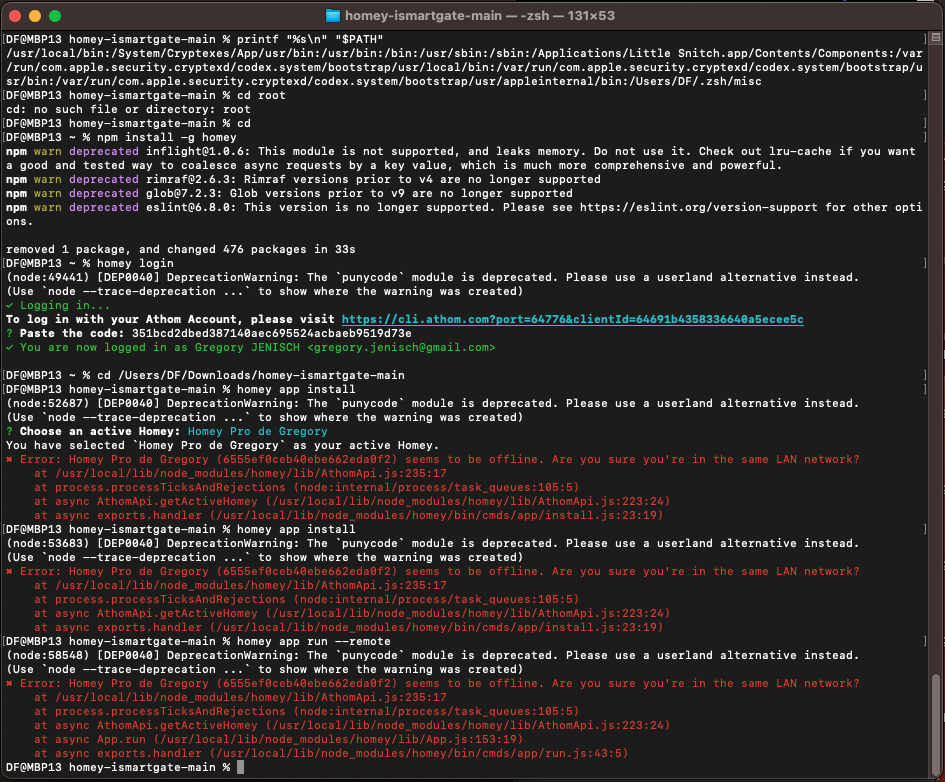
Got it thank you 
However I did try homey app install, it is what I want (a 2nd instance on my homey)
Did not work -sadly-
Got it thank you
However I did try homey app install, it is what I want (a 2nd instance on my homey)
Did not work -sadly-
Ah… I didn’t recognise the comment (French?) as error;
Altough you reported it clearly the other day
 wow, thanks for discovering.
It never occurred to me not both commands need --remote to install or run apps @ Pro 2023. Makes no sense to me.
And @DaneedeKruyff thanks for elaborating on both commands.
Learning every day.
I guess you"d just repeat the install command until the offline error msg doesn’t appear.
At least we now know you can install apps by CLI on your Homey
homey app install is the (only) valid command.
About installing a second instance of an app:
It might be possible the ‘trick’ to change one line, the app id, only works @ Pro 19?
Are you sure you edit the correct file?
.homeycompose/app.json
  "id": "io.home-assistant.community-greg",
  ....
  "name": {
    "en": "Home Assistant Community Greg"
I guess you"d just repeat the install command until the offline error msg doesn’t appear.

.
At least we now know you can install apps by CLI on your Homey
homey app install is the (only) valid command.
.
About installing a second instance of an app:
It might be possible the ‘trick’ to change one line, the app id, only works @ Pro 19?
.
Are you sure you edit the correct file?
.homeycompose/app.json
  "id": "io.home-assistant.community-greg",
  ....
  "name": {
    "en": "Home Assistant Community Greg"
.
@robertklep : do my answers (to your questions HOMEY --VERSION & WHERE HOMEY) help you understand what’s going on with my attempt to install a 2nd “ismartgate” App ?
thank you ! 
Wasn’t your problem that your Homey is marked offline? I don’t know why that happens other than like I said, Homey’s authentication system is broken.
the offline error messages are due to an unsteady wifi connexion of my laptop i think because my homey is in front of me and never shows signs of disconnection or reboot.
your comments help me find that out, thanks ! 
but like i said my main question / problem is as follows, and your expertise would. be a glass of water in the desert to me…
so thank you in advance !!!
Greg
my initial post is #146 in this topic on January 20, starting with :
The CLI client will happily say Homey is offline when it isn’t, and it’s most likely not caused by your laptop having an unsteady connection. Homey’s authentication/connection implementation is just buggy.
Hi,
We have no yet seen a screenshot of where you used a proper commmand to run the app.
Please try to RUN the app with the command homey app run --remote and post a screenshot of the result of that.
(Run does basically the same as install but it will also dump any output from Homey and the app to the terminal session you start the command from. I’m not sure if the app will be available when you reboot your Homey, but I don’t think that that’s important for now, let’s first try to get it started)
I assume homey list and homey whoami retrieve their information from your cloud account, so in my opinion those commands have no real indication whether you Homey is online or not.
The offline issue will have to be resolved before we’ll able to give you any usefull advice.
Just to be sure; Is your Homey in the same network/vlan/ip range/LAN segment as your computer?
If you don’t know this; Are you in a simple homenetwork with just the ISP’s router and just 1 wifi name?
Both laptop and homey are connected to the same internet box / repeater (mesh) with same SSID and password.
Does the web app (https://my.homey.app) work for you on the same computer as you’re running the CLI client on?
Very strange. All I can think of now is to completely remove ~/.athom-cli (or rename it) and start over.
You’re sure it’s not Little Snitch that’s blocking connection attempts?
I saw the mention of little snitch in the $path check, but i deep-uninstalled it a long time ago with CleanMyMacX
Can you check in your internet router/modem if it has a security measure related to “DNS Rebinding”? If so, and it’s turned on, try turning it off.
no such thing…
I’m afraid I’m going to have to give up  Perhaps Athom can explain why this is happening: https://support.homey.app/hc/en-us/articles/360015784034-Submitting-a-support-request


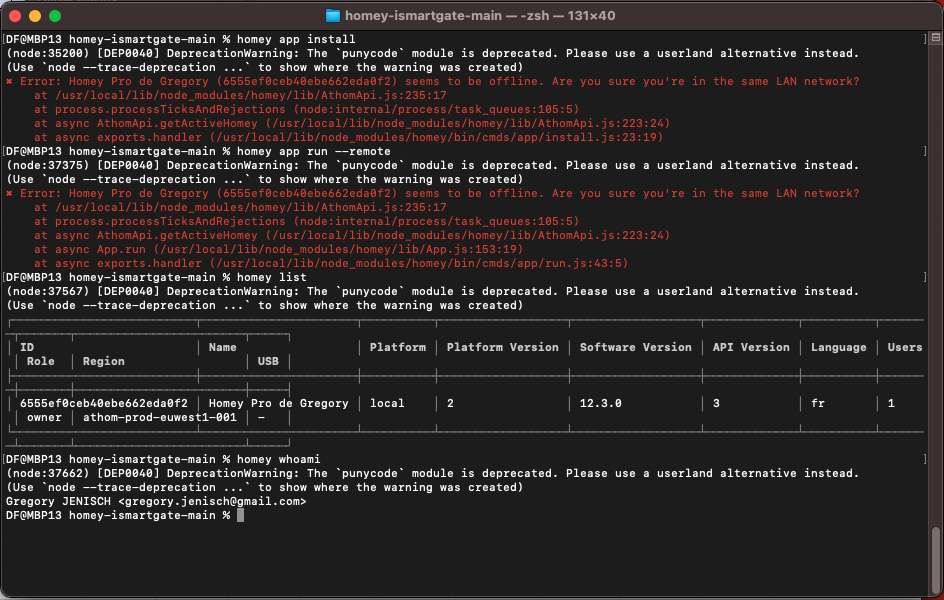

 for app install AND app run --remote !