Hello everybody 
I am not a dev-guy myself as you will rapidly notice… I have a Homey Pro 2023 and I need a 2nd instance of ISG App (Ismartgate) in order to manage my 2 ISG devices in flows.
Here is what I did :
- I followed CLI install protocol : I downloaded Node.js v.22.x (higher than my Homey’s v.18.x) and installed it on my computer.
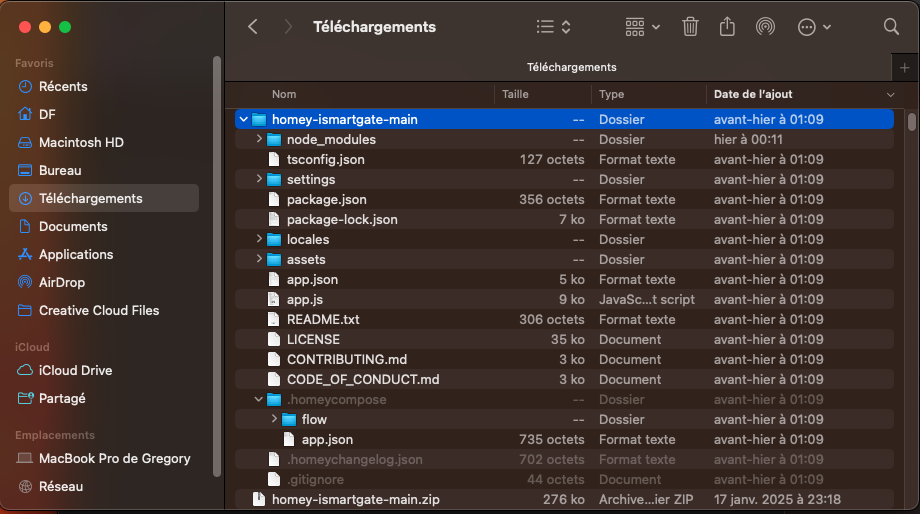
- I downloaded the App Zip file posted here iSmartGate app with more than one device - #2 by Peter_Kawa (thank you), unzipped it in my Downloads directory
- Setup Nodejs in Terminal (cmd prompt) : npm install -g homey and logged in with success through the webpage that had opened
- I navigated in Cmd prompt to my Downloads rep :
cd /Users/DF/Downloads/homey-ismartgate-main
and chose when prompted my Homey device as Active Homey - I changed (and saved the file ) the App Name on lines 1 & 11 for
“id”: “com.gogogate.ismartgateGREG”,
“en”: “ismartgateGREG” - Still in Cmd I ran : npm install and addressed 1 moderate severity vulnerability (out of 12 packages) using npm audit fix. I ran again npm install and 0 vuln. where found.
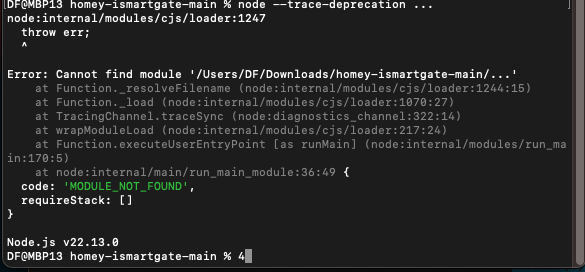
- I also tried to run : homey app install --remote… to no avail

Did I miss something ?
here are screenshots to better understand
Thank you for your help !
GREG