I am sorry this is really new to me. I think I have unzipped the folder. How do i point it to the app?

Warnings, not errors.
Just wanted to make a post, thanking for this HOW TO, and adding that the Airstage app on GitHub by mskg works fine! Fujitsu Airstage - Homey
I am quite a beginner at this, but I found it easier to install nodejs on my windows laptop than the mac. I troubled a bit and got some errors, but a tip is to paste the debug logs to Chat GPT, it helped me fix the errors, and now it´s installed and working with all capabilities on Homey.
Did you get it to work?
Hello everybody 
I am not a dev-guy myself as you will rapidly notice… I have a Homey Pro 2023 and I need a 2nd instance of ISG App (Ismartgate) in order to manage my 2 ISG devices in flows.
Here is what I did :
- I followed CLI install protocol : I downloaded Node.js v.22.x (higher than my Homey’s v.18.x) and installed it on my computer.
- I downloaded the App Zip file posted here iSmartGate app with more than one device - #2 by Peter_Kawa (thank you), unzipped it in my Downloads directory
- Setup Nodejs in Terminal (cmd prompt) : npm install -g homey and logged in with success through the webpage that had opened
- I navigated in Cmd prompt to my Downloads rep :
cd /Users/DF/Downloads/homey-ismartgate-main
and chose when prompted my Homey device as Active Homey - I changed (and saved the file ) the App Name on lines 1 & 11 for
“id”: “com.gogogate.ismartgateGREG”,
“en”: “ismartgateGREG” - Still in Cmd I ran : npm install and addressed 1 moderate severity vulnerability (out of 12 packages) using npm audit fix. I ran again npm install and 0 vuln. where found.
- I also tried to run : homey app install --remote… to no avail

Did I miss something ?
here are screenshots to better understand
Thank you for your help !
GREG
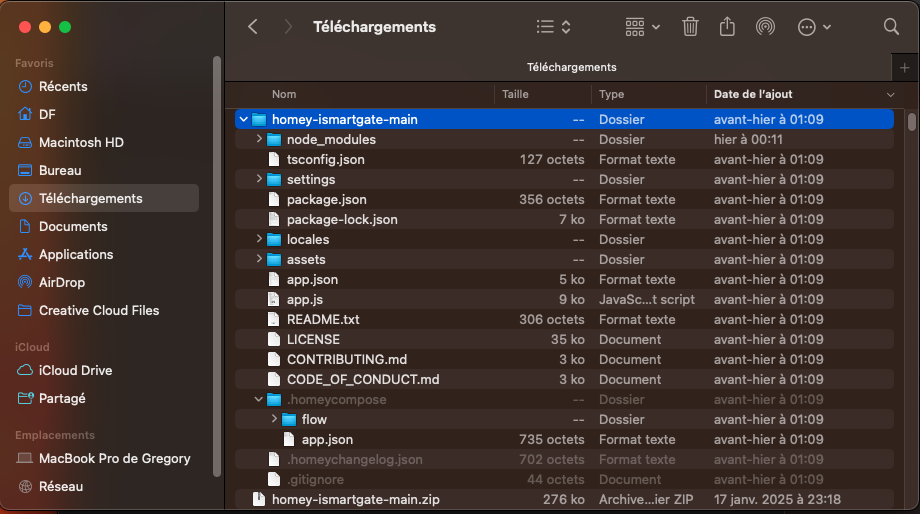

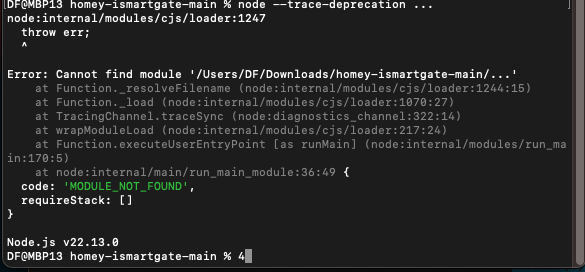
Two more ideas:
Try without using capitals! Like:
com.gogogate.ismartgate-greg
Capitals could cause weird effects.
When this line is present in that same file:
"compatibility": ">=5.0.0",
You’d change it to:
"compatibility": ">=12.2.0",
If that doesn’t help,
like I proposed before, try to install an other app, to see if the app code OR the CLI install fails.
Try this one for instance:
https://github.com/RonnyWinkler/io.home-assistant.community
Download button:

Hi Peter,
Tx for this new attempt, unfortunately unfruitful


I will try the 2nd idea
Maybe @robertklep will make his magics into motion…? 
I tried with the other App.
i don’'t see a second instance “home-assistant.community-greg” in the AppList on my homey, sadly…
note :
- in step 3. (see above, my first post) I was not asked to log in, no webpage opened
- in step 4. I was not prompted to select my Homey device as Active Homey
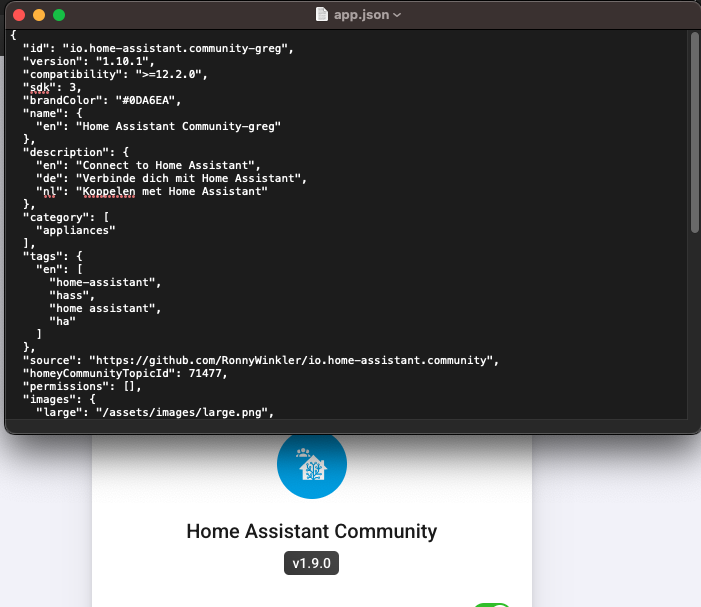
you will find below the screenshots of my attempt
→ “npm install is up to date in 879ms” (is it good?), and
→ “remote” is an unknown argument (is it bad ?)
thank yo for your help !

Sorry, I wasn’t clear.
When you don’t use the HA community app, when it’s not installed that is,
try to install it without editing the code.
You don’t need to perform npm install -g homey each time. It’s already installed on your computer, like any software you install.
When additional stuff needs to be done, it will be prompted.
You’d only use the homey app install or homey app run commands, from the app directory path, to install or run an app
.
These are 1 time actions and saved. The login will be prompted when it’s expired.
But it can’t hurt to select Homey each time with homey select to see if it’s reachable.
I don’t understand why --remote is unknown
Are you sure you’re running a Pro 2023, the hockey puck?
Can you try homey app install without the --remote flag?
I hope Robert can take a look here 
thank you Peter for the explanations
i already had the HAC App installed on my Homey !
I installed again 5 minutes ago like you said, without the changes in the code and no --remote flag : it worked or so I think (overwritten) because the version was v1,9,0 (see screenshot yesterday) and is now v1,10,1 (see screenshot below). Right ?

and YES! I have the puk !!!

can’'t wait for @robertklep
Can you try homey app run --remote?
- What does
homey --versionsay? - What does
where homeysay?
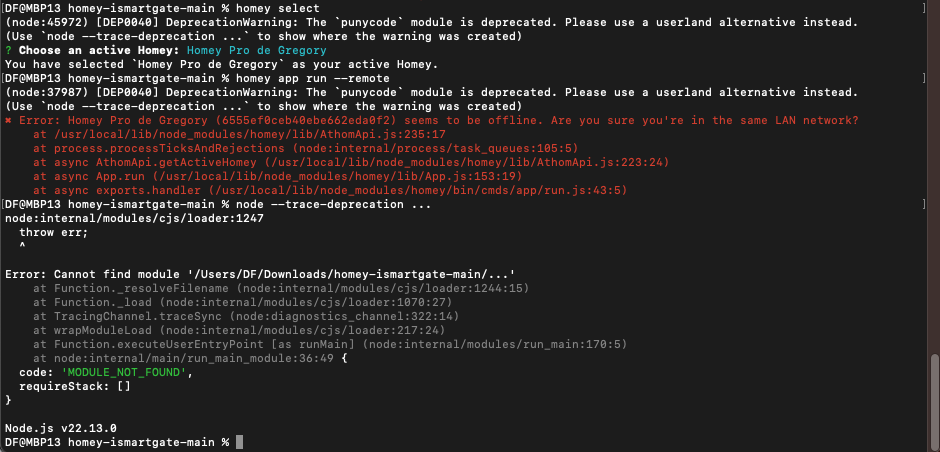
It says your Homey is offlinem you will have to fix that first.
Also, there is no need to run additonal node commando’s
Ok thanks.
How can I make sure that it is online … because every time I try Cmd prompts I refresh the homey webpage to check for the changes and it appears online to me🤪

Ah I see now: --remote is only defined when using homey app run, not for homey app install
The whole “Homey Offline” thing is because Homey’s authentication system has been broken for years 
So, any idea of what might have failed / I did wrong  ?
?
You used the parameter --remote on the homey app install command which isn’t a valid parameter. --remote is to be used only for homey app run.
So, it’s like this:
homey app install Installs the app on your Homey, no debugging output
homey app run runs the app from a docker* container with debugging output
homey app run --remote runs the app from your homey with debugging output
When you use homey app run --remote the app will keep running on your Homer after quitting your terminal app.
* needs docker setup, not recommended for novice users
