I am trying to make an advanced flow so it is possible to give for example a car charger higher priority than heating units or the hot water. Given that the total effect is limited to a certain value, for example 10 kw/h. I have seen that the app “sparegris” included functionality like this, but i just want to, if possible: doing it by my own simple, advanced flow.
Do anybody have experience with such a flow?
I really like the idea of building an Advanced Flow instead of relying on an app, it’s a great way to learn more about how flows work and gives you full control!
Here’s a step-by-step suggestion:
- Install the Strømregning app
This app gives you the flow cards needed and tracks your energy usage over the last hour.
You need to feed it data from a smart power meter or a device that measures consumption, as described here. - Set up the devices you want to control
Start with the lowest-priority device and assign it to turn off first at the lowest kWh threshold. Then add the next device in order of importance, with increasing kWh values. The highest-priority device should be the last to turn off, at the highest threshold (closest to your limit). - Choose your kWh limits and reactivation rules
You can customize when each device turns off/on and how soon they should be reactivated if conditions allow. - Add a confirmation step for critical devices
For high-priority devices (like an EV charger), you can add a push notification with a Yes/No option to confirm before turning it off. Or skip the notification and automate it fully. - Set reactivation thresholds
Define a lower kWh value at which your devices — especially high-priority ones — are allowed to turn back on. Make sure to turn on the lower-priority ones also if they were shut down and have not turn back on yet. - Optional: Add or remove notifications
Customize your flow with alerts depending on your preferences.

I don’t have an EV charger connected, so I’ve just used a basic card to visualize the concept.
Be sure to test the flow thoroughly before depending on it fully.
Adjust as needed to fit your setup and preferences

Thanks! It is really a lot of fun testing and trying different alternatives in home made flows. Really nice activity for the brain, during summer holiday  . There is a lot information and inspiration in other setups, but i can’t find any “library” or a collection of flows from other users. Is it possible to find such a library, somewhere?
I am thinking about ways to also include price in the flow suggested above. What app is the best to provide cards to build flows based on price? For example only turn on the warm water heater or EV charger when price is below a certain threshold based on daily mean or median value from NordPool.
I am not aware of such an all encompassing library.
Homey allows you to share Standard Flows through a link. But I don’t think there is a library of those on this forum.
Regarding Advanced Flows, the Device Capabilities app allows you to generate a file/string of text that includes the flow. There is a topic on this forum with such shared flows: The Flow Exchange(r) - Exchange Your Flows with Others!.
I totally agree, it would be great to have a Wiki or library with general/basic flows that users could copy or build on. But I suspect the reason this doesn’t exist is because flows (especially Advanced Flows) are so customizable that it’s hard to make examples that fit all setups.
That said, there are a few useful threads and resources:
 The Flow Exchange Thread — where users share flows and ideas.
 Homey Support - Flow Examples — basic flows and guides from the official support pages.
 You can also find great inspiration by searching the forum using the Flows or advancedflow tags.
Yes, combining power usage and hourly prices makes the flow much more efficient and cost-saving 
Here are a few ways to integrate price into your flows:
Use the recently released Homey Energy flowcards as example:
“It is one of the x Hours cheapest hours of today”
You can use this to run a flow that only starts EV charging or heating when the price is in the cheapest of example 12 out of 24 hours.

Homey Energy Flowcards:
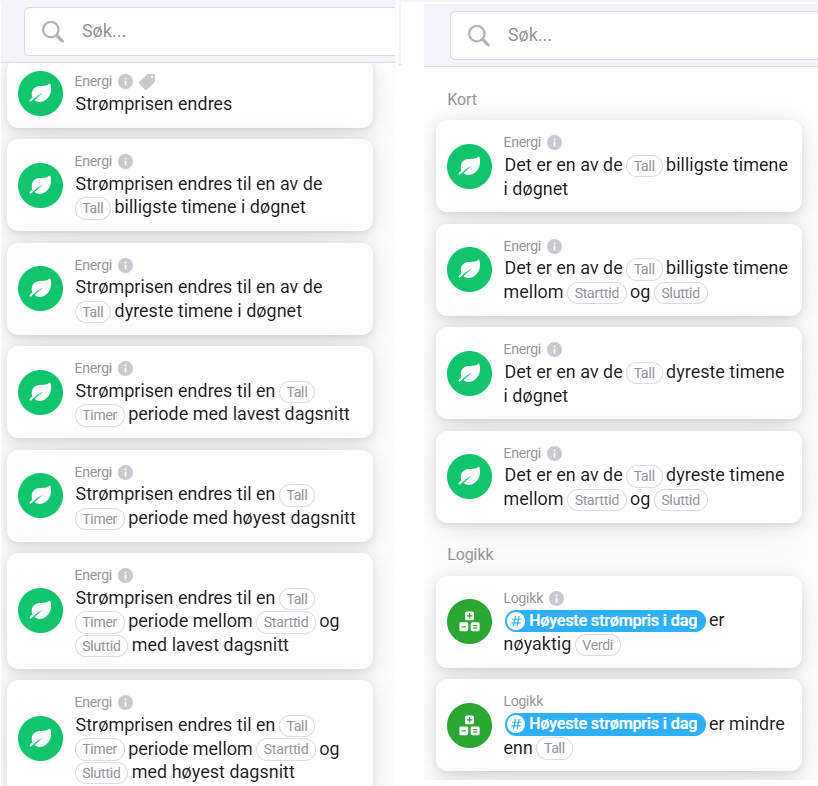
Strømregning App (Link)
This app doesn’t yet offer flow cards for the cheapest hours, like the other apps does. But it does include cards for average/median price, which can work for simpler setups.
Example use:

“And” Flowcards:

Tibber App (Link)
Tibber has powerful flow cards for price-based logic (if you are a Tibber customer).

Power by the Hour App (Link)
If you don’t have Tibber, the Power by the Hour app is a great alternative. It includes similar price flow cards like Tibber.

Heating Controller (Link)
Heating Controller have also the similar flowcards like the other apps.

Thanks for all the good examples of flows, apps and cards that can help making flows based on power price. After a while i have tried the most of those, but haven’t reached the final goal:
I want to make a flow, that, after price for the coming day is known, about 13-14 o’clock, determines a period of x hours (not single hours, to prevent constantly turning off/on) with lowest (average)price until a certain time, crossing midnight.
For example when coming home at 18’oclock and wants the EV to be ready (full charged) next morning at 8 o’clock. I really haven’t find a flow that deals with crossing midnight. I suspect that all of them are using kinds of daymean-values, that not handle a period spanning more than a single day from midnight to midnight.
Also there are cards where you can determine a mean value for a fixed number of hours into the future, but that demands that you plug in the EV at the same time every day, which is impossible.
I have worked on this issue a couple of weeks now, and are really thankful for all kind of help to solve the problem…
Happy to help! 
I see your goal regarding EV charging. I suspect most flow cards/ apps stop at midnight 00:00 — because after midnight the “tomorrow’s prices” will become “today’s prices”, which could causes logical issues. That’s probably why the between condition only works properly with price events on the same day.
One idea: instead of looking at today or tomorrow separately, you can combine both day price arrays into one “extended price list” that spans from 18:00 (today) → 08:00 (tomorrow). Then you run a calculation once (around 13–14:00, when tomorrow’s prices are available) to find the cheapest continuous block of X hours inside that window.
Example flow logic:
- At 13:15 (when tomorrow’s prices are published):
- Trigger: “Nordpool has new prices available” (or a fixed time).
- Action: Run a HomeyScript that:
- Reads today’s prices (18–23).
- Reads tomorrow’s prices (00–08).
- Merges them into one list (14 hours long).
- Finds the cheapest continuous block of X hours (how long your EV needs).
- Stores the start & end times in Better Logic variables (ev_charge_start, ev_charge_end).
- When you plug in the EV:
- Flow triggers on EV connected.
- Condition: check if current time is inside [ev_charge_start … ev_charge_end].
- If yes → start charging.
- If no → schedule a “start charge” at ev_charge_start.
This way, no matter when you plug in, charging should always happen in the cheapest hours.
Perfect. It is exactly what i want to do. Until now i am completely unexperienced with scripts amd new variables but i will give it a try, during weekend . Maybe i find a way through it…
