Email - Trigger flows based on incoming emails

I wrote Adam Noren about this and contacted Athom. While Mr Noren didn’t react in any way, Athom is just being Athom and gave me a standard mail response.

So I thought about how I can achieve this in other ways. I want to share my alternatives with you.

1. IFTTT
I used the IFTTT Mail integration and the IFTTT-Homey-App for a long time. It works. Not fast, not on every mail (paypal mails eg seems to be filtered out), but it works. But due to the lag and not every mail being delivired, it was not reliable enough for my purpose.

2. Webhooks
In my case I used the mails as a transmitting service for information. So I chose to do this with a complete other method: a webhook called by a PHP-script with curl and all the tags I want.
Here is the PHP-script:

$url = ‘https://webhook.homey.app/YOURWEBHOOKTOKEN/THEHOMEYTAG?tag=‘.rawurlencode($data1).’_’. rawurlencode($data2).‘_’.rawurlencode($data3);
$ch = curl_init();
curl_setopt($ch, CURLOPT_URL, $url);
curl_setopt($ch, CURLOPT_CUSTOMREQUEST, “GET”);
curl_setopt($ch, CURLOPT_RETURNTRANSFER, true);
curl_exec($ch);
curl_close($ch);

The “_” serves as seperator of tags I want to read out differently in homey. The $data-variables can be anything you want. Everything gets encoded in rawurl, therefore nothing gets lost. This must be reverted in Homey, so you have to split the string and decode it and write it in variables to use after in the flow. This is my script (Run Script with Input) in Homey, following the logic card “Webhook event [THEHOMEYTAG] has been received”:

// decode & split
let input = (args[0]);
input = decodeURI(input);
let array = input.split(“_”);
let one = array[0].trim();
let two = array[1].trim();
let three = array[2].trim();

// create Homey-Tags
await tag(‘TAG1’, one);
await tag(‘TAG2’, two);
await tag(‘TAG3’, three);

TAG1, TAG2 and TAG3 are the tags that can be used in flows from then on. You have to start the script once, to create the tags and then they will be available in the tag-list in other flow-cards.

I know, not every usecase of the mail-app can be replaced with the PHP-webhook-method, but maybe it will help some of you. There are also several ways on different systems to trigger a PHP-script, when a mail is received, but I haven’t dived deep in there yet.

3. Rebuilding another App for incoming Mails
I just have started to get into the app-building process for Homey. Once I’m able to get there, I will try to create another app for this purpose, called Mailtrigger or something like that. But please be patient as this is just a hobby and I have to use my limited free time for this.

Please feel free to ask any questions about this.

1 Like

Very strange…as soon as the mail arrives (i assume that’s when it happens), the “email cards” are greyed out. After some time they go back to normal :roll_eyes:

The flow is not executed.
Any idea what this might be?

The app crashes.

Oeps…that’s not good.

bonjour à tous est-ce que quelqu’un à réussi à faire fonctionner cette appli.
je n’arrive pas avec une adresse mail @gmail.com ou outlook
dommage qu’Homey ne fasse pas de support.

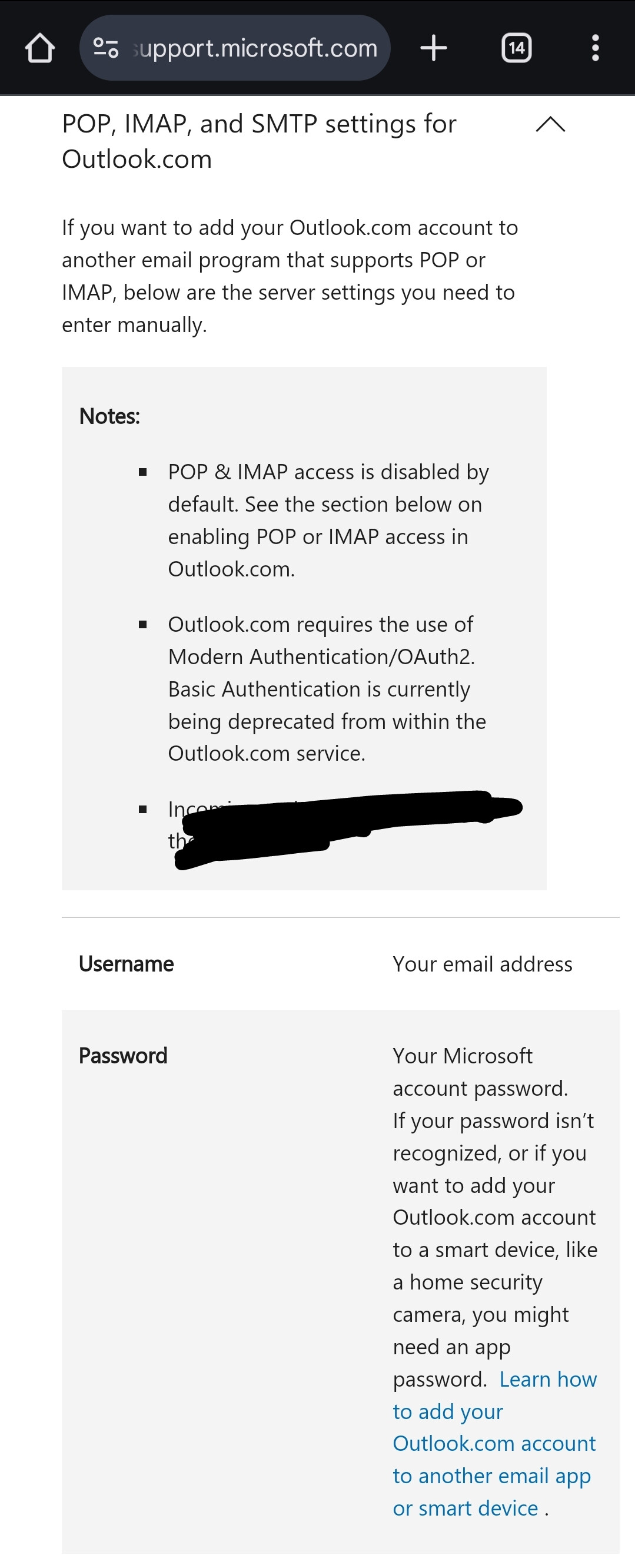
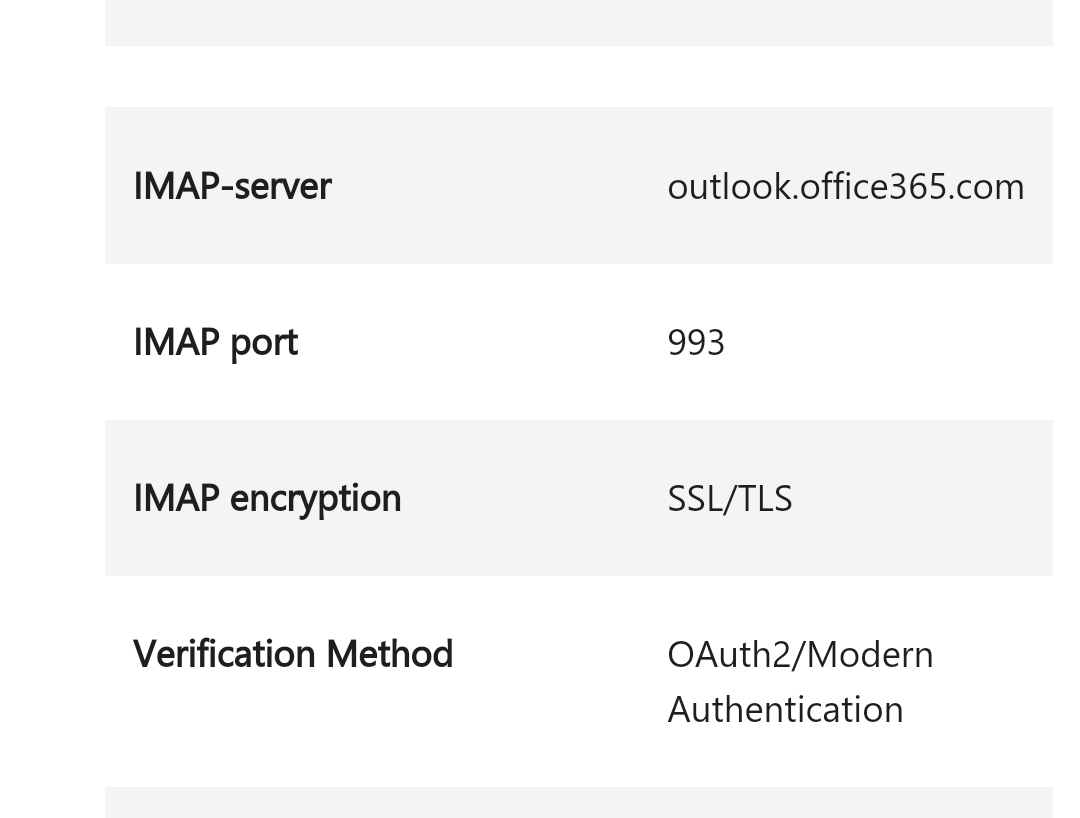
Does anybody now what “Host” and “port number” I had to use for my hotmail.com account? I used “map-mail.outlook.com” and “993” but I get the message “Timed out while authenticating with server”. When I check the box “TLS” I get the message “LOGIN failed”.

Hi Mike,

If you haven’t already, first enable IMAP for your mailbox
https://go.microsoft.com/fwlink/?linkid=875424

Then, configure the app with these settings:

Source

Hi Peter_Kawa, Thanks for your response. Due to personal issues I did not respond earlier, apologies for that. I will work on your comments.

1 Like

Hello lukenukemmp3, how are you?

I am a new Homey Pro (2023 release) user and I stumbled upon this post because the original e-mail application by Adam Norén isn’t fully functioning for me. Every time the start block triggers, the card turns gray and is unavailable, with the following explanation - This card is unavailable because the app or device that it belongs to might have been removed.

Anyway, I am extremely interested in your second method since I wanted this option for my job. I, however, am very green to coding. Could you please assist me into implementing your code into my Homey? Also, do you have an update in your Mailtrigger app?

Hey Kam,

thank you for your kind words!
The unfortunate words first: I did not have found any time on building the Mailtrigger-App. Maybe I will some time, but not now.

Regarding your question on my “second” method AKA the webhooks: may I ask you, what it is you try to achieve? Can you tell me any details on your task without personal information? That would be very helpful and I would be glad to help you out!

Thank you for the swift response. I am trying to do what Adam’s initial app accomplished. I want to start a flow with “if” block, checking my Gmail inbox to see if I received an email from a specific email address. Furthermore, I also included a screenshot of my current flow, realized it was no longer functional :frowning:

Okay, do you got the opportunity to fire a PHP-script when the mail is received? From where is the mail send? Can you execute the PHP-script instead of sending the mail?
Otherwise I don’t know, how the PHP-method could help here.

Maybe you can use IFTTT instead. Create a forwarding-rule for your specific sender and trigger an IFTTT-automation for incoming mails to start a Homey flow. Set up the IFTTT-App in Homey and use the If-card in a flow to start the computer. This will have a bit of a latency but it is working.

I would prefer to stay away from services like IFTTT because of latency. Here’s about why I want to set up this type of note. I have a job where I get notified, by email only, of available tasks. These tasks are also available to our coworkers. That means, each task is available only to the first person who accepts it, AKA sees the email. Maybe that’s fair or not, discussion for a different forum.

First, how do I fire a PHP-script when the mail is received? The email is sent from outlook.com to gmail.com.
I apologize for the countless elementary questions when it comes to scripts, but I’m extremely unfamiliar when it comes to coding anything.

@AdvaLa please remove the [App][Pro] part of the title.
This is reserved to use (and identify) for actual app topics. Thx.

Hello everyone, do any of you use the APP Email? I have connected my email account. When an email arrives with the subject as an example test, a flow should start. When an email arrives, the app reports an error and crashes. who can help?


Text:TypeError: Cannot set property errored of # which has only a getter
at new MessageSplitter (/app/node_modules/mailsplit/lib/message-splitter.js:28:22)
at new MailParser (/app/node_modules/mailparser/lib/mail-parser.js:132:25)
at module.exports (/app/node_modules/mailparser/lib/simple-parser.js:29:18)
at EventEmitter. (/app/app.js:76:17)
at EventEmitter.emit (node:events:517:28)
at Parser. (/app/node_modules/imap/lib/Connection.js:220:24)
at Parser.emit (node:events:517:28)
at Parser._resUntagged (/app/node_modules/imap/lib/Parser.js:196:10)
at Parser._parse (/app/node_modules/imap/lib/Parser.js:137:16)
at Parser._tryread (/app/node_modules/imap/lib/Parser.js:82:15)

Hello everyone, do any of you use the APP Email? I have connected my email account. When an email arrives with the subject as an example test, a flow should start. When an email arrives, the app reports an error and crashes. who can help?


Text:TypeError: Cannot set property errored of # which has only a getter
at new MessageSplitter (/app/node_modules/mailsplit/lib/message-splitter.js:28:22)
at new MailParser (/app/node_modules/mailparser/lib/mail-parser.js:132:25)
at module.exports (/app/node_modules/mailparser/lib/simple-parser.js:29:18)
at EventEmitter. (/app/app.js:76:17)
at EventEmitter.emit (node:events:517:28)
at Parser. (/app/node_modules/imap/lib/Connection.js:220:24)
at Parser.emit (node:events:517:28)
at Parser._resUntagged (/app/node_modules/imap/lib/Parser.js:196:10)
at Parser._parse (/app/node_modules/imap/lib/Parser.js:137:16)
at Parser._tryread (/app/node_modules/imap/lib/Parser.js:82:15)

@moderators pls move to existing topic about issue: [App][Pro] Email - Trigger flows based on incoming emails

1 Like

This application seems to not properly function.

Hey Kam,

please excuse my late response, there has been some movement of posts which lead to difficulties finding our conversation again - at least for me.

Is the mail from outlook send automatically? I thought you can execute the PHP-script instead of sending an e-mail. I do need more information on your enviroment, because I’m not sure, if I understand your topic correctly. Thank you in advance.

Totally no problem on the response - we’re all human :smiley:

I set up the Outlook e-mail to be forwarded to Gmail. How do I execute the PHP-script instead of sending an e-mail?