Added JavaScript function as valueTemplate/outputTemplate.
Your enum conversion from numeric to string is not possible with MathJS expression (I think).
That’s why I just added the possibility to use a JS function as template.
Use this syntax:
(value) => { return value * 100 }
@Filip_Sutovsky
You can try to use th enew JS function as value template:
The conversion works with MathJS with the unit check fix. The JS evaluation seems like a nice addon, but I’m afraid that using pure JS eval can introduce unwanted security risk. I’m totally not familiar with homie’s architecture, so I can’t tell to which data possible XSS attack could have access to, but I know from professional experience that it is a big no no
Yes, agree. I hope it’s still safe. It runs locllally, you need to be logged in to set device settings.
And it’s so flexible. Parhaps on MQTT it’s not really needed if you have simple topic values. For HA app I used it for many checks up to array and string handling.
Can you share your MathJS expression? Haven’t seen a number=>text conversion.
Any chances in hunting down why MQTT Hub uses a lot of memory? Decreasing memory usage would help in keeping Homey stable over night when the cloud backup happens.
Currently MQTT Hub is the top memory user of apps installed.
The app uses a lot of Node modules. But that was already the case as Harrie developed the app.
Anyone knowing some details about the used modules - and how to replace them with small coding (can also be copy/past some parts into a local library) can optimize it
I don’t know the modules well enough.
I have created a MQTT hub virtual device with alarm-motion capabilities. The name of the device is sensor.mqtt.
In the advanced settings the Topics field has the following value:
{
“alarm_motion”: {
“capability”: “alarm_motion”,
“stateTopic”: “”,
“setTopic”: “”,
“valueTemplate”: “”,
“outputTemplate”: “”,
“displayName”: “Motion alarm”
}
}
Logging in with MQTT explorer and publishing a message on topic
homie/homey-devices/sensormqtt/alarm-motion/set false
Is NOT changing the state of the motion sensor.
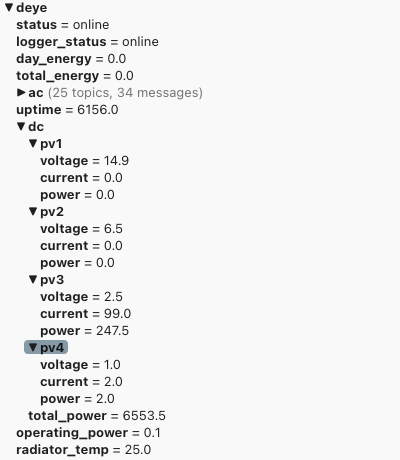
I need to create one value from multiple topics. Specifically, I need to create measure_power capability, which would be a addition of deye/dc/pv1/power and deye/dc/pv2/power. How can I do that? I’ve tried multiple ways, but can’t seem to make it work.
For example when I tried mqtt wilcards like deye/dc/+/power, icoming message from subscribed topics couldn’t be processed, becase MQTT Hub tries to match them exactly and deye/dc/pv1/power (incoming topic) != deye/dc/+/power (definition saved in valueTemplate)
The app subscribes to topics. If the topic changes, the app writes the value into the capability.
If you would register topics with wildcard, every topic would appear as changed value and you don’t get the other to sum up.
As workaround you can create a virtual device. Then use the three Mqtt capabilities as trigger and sum up the capabilities into the virtual device.
Make sure to disable the log functionality. It can grow very large and might cause partition space issues.
I don’t expect app memory usage is influencing backup functionality
After some testing this configuration worked for me
{
“alarm_motion”: {
“capability”: “alarm_motion”,
“stateTopic”: “homie/homey-devices/sensormqtt/alarm-motion”,
“setTopic”: “homie/homey-devices/sensormqtt/alarm-motion”,
“valueTemplate”: “”,
“outputTemplate”: “”,
“displayName”: “Motion alarm”
}
}
by sending MQTT message
homie/homey-devices/sensormqtt/alarm-motion true
Note that virtual devices lamp need to be switched with teh following MQTT message
homie/homey/kitchenlight/onoff/set true
Hello to everyone familiar with HA internal sensor handling.
After upgrading to HA 2025.1 I got these messages for Entities imported via MQTT Hub:
Details for error message:
In the past, statistics were generated for “Gas Meter Gas Meter” (sensor.gaspayer_gaspayer), but it no longer has a state class and therefore long-term statistics can no longer be generated for it.
Statistics cannot be generated until this entity has a supported state class.
If the state class was previously provided by an integration, this may be a bug. Please report the issue.
If you previously set the state class yourself, please correct it. The different state classes and their usage can be found in the developer documentation.
If the state class has been permanently removed, you may want to delete the corresponding long-term statistics from your database.
Do you want to permanently delete the long-term statistics of sensor.gaspayer_gaspayer from your database?
HA links to this page:
Is it somehow needed to set these classes for MQTT export? Has anyone experience about the syntax for Homie standard?
I can’t find anything in the ha-homie code that would enable you to set state_class other than manual configuration for each device.
But from what I remember when this change was introduced (a few months ago I think?), the warning that’s being shown was added because previously, a missing state_class would just be silently ignored and you wouldn’t have long-term statistics anyway.
Thanks, Robert.
So we can’t set it via MQTT, right? It’s more for integrations to set these class (like energy settings in Homey)?
So there is nothing to do for now?
What statistics are meant in this case? Is HA calculating additional statistics for such energy data.
I have to say that I did not go deeper with energy until the HA energy dashboard.
Not with Homie you can’t. HA MQTT Discovery supports it.
Yes and no. The state_class for an entity tells Home Assistant what kind of value it provides, either a measurement value, a “total” value or a “total increasing” value. The Homie integration will have no idea what the actual values that it’s importing into HA represent, so it should be the “Homie broadcaster” (your app) that sets it, if that were possible.
I don’t think so, no.
It’s for long-term statistics for sensors (any sensor that provides a numerical value), similar to what Insights does with sensor data: averaging values over a longer period.
For instance, here’s my “outdoor temperature” sensor graph:
I store 10 days worth of actual values, which is shown as dark blue, and the long-term statistics part (calculated by HA by storing average values) is shown as light blue.
That’s the part the app can support. The Homie topic is just the data storage, the HA autodiscovery links to it. I can check if I can add this class for autodiscovery export.
I’m not sure how this can be mapped. Currently only based on capability id (meter* vs. measure*)?