It was not possible to set as a separate line.
It looks like you missed something on copy/paste?
	"meter_power.acc": {
		"capability": "meter_power",
		"stateTopic": "ams/meter/import/active/accumulated",
		"setTopic": "",
		"valueTemplate": "",
		"outputTemplate": "",
		"title": "Energy",
		"energy": {
			"cumulative": true
		}
	},
But I don’t think it will set the cumulative flag, but just try 
Thanks for the guidance on the JASON, but did not solve my problem/feature request!
New test version 4.3.0:
- Added new device classes (pairing)
- Added new capabilities (pairing)
- Added device setting for cumulative device option (power/gas/water meter & measuring) to add devices to Homey Energy
Minimum Homey FW: 12.2.0 based on requirements for devicce classes and capabilities.
Test version:
@Awangens FYI and test
Thanks, this was perfect!
@Amersfoort Better use this thread 
It’s not possible yet. I’ll add a device setting like it’s done in HA community app.
New test version 4.3.1
- Added device setting for device class.
- Fixed int (0…100) conversion for dim capabilities.
@Awangens FYI and test
New test version 4.3.2:
- HomeyEnergy: Added device settings to define device as cumulative and set imported/exported meter capabilities.
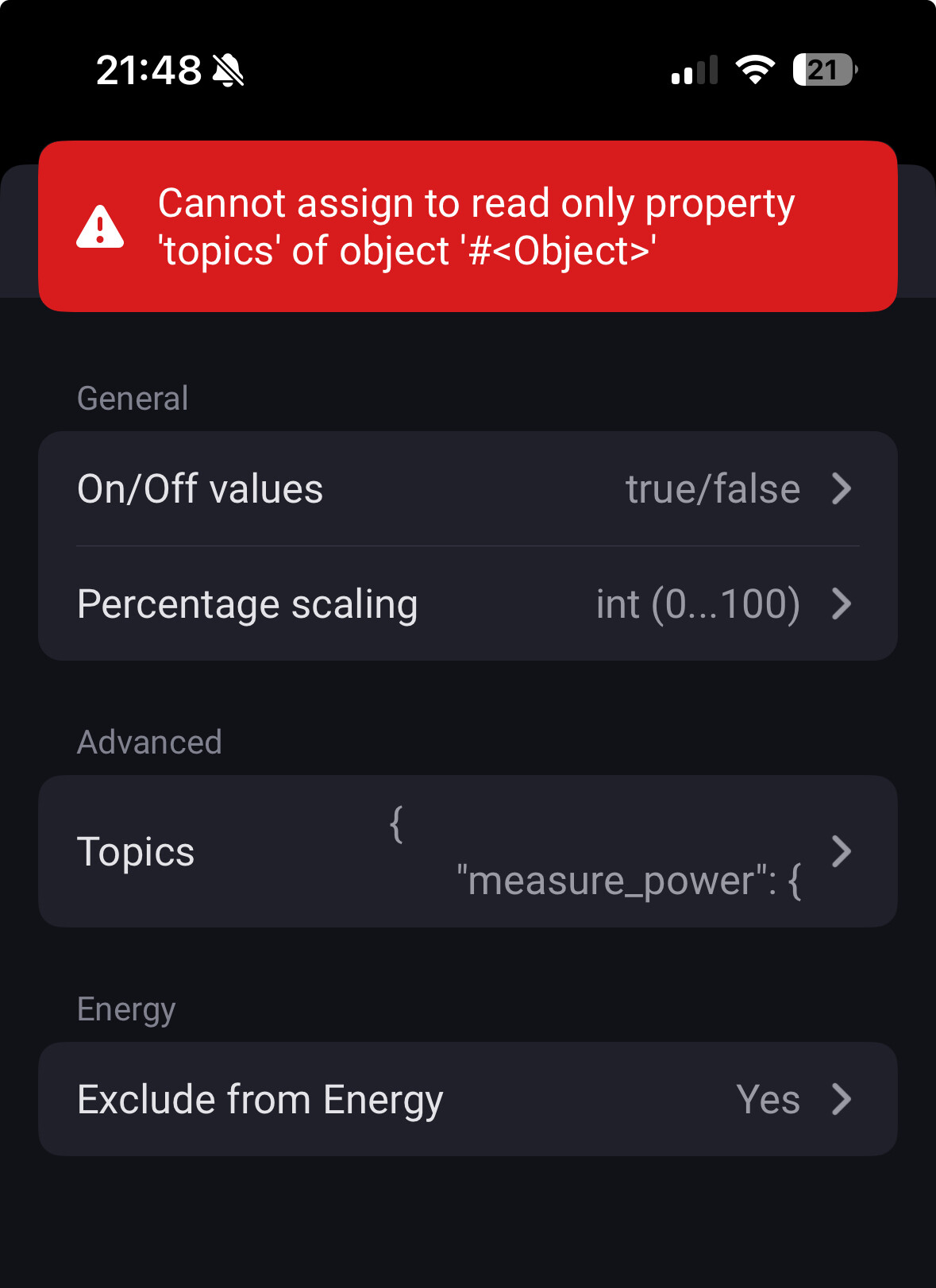
Hi @RonnyW . I’m testing version 4.3.2 and I’m getting an error when trying to set Cumulative energy measuring. Both if I try to set it by itself or if I try to set imported/exported meter capability trough device settings UI
App version: 4.3.2 (Test)
Homie Pro 2023: 12.3.0-rc.7
Capabilities:
{
  "meter_power.imported": {
    "capability": "meter_power",
    "stateTopic": "deye/ac/total_energy_bought",
    "setTopic": "",
    "valueTemplate": "",
    "outputTemplate": "",
    "displayName": "Bought Energy"
  },
  "meter_power.exported": {
    "capability": "meter_power",
    "stateTopic": "deye/ac/total_energy_sold",
    "setTopic": "",
    "valueTemplate": "",
    "outputTemplate": "",
    "displayName": "Sold Energy"
  },
  "measure_power": {
    "capability": "measure_power",
    "stateTopic": "deye/ac/total_power",
    "setTopic": "",
    "valueTemplate": "",
    "outputTemplate": "",
    "displayName": "Power"
  }
}
Setting cumulative measuring by itself:

Settings imported/exported:

API call payload:

Funny, this works just fine for me.
I’m on the stable homey firmware though, in case that makes a difference. v12.2.1
Hi, thanks for reporting.
This is caused by a null energy object for a new device. Should be fixed now.
The initial settings update for device class is re-added, too. Forgot about after tinkering with the energy settings bug in last rc FW.
Nice to have such beta testers
Fixed  All settings can be updated. Thanks for the quick update and also big thanks for maintaining/developing this app
 Without it I wouldn’t be able to connect my inverter to homey at all (of course I mean locally, I don’t like apps/integrations that use cloud APIs, seems borderline stupid to use them when you have all data available locally)
Don’t hesitate to tag me in future releases, I’ll be more than happy to test them 
Now that my meter should be set up with correct meter_power.imported/meter_power.exported, I’m unable to see it in Energy tab 

One thing I’ve noticed in homey dev tools is, that in capabilities property, the “names” of capabilities do not match the names I gave them (ones shown in topics property)
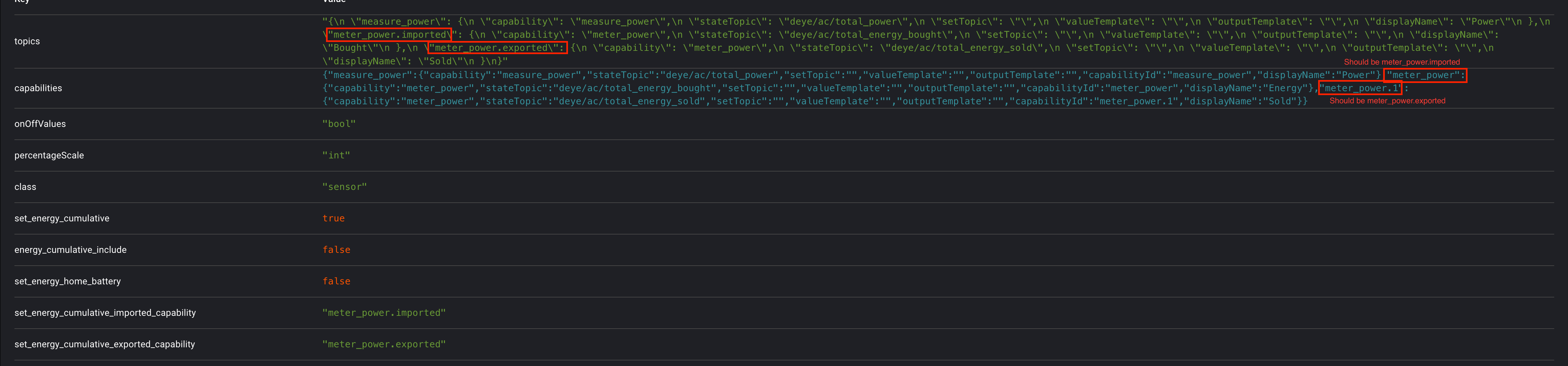
@RonnyW
This topic handling is unchanged so far.
Can you please check what capabilities are present in the device (in dev tools)?
And did you set the “include in total” in device settings? This is needed in addition to device energy settings - because for standard apps the energy settings are static and you have to add the device to energy dashboard using this setting.

You are right, it was set to No. After toggling it, my Grid device showed up in Energy tab I didn’t turn it on, because it is confusing to me. I thought, it would be counted as a home usage. This is only the grid consumption, not my home consumption (I have PV, which is not active right now and battery). I saw you were pointing to this specific use case on athom slack, where grid consumtion != home consumption. I’ve just updated to homie to 12.3.0-rc.10 and they’ve added Track total home energy consumption property to the device, which would be the one to turn on for overall home usage, right? I’m still confused about how should I set up homie devices, if I have values for grid consumption (import/export), battery consumption(charge/discharde) and pv generation
The difference is the energy setting for imported/exported capabilities.
To show a smart meter in new energy dashboard, you need a device with at least meter_power set as “imported” in energy settings. If you are also exporting energy to the grid, you need the second meter_power for exported. And for realtime chart you need measure_power.
The old energy dashboard used all devices with a measure_power set to “include in total” to use these devices as smart meter.
In this version, I set some of my internal meters (PV production, internal usage, battery charging, battery discharging) as “total device” so sum up all measures to get the sum as house usage.
The new dashboard is acting differnent. It’s more like the HA energy dashboard based on meters.
It’s not clear how EV charger and batteries will be included in future.
I think this will be based on device class (like defined in SDK).These devices will need a measure_power and a meter_power I tink to be summarized in the usage overview. But this is not yet documented by Athom.
I have a question about JSONPath and MathJS. How exactly are they evaluated? Are there any examples for valueTemplate or outputTemplate? I tried to find some online evaluator for debugging, but haven’t been able to.
F.e. I want to determine charging/discharging value for battery_charging_state capability from power value. How can I do that? This doesn’t work:
{
  "battery_charging_state": {
    "capability": "battery_charging_state",
    "stateTopic": "deye/battery/power",
    "setTopic": "",
    "valueTemplate": "value > 0 ? 'charging' : 'discharging'",
    "outputTemplate": "",
    "displayName": "Battery charging state"
  }
}
Also the valueTemplate isn’t updated in the capabilities property, can this be the problem?

Only a short check on the code:
- mathjs expression or
- JSON path
Haven’t tried it yet.
I’ve debugged it @RonnyW and I found the issue. MathJS evaluation runs ok, but after that, there is a bug when ValueParser.parseValue tries to access capability.units.en on object that doesn’t have units defined, because it is of type enum. Simple fix is to add an undefined check. I’ve tested it locally and it works. Here is a screenshot of the fix:

Can you update it? Or I can create a PR, if you give me permission to the repo (GH username: filipSu)
Thanks, I will add the check.
