Is currently per hour, but only for the trend value. And it’s now global on all trend value, since i adjusted the base function.
Hi Sir ! Long time… thanks for keeping your apps alive  ….so it means all conditions needs to be reworked now in all relevant flows, do I understand that correctly ? It would be still better to implement it in non-breaking manner, eg. keeping trend and trend and implement TrendHumanized. I haven’t installed the testing version yet.
Only if you use the trend, so often yes 
I’ll add a setting to the app setting, so you can choose.
Test Version 1.6.0🚀
 What’s New
- Added option to humanize the trend value in the app settings (Default Off).
- Added Trend Direction Tag to flow cards.
- Bug fixes
Your feedback is incredibly valuable for making this app as reliable and feature-rich as possible!
 Support My Development:
If you appreciate my work and want to help out, consider buying me an energy drink  or a beer
  . Donations are a great way to support and motivate me!
You can donate via PayPal.
 Calling All Developers!
Are you a developer? Want to contribute to this project? I’d love to collaborate! Feel free to send a pull request on GitHub and join me in making this app even better.
 Thank you for your support!
I have the following error:
Calculated trend for “>Eenergieverbruik”. Cannot read properties of undefined (ready ‘y))
Below you find the diagnostics id:
75e5fcda-4924-4b59-89fa-f0212caf7e3b
What is going wrong? It was working until yesterday and this afternoon I noticed this error the first time.
I uninstalled the app already. I restarted Homey already and did a combination of the two. (uninstall/restart)
I checked my app insights but seems to have it for every device and don’t see strange app insights.
something additional: My homey updated this night to version 12.10.0 ? Any correlation?
I want to calculate the average of the energy consumption per minute. I use Insight trends reloaded for this. If I set that I want to calculate the average over 1 minute every minute, it doesn’t work. Only when I increase the time to 3 minutes is an average value calculated.


Am I doing something wrong?
Same here, since couple of days an error in those trend cards if using less than 3 minutes. Was working before.
Same here.
Same here. - And I have the strong suspicion that Athom´s new (and for many reasons catastrophic) handling of insights data is the reason.
Pls. everybody file a complaint to Athom so that they might come to their senses and revert the insights data handlingt to what it was before the last update!!!
Strange. on my first try to debug this issue, it didn’t worked. Once I re-selected the device from the flow card, it works again.
Could you try that?
For me that did not change anything.
But I can confirm that calculations for time periods greater than one minute still work while for one minute or less they do not.
I can not use the app for 8 days now. Can anything be seen from my diagnostics? Anything I can do to assist to find this issue?
Same here. 1 min does not work, but 3 min does. This has messed up my dynamic EV charge flows.
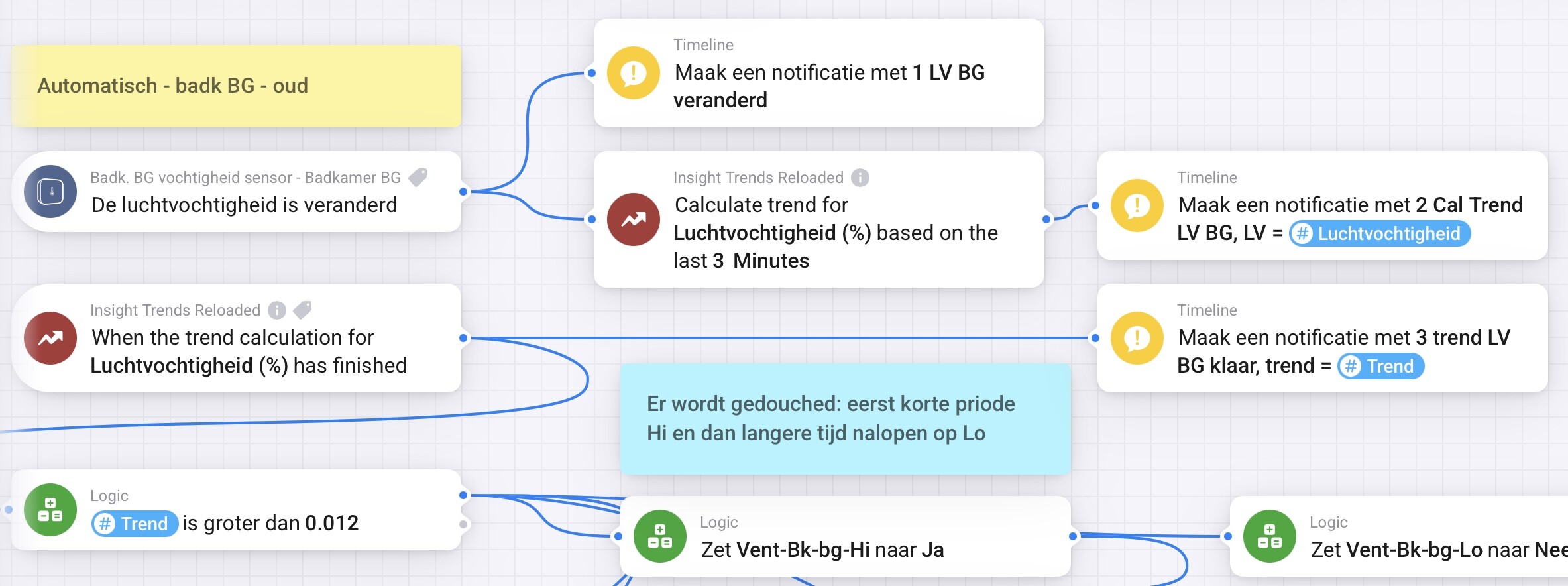
I have a flow to turn on the bathroom fan based on the steepness of increasing humidity (LV), based on the trend of the past 2 minutes. Doesn’t work anymore either.
Now adjusted to 3 minutes (see picture), see if that works.
I put timeline notifications on it for the benefit of debugging. the notifications ‘1LV BG’ and 2 Cal’ always come through, but the report ‘3 trend LV’ with also the value to which the trend calculation comes out does NOT get through.
I’m going to take a shower now, see if this works…
I’ve looked into this a bit deeper and both errors have the same cause.
Both happen when Insights returns 0 logs (empty result).
Cannot read properties of undefined (reading 'y')
→ With 0 logs there is no trend data, so the result isundefinedand reading.yfails.- “Invalid token”
→ Also caused by 0 logs. Calculations end up withNaNor missing values and the parser throws an error.
That also explains why 1 minute doesn’t work, but 2–3 minutes often does:
longer periods usually return at least some data points.
I didn’t change anything in the app that would cause this.
This looks like a change in Athom’s Insights handling, especially for short time ranges with zero values.
At the moment there’s nothing I can safely fix on app side.
TL;DR: It’s broken due to Insights returning 0 logs.
This is caused by a bug in Athoms last update. - See Rounded and flattened charts in Insights.
They reduce data points as they normally only do for older data.
I recommend to complain/bug report to Athom to make sure, they put a fix high on the agenda for the next update.
[EDIT]
Just got confirmation from Athom that the problem described in ”Rounded and flattened charts in Insights” will be fixed with the next update. - I am pretty positive, that this will resolve the problem here as wel.
Version 12.11.0 just landed.
My flows have come to life. Issue is fixed!
I think there’s a problem when calculation averages over one year, 365 days, as it seemingly divides between years, last year and this year.
So the average I get looks like average from ‘last year’ data only?
