I also have non-working Homewizard power and water meters after the latest update on my early 2018 Homey with version 12.7.1. I have version 3.8.4 of the app installed. Should I do anything or will this fix itself?
App ver. 3.8.4. The kWh Meter 3-Phase don’t work anymore. All other: smartplugs and P1 meter are working normally
No but you can force update the app to v3.8.8 as that has the fix.
Yes fixed in v3.8.8 is live now.
Just noticed it. Thank you. Everything working again.
Everything is working with 3.8.8. Thank you for all the work!
How do I do that? “Check updates” in the settings appears only to check the Homey firmware version. At least, it says there are no updates, while the Homewizard app is still at 3.8.4. I can’t find something similar for apps.
And if you access the Homey store and check this app? Also?
Else it should be updated in the next few hours automagically.
Alsof de duivel ermee speelt. The app just updated automatically…
Yeah its magic 
From the store I “installed” the app (over the existing one).
Not sure, but I guess that did it.
Since today I lost connection with the 3-phase kwh meter. I removed it, and tried to reconnect. Without succes. Already running the newest app version.
1 subnet, mdns enabled. Running multiple HW devices without any issues.
Can connect the api by using my browser.
Any idea?
Drop me a diagnostic report so I can see what goes wrong.
Thank you for your reply! Did made a report. a408e871-f299-4fe3-b910-843a21d534cb
So yes mDNS problem:
Discovered devices: {}
Discovered devices: {}
Discovered devices: {}
Discovered devices: {}
Discovered devices: {}

Any wifi issues

2025-11-07T13:20:52.734Z [log] [ManagerDrivers] [Driver:energy_socket] [Device:cd9b4761-e2b0-454e-8149-7fe66a4811ea] Socket unreachable
2025-11-07T13:21:02.688Z [log] [ManagerDrivers] [Driver:energy_socket] [Device:016aec25-9f67-4531-b9d7-169842af17e0] Socket unreachable
2025-11-07T13:21:02.720Z [log] [ManagerDrivers] [Driver:energy_socket] [Device:cd9b4761-e2b0-454e-8149-7fe66a4811ea] Socket unreachable
2025-11-07T13:21:02.725Z [log] [ManagerDrivers] [Driver:energy_socket] [Device:57743d02-418d-4959-9d3d-0a32b0ac14f4] Socket unreachable
2025-11-07T13:21:02.728Z [log] [ManagerDrivers] [Driver:energy_socket] [Device:4a3f52c0-f406-4ef4-a0be-ef676ea83447] Socket unreachable

2025-11-07T13:20:52.477Z [err] [ManagerDrivers] [Driver:SDM230] [Device:212d4b46-7c76-4dce-9aac-b672b9730311] FetchError: request to http://192.168.2.116/api/v1/data failed, reason: connect EHOSTUNREACH 192.168.2.116:80
    at ClientRequest. (/app/node_modules/node-fetch/lib/index.js:1501:11)
    at ClientRequest.emit (node:events:519:28)
    at emitErrorEvent (node:_http_client:107:11)
    at Socket.socketErrorListener (node:_http_client:574:5)
    at Socket.emit (node:events:519:28)
    at emitErrorNT (node:internal/streams/destroy:170:8)
    at emitErrorCloseNT (node:internal/streams/destroy:129:3)
    at process.processTicksAndRejections (node:internal/process/task_queues:90:21) {
  type: 'system',
  errno: 'EHOSTUNREACH',
  code: 'EHOSTUNREACH'
}

2025-11-07T13:20:52.479Z [err] [ManagerDrivers] [Driver:watermeter] [Device:54964753-5e35-4ffc-ac71-9ac830c34acb] FetchError: request to http://192.168.2.75/api/v1/data failed, reason: connect EHOSTUNREACH 192.168.2.75:80
    at ClientRequest. (/app/node_modules/node-fetch/lib/index.js:1501:11)
    at ClientRequest.emit (node:events:519:28)
    at emitErrorEvent (node:_http_client:107:11)
    at Socket.socketErrorListener (node:_http_client:574:5)
    at Socket.emit (node:events:519:28)
    at emitErrorNT (node:internal/streams/destroy:170:8)
    at emitErrorCloseNT (node:internal/streams/destroy:129:3)
    at process.processTicksAndRejections (node:internal/process/task_queues:90:21) {
  type: 'system',
  errno: 'EHOSTUNREACH',
  code: 'EHOSTUNREACH'
}

2025-11-07T13:20:52.509Z [err] [ManagerDrivers] [Driver:energy] [Device:58ac0ebe-408d-4919-a9ed-272d351c9b45] FetchError: request to http://192.168.2.201/api/v1/data failed, reason: connect EHOSTUNREACH 192.168.2.201:80
    at ClientRequest. (/app/node_modules/node-fetch/lib/index.js:1501:11)
    at ClientRequest.emit (node:events:519:28)
    at emitErrorEvent (node:_http_client:107:11)
    at Socket.socketErrorListener (node:_http_client:574:5)
    at Socket.emit (node:events:519:28)
    at emitErrorNT (node:internal/streams/destroy:170:8)
    at emitErrorCloseNT (node:internal/streams/destroy:129:3)
    at process.processTicksAndRejections (node:internal/process/task_queues:90:21) {
  type: 'system',
  errno: 'EHOSTUNREACH',
  code: 'EHOSTUNREACH'
}
Weird, because I can still discover it from my PC via mDNS. But it has always worked — until today.
The single phase meter is also not a problem.
Could you make it possible to add it using its IP address?
the things I tried:
Restart homey
Restart meter
Checked mdns laptop and phone -both found both meters I have-
Restarted modem
Then your Homey has wifi issues. Clearly log says unreachable etc. If your pc is fine then your Homey is not. Sorry this is not an app issue but your Homey with a stability issue to keep wifi connection ok.
Look at the access point it connects? Something isn’t right.
I’m using a Ubiquiti network and have double-checked all the settings.
Homey is connected to the same access point as the 3-phase meter.
Is there no option to connect it directly using an IP address?
Is there a mDNS check inside of Homey?
Cabled my homey:
40e37cd5-6737-4ec4-8c92-0ce53e75d5c5
You can edit the advanced settings for you kWh meter.
The url is there and you can update the ip, just keep the rest as is.
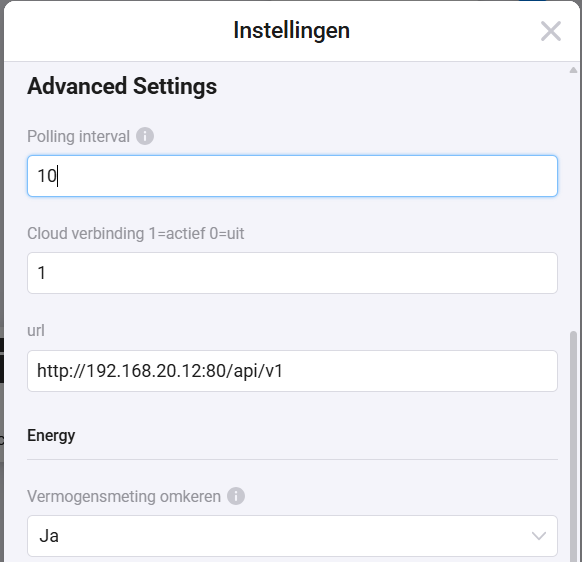
But again, UNREACHABLE has nothing to do with mDNS. Homey tries to reach it last known ip address and that is not responding for Homey.
The only thing it would tell me is that your devices are not having a static ip and are wandering around changing ip address. Only then it would be updated via mDNS with a new ip.
Thanks for the explanation!  I can’t add it again -its been removed by me because of connection problem-, so I can’t change the IP address manually. All my other HomeWizard devices are using fixed IPs and are working fine — it’s just the 3-phase meter that doesn’t want to connect anymore. Would it be possible to add an option to connect using the IP address during setup? That might help in situations like this.
