yeah seems like it indeed. look like homewizard has limits on amount of request you can do to it.
I added some finetuning on keep-alive with max-sockets etc. Let me release that and see if that helps your case.
Thanks for your explanation.
nice that would be great!
Try v3.6.74 (test) see if that improves it.
I posted a support-ticket with Athom. I tried to forward it to you, but the mail was rejected. Would you like to have a copy?
Sadly not improved enabled in hass prevent control from homey.
Ok then I can’t help. Option is to integrate HASS with Homey and see if you can remotely toggle that device, so relay that on/off via HASS.
Moving from old Homey pro 2019 to new homey pro 2023.
Don’t use backup / restore method , but fresh install.
I have a lot of homewizard stuff , like power plugs , KwH and P1 dongle.
All devices connects at once except the 3f Kwh device.
It would not showing up.
Things I already tried :
- Homey is in the same (WIFI network)
- Disconnect all mesh routers
- Forced Homey to 2.4 Ghz ( the 3fKWH is also on the 2.4 Ghz band)
- No Guest WIFI
- Reboot homey
- Reboot Routers
- Power cycle your 3f KWH device
- “LOCAL API” is on in Homewizard Energy app
- Put it off , exit , put it on exit
- Restart the HW app on Homey to discover again
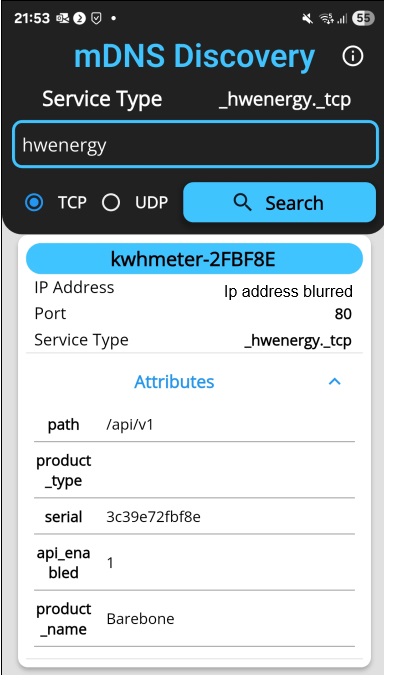
- Installed mDNS , run the query “_hwenergy._tcp” , 3f KWH shows up in the overview
App version V3.6.71

Goodmorning Jeroen,
Diagnostic report is made : 2a37fe5a-da1a-4d7a-a450-1cb2a8b499ac
Test-Netconnection ( powershell) to 3f KWH device is working on port 80. 
Are you using pihole?
Not even heard of this
so not using
Am prepping a new test version that should be more verbose on mDNS discovery. Will let you know when it’s uploaded.
Ok version v3.6.75 is available on test here:
Please install, try to add/pair your SDM630 via apiv1 and create another diag report.
Thanks , just installed and created report.
52538171-1707-46f3-829f-6c5dfc51bd91
Well Homey doesn’t find your SDM630 at all:
Discovered devices: {}
So something is wrong with mDNS and or your wifi eventually.
It is now to narrow down on what your wifi settings are, accesspoints etc.
Is your 3f kwhmeter connected to the same accesspoint as your 1f kwhmeters (SDM230)?
Something is not connected/configured correctly.
VLANS?
IoT?
Mesh?

Alright then its your router then.
Something with multicast that needs to be checked for some reason your port that connects your mesh pods are ok but the wifi settings on your router doesnt allow multicast.
What flavor/brand is your router?
What settings are enable or disabled in your wifi ssid on your router?
I understand the point you’re looking to , but yesterday evening the old homey had still the connection to the 3f KWH device ( updating as well) , and the new homey doesn’t find it.
For now i did remove it from the old homey ( to avoid collision)
Both on the same network and connected without repeaters or mesh. ( completely shutdown mesh network for a while)
Router is Fritzbox 7590
