I am sorry I have been away for some time - my availability is much lower than it used to these days. For now, I continue supporting the app – I hope I will be able to find the time for it in the future. If not, we will try to find a new owner.
I answered all the ones that sent me diagnostics report on issues via email. If you have issues that require my attention, the best is to send diagnostics report (App Settings à Send Diagnostics Report) and wait for an answer by email.
I would like to share an issue many users encounter recently, related to Netatmo’s change in their behavior.
As Netatmo always had limitations on the amount of requests they allow to send, it seems that since the beginning of April, they started to be very strict on those limitations and are refusing to provide service to users who exceed the limitations.
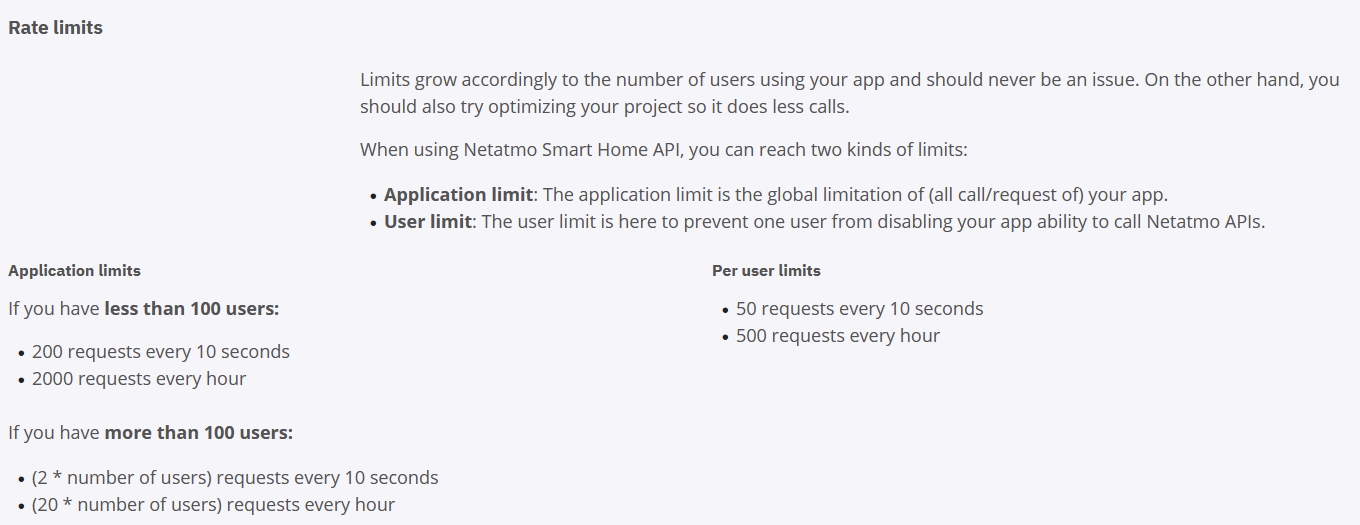
The limitations can be found here;
The most problematic one is the Per-user limits. I noticed that user who have flows which are affecting many devices and are turning them on/off together (for example, in a “leaving home” flow where you turn off everything) are exceeding the rate limit. Once that happed, you will have to wait to the end of an hour to do another request to Netatmo.
As a workaround, I recommend putting a “guard” on your flows before turning on/off your Netatmo devices.
In this case, I am turning on a lamp only if its NOT already turned on.
By this, if the device was turned on before my operation, I would “save” the call to Netatmo API.
I might be able to implement that “guard” in the app itself, but it has its drawbacks. I will update in this forum in case I implement it.
Gal: For a while I experience a read explanation mark with the Netatmo Doorbell device (seems totally random). I have tried to remove and re-add the device twice, to no prevail. Is this related to the same issue that you describe above or something else? HP2019. I can send a diagnostic report upon request.
ps. also lately this started to happen with the Netatmo radiator valves using the ‘official’ Homey app (much more rarely than with the doorbell though). Could be my HP2019 that is low on RAM, but the common denominator seems to be Netatmo products… Restarting the relevant Homey app(s) always fixes the issues temporarily.
Error when clicking on the device:
Device Unavailable
Fatal error connecting to Netatmo cloud service. If the problem persists - select one of your Netatmo devices, remove it from your Homey, add it again, and wait for 2 minutes to allow the system to refresh. Please note that after this operation, all the flows that are using this device will need to be fixed.
After digging into the data and many issues reported byusers, I got to the (sad) conclusion that the bottom line is that we are too big for Netatmo API to hold us.
In general, we passed the 1,000 users on the last month, and this is too much for the Netatmo APIs to handle.
In order to overcome this problem, I created a new version in which each user can create his own private API in front of Netatmo.
All users must follow the procedure mentioned below, and start using the Private API. Otherwise, the app will stop working very soon.
Here are the instructions on how to install and use a private API in front of Netatmo:
Make sure you are upgarded to app version 1.2.8 or later. If you are not updagraded automatically, you can manually install it from Homey App Store (Bticino/Legrand/Netatmo App for Homey | Homey)
Remove one of your Bticino/Legrand/Netatmo devices. It doesn’t matter which, but keep in mind that flows using this device will be affected. So choose the device with as less flows as possible.
Create an API with Netatmo:
a. Browse to https://dev.netatmo.com/
b. On the top-right corner of the screen, click “Log In”
c. Log in with your Netatmo Credentials
d. Click your username on the top-right corner of the screen (same place you clicked to log in), and choose: “My Apps”
f. Fill in the following details:
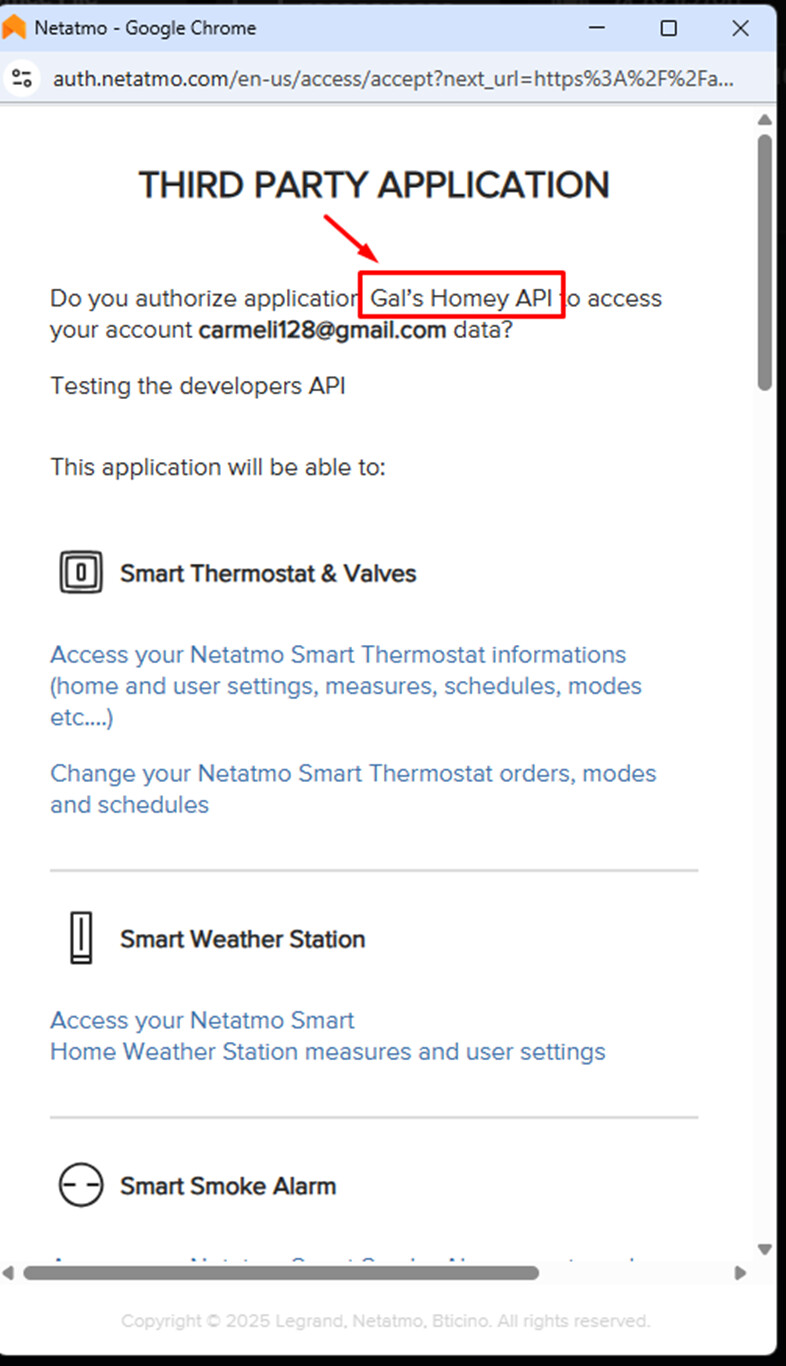
i. App Name: Give a name you will identify later. For example, “Gal’s Homey API”
ii. Description: Fill in something, it doesn’t matter what
iii. Data protection officer name: fill in your name
iv. Data protection officer email: fill in your email
v. Check the “I agree to terms and conditions” checkbox
vi. Click “Save”
You will now see the App Information page, and App Technical Parameters, which has Client-ID and Client-Secret. You will need the Client-ID and Client-Secret on the next steps
Fill in the Client-ID and the Client-Secret you got on step 3
Click “Save Changes”, and close the dialog box with the X button
Go to the devices page on Homey and Re-add the device you removed on step 1.
When getting to the approval page, make sure that the name of the API is the same name as you filled in step 3.f.1
@Trond_Nordfjaern - please follow my previous post, and try following the procedures there. I assume it will solve all your problems. If not, please send diagnostics report while adding commtns with the sympthoms.
Good to hear you. I thought something had happened to you.
Thank you for your analysis and your answer. I’m shocked about Netatmo’s reglementations … 20 accesses per hour. That is not much… So I have to find other solutions.
This is correct. Whoever moves to the “Private” API by following the procedure mentioned above, will be limitted by the “Per user limits” which are 50 requests every 10 seconds, and 500 requests every hour.
This should be more than enough for a single user.
Hi. I’ve sent the following report:
486538de-0482-4048-960f-85cb585e0557
I’ve made an error counter. It shows that the Netatmo-devices goes offline every hour for 10 minutes (from 50 minutes to the new hour starts). It corresponds with your latest API findings. I’ll update the app and try again with restrictions
@JoeMama - thanks for this wonderful investigation!
This is exactly the issue with API usage limitations we have in front of Netatmo.
Once we pass the hourly quota, Netatmo stops serving the API calls. It usually happens about 10 minutes beofre the hour ends.
Once the hour ends, and a new hour starts, Netatmo are reseting their counter allowing the APIs to be served. After ~50 minutes it gets filled again, and so on.
Moving to a private API in front of Netamto as explained above will solve this.
I published version 1.2.8 supporting Private API in front of Netatmo to the public.
Special thanks to all the testers that provided feedback.
IMPORTANT: All - please follow the procedure mentioned on my prvious post:
Testers - please move away from the test link and install from the public link as mentioned above. The test link might hold some unstable versions inthe future.
Great app. However I experience issues with long delay with Netatmo Doorbell Rang trigger. I assume this is since Netatmo webhooks still are unreliable?
The slowdown is most likely related to slowdown on Netatmo cloud side, in which they do not send the webhooks fast enough (these are the notifications that the doorbell was pressed). Nothing we can do about that.
Hello and thanks for your work… I have three systems in my bticino account: office, home and second home. I configured the dev account with the new procedure but I saw that it does not see any object related to the main home system where the new F460 webserver is installed. Could this be the problem? Thank you very much