Hi All,
After digging into the data and many issues reported byusers, I got to the (sad) conclusion that the bottom line is that we are too big for Netatmo API to hold us.
In general, we passed the 1,000 users on the last month, and this is too much for the Netatmo APIs to handle.
In order to overcome this problem, I created a new version in which each user can create his own private API in front of Netatmo.
All users must follow the procedure mentioned below, and start using the Private API. Otherwise, the app will stop working very soon.
Here are the instructions on how to install and use a private API in front of Netatmo:
- Make sure you are upgarded to app version 1.2.8 or later. If you are not updagraded automatically, you can manually install it from Homey App Store (Bticino/Legrand/Netatmo App for Homey | Homey)
- Remove one of your Bticino/Legrand/Netatmo devices. It doesn’t matter which, but keep in mind that flows using this device will be affected. So choose the device with as less flows as possible.
- Create an API with Netatmo:
a. Browse to https://dev.netatmo.com/
b. On the top-right corner of the screen, click “Log In”
c. Log in with your Netatmo Credentials
d. Click your username on the top-right corner of the screen (same place you clicked to log in), and choose: “My Apps”
e. Click the orange “Create” button
f. Fill in the following details:
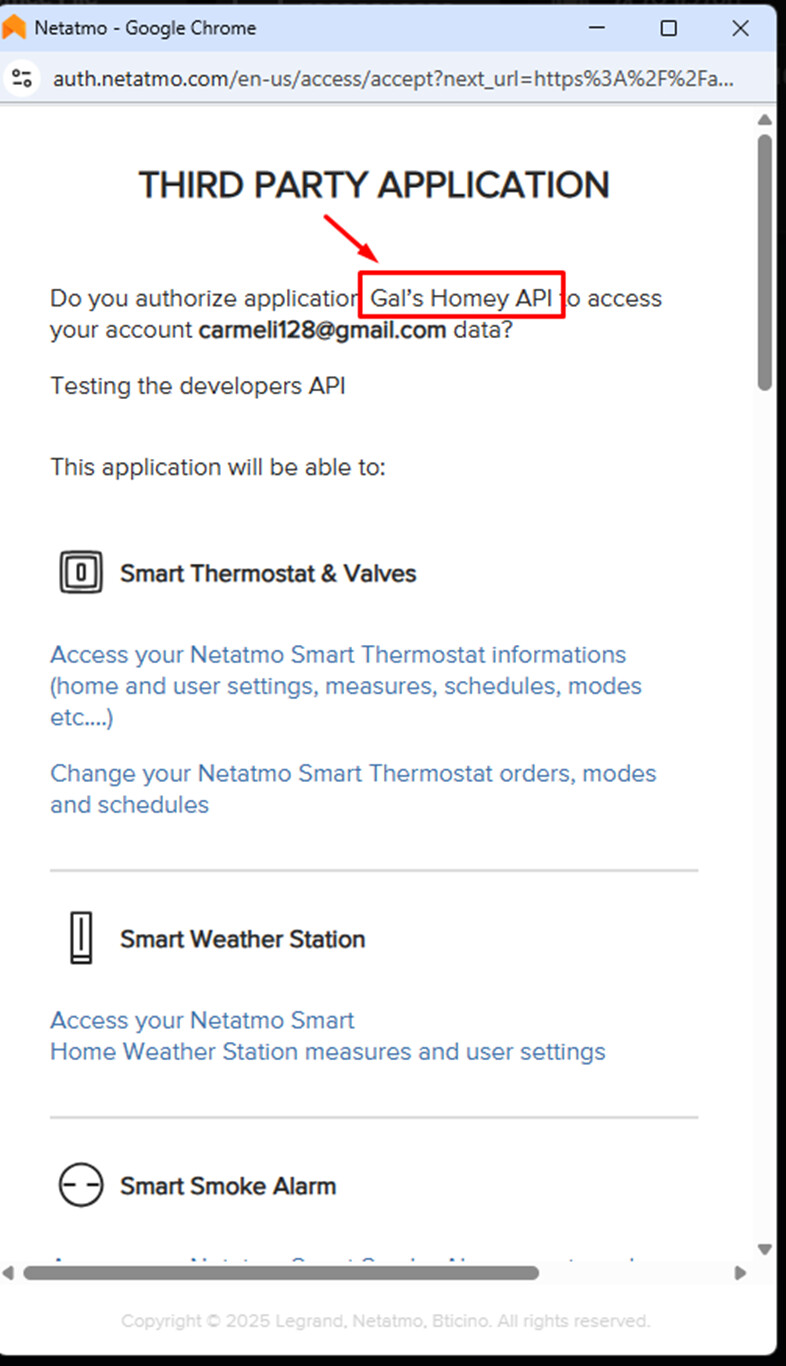
i. App Name: Give a name you will identify later. For example, “Gal’s Homey API”
ii. Description: Fill in something, it doesn’t matter what
iii. Data protection officer name: fill in your name
iv. Data protection officer email: fill in your email
v. Check the “I agree to terms and conditions” checkbox
vi. Click “Save”
You will now see the App Information page, and App Technical Parameters, which has Client-ID and Client-Secret.
You will need the Client-ID and Client-Secret on the next steps
- Go back to the Homey App. Go to the App Settings Page, click “Configure”:
- Fill in the Client-ID and the Client-Secret you got on step 3
- Click “Save Changes”, and close the dialog box with the X button
- Go to the devices page on Homey and Re-add the device you removed on step 1.
When getting to the approval page, make sure that the name of the API is the same name as you filled in step 3.f.1
Don’t forget to fix the flows that were using that device that was removed on step 1.


That’s it. If you managed that, you are now using a private API in front of Netatmo, which should be small enough for them to be able to handle.
If there are any problems, please send me diagnostics report (App Settings → Send Diagnostics Report), and explain the issue in the comment.
I am looking forward to any feedback: please let me know if it worked for you, and if things look better now.
Good luck!
