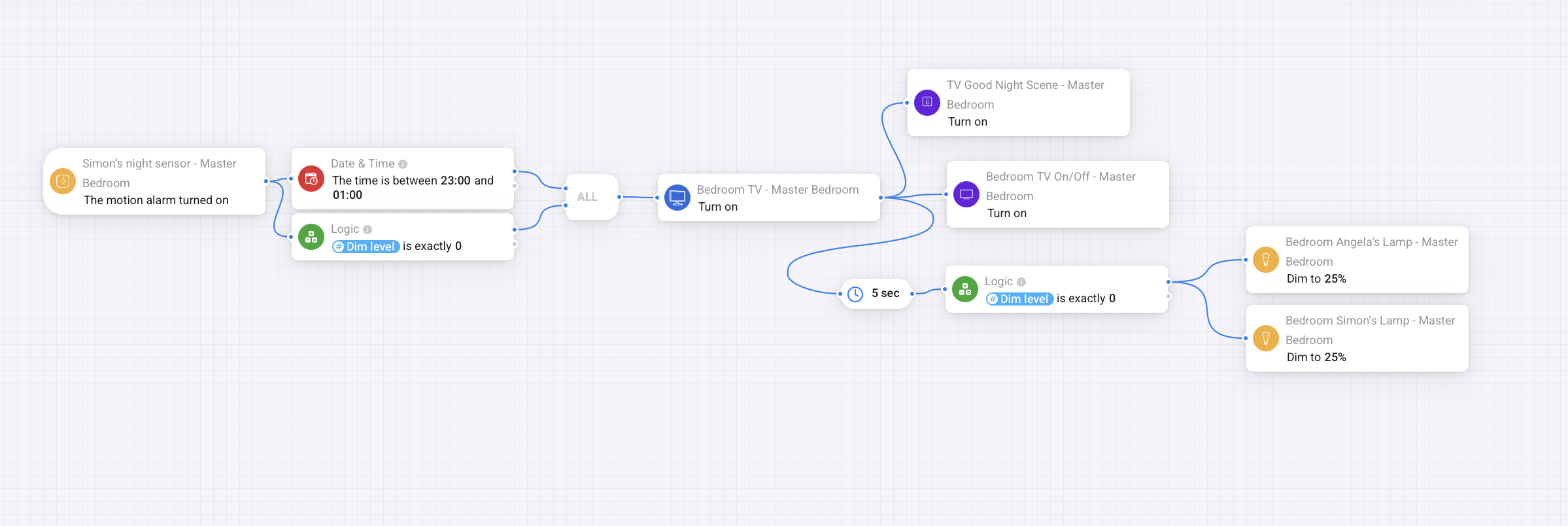
I have added the lamps to my TV on flow. But was concerned the 2 min delay in the lamp flow would affect the TV flow. Not sure which (if any) are correct?
Please let me know your thoughts?
The idea with the lamps is to turn them on at the same time that the television turns on and they will turn off after two minutes unless the TV doesn’t turn on. I have used the light strip behind the TV to determine whether the TV is turned on or not as it is a Phillips Hue lightstrip tied to the TV.
A dim level can’t be negative, so the flow will never continue after ‘dim level is less then 0’. So in the first flow only Angela’s lamp will turn on. Better use ‘dimlevel is exactly 0’.
I think you want both conditions (dimlevel is 0 and time between 23:30 and 3:00) to be true to continue. So you have to add an ALL-card.
In the second and third flow the lamp will dim to 20% and turn off after 2 minutes after every motion, even if you are watching TV. I think you want them to stay on while watching TV.
The flow will turn on the TV only once after 23:30 because the dimlevel is set to 0 at 23:30. When the TV is turned on the lamps are also dimmed to 20%.So the dimlevel is no longer 0. So the conditions are no longer both true.
After 2 minutes I added an extra condition: TV must be off.
Next thing to decide: how do you want the lamps to react on motion when you turn off the TV and go to sleep.
@Wim_Post Thanks for your Flow description. I decided that when the TV turns on it uses a Hue light strip behind the TV and behind the headboard, so there is plenty of light without turning on the lamps, but have added a failsafe to turn on the lamps if the TV doesn’t turn on, after a 5 second delay, although maybe 3 seconds would be more acceptable? measured by the TV light strip dim level. I believe this Flow is correct but would love your thoughts.
I have been creating more flows this evening to replace a number of my Apple Home Automations by laying multiple automations on to a single canvas. Everything has tested positively, with a few tweaks!
The single most frustrating card has been the Device On for an AND card but not an Off option. Discovering I can just invert the card to an Off position has made me happy
Yes, some options are ‘hidden’ in the context menu (right click). Inverting a flow card is perhaps the most common one. Not only for the device state (on/off), but also e.g. for some of the logic cards.
Another example of such a hidden option is that for dimmable lights, in most cases, you can use the ‘duration’ option to indicate within how many seconds/minutes the dim level is to be reached. This way you can smoothly transition into the desired dim level, instead of an instant change.
I have several sets of lights. Before advanced flow I needed 5/6 flows per set. When a lamp didn’t turn on or off as expected I had to check multiple flows to find the issue. (Proper namegiving would have made things easier. )
So when started with advanced flows I decided to have 1 flow per set of lights. Now I have to check only one flow.
The flow below handles the 2 hallway lamps.
Please note that there are multiple THEN-cards ‘change dimlevel spotjes to 0’ (or 0.2). Some may say one should only use one pair and they have long and curly lines to connect the cards. I like to have the lines short, as horizontal as possible and never behind a card.
The fun part of changing a variable is: if the variable is 0 and another trigger changes it to 0 homey doesn’t see it as a change. So the 8th trigger ‘variable is changed’ doesn’t trigger again.
Motion in the garden starts a timer ‘beweging’. When there is 135 seconds left on the timer the hallway lamps turn on. Thus mimicking my reaction to motion in the garden.
I have been working this week on replicating all the automations I had in Apple Home and then looking at enhancing them.
Today I completed everything, but I just have one issue in my bedroom light flows which turns on the lamps when I don’t want them to run on and then they won’t go off.
I’m going to troubleshoot it now, and will see if it needs separation as you suggested above. If I’m still struggling tomorrow and I post the flow, would you mind taking a look?
I found my issue. I was using a light strip condition turned on by the TV to check the TVs power state, but as it is part of a Philips Hue Entertainment area I believe it wasn’t reporting its state, so since learning the invert card I swapped it out for the TV power state which has fixed the issue.
Now I’d like to learn this gradual dim function and see it in action.
Hey @Simon_Salvin ,
Maybe a little bit late to the party, but I also wrote a tutorial on how deal with motion sensors. It will also allow you to recheck certain conditions during the time that the room is active.
Thanks for your guide. It blows my mind how you come up with these solutions and thank you for sharing.
Since I bought my Homey Pro a month ago I have taken all the automations I had in Apple Home and rebuilt them in Homey with some using virtual triggers to fire back to Apple Home. I’ve added & refined lots, played around and had lots of fun doing it, and the friendly help and feedback from this community has been invaluable. I have also leaned on Gemini for help which has cut down on the timescale it would have otherwise taken.
I thought I would share the flow I’ve been working on since asking the question.
I have used a virtual switch to turn off a sunset/sunrise timing, which turns off at 11pm.
We go to bed between 11pm-1am, so upon walking in to the bedroom the TV turns on and turns on a virtual switch exposed to Apple Home, this switch is tied to an Onvis Button.
When the TV turns on it uses Philips Hue light strips behind the TV and headboard which provide enough light however if the TV doesn’t turn on this will trigger our lamps to turn on so we are not left in the dark.
When we are ready to sleep and the Onvis button is pressed, this will activate the TV off flow and also set the Good Night scene in Apple Home & play sleep sounds on the HomePod for 30 minutes.