This tutorial is about setting up a basic MQTT system.
(and yes I know there’s several other MQTT tutorials around  )
)
Additionally, it tries to explain how to connect a system like the NRG.watch interface for Itho airboxes
(no need for the Homey NRG.watch app)
Feel free to add missing info, or correct any possible errors.
(This is a wiki)
Homey:
1
Install 3 MQTT community apps:
- MQTT Broker [1]
- MQTT Client
- MQTT Hub
-
¹)The broker may run anywhere, but we stick to Homey for now
2
Configure the broker and client;
- In this example, Homey’s IP address is
192.168.12.34→ replace this with your Homey’s IP address - Make up your own username and password
- The default MQTT portnumber is
1883
MQTT Broker

.

MQTT Client
Use the same user/pw as you entered at the broker configuration
Enter Homey’s IP address as broker IP

3
MQTT Hub
No configuration needed, but make sure it runs:

Then it connects with the MQTT Client app automatically
not-Homey:
4
NRG.Watch Itho interface
Use the same user/pw as you entered at the broker configuration
Enter Homey’s IP address as broker IP

If all’s configured well, the systems now can communicate.
You can use the MQTT Explorer software to confirm, see Troubleshoot section below
Homey:
5
MQTT Hub virtual device
With use of such a VD, you can control and monitor your airbox
-
add a device, pick MQTT Hub
-
no need to create anything now, just save it
-
go to Settings > Advanced settings of this device
-
at Device Class select “Fan”
-
now tap “Topics” at the *Advanced section
-
Now copy this topics JSON below, and paste it into the aforementioned Topics field

{
  "fan_speed": {
    "capability": "fan_speed",
    "stateTopic": "itho/state",
    "setTopic": "itho/cmd",
    "valueTemplate": "round((value / 255) * 100)",
    "outputTemplate": "round((value / 100) * 255)",
    "displayName": "Fan speed control"
  },
  "fan_mode": {
    "capability": "fan_mode",
    "stateTopic": "itho/ithostatus",
    "setTopic": "itho/cmd",
    "valueTemplate": "",
    "outputTemplate": "",
    "displayName": "Fan presets",
    "values": [
  { "id": "low", "title": "low" },
  { "id": "medium", "title": "medium" },
  { "id": "high", "title": "high" },
  { "id": "timer1", "title": "timer1" },
  { "id": "timer2", "title": "timer2" },
  { "id": "timer3", "title": "timer3" }
]
  },
  "measure_number.speedrpm": {
    "capability": "measure_number.speedrpm",
    "stateTopic": "itho/ithostatus",
    "setTopic": "",
    "valueTemplate": "$['fan-speed_rpm']",
    "outputTemplate": "",
    "displayName": "Speed (rpm)"
  },
  "measure_number.speed%": {
    "capability": "measure_number.speed%",
    "stateTopic": "itho/ithostatus",
    "setTopic": "",
    "valueTemplate": "$['speed-status']",
    "outputTemplate": "",
    "displayName": "Speed (%)"
  },
  "measure_temperature": {
    "capability": "measure_temperature",
    "stateTopic": "itho/ithostatus",
    "setTopic": "",
    "valueTemplate": "$['temp']",
    "outputTemplate": "",
    "displayName": "Temperature"
  },
  "measure_humidity": {
    "capability": "measure_humidity",
    "stateTopic": "itho/ithostatus",
    "setTopic": "",
    "valueTemplate": "$['hum']",
    "outputTemplate": "",
    "displayName": "Humidity"
  },
  "measure_string.lastcmd": {
    "capability": "measure_string.lastcmd",
    "stateTopic": "itho/lastcmd",
    "setTopic": "",
    "valueTemplate": "$['command']",
    "outputTemplate": "",
    "displayName": "Last command"
  },
"measure_number.ppmw": {
    "capability": "measure_number_ppmw",
    "stateTopic": "itho/ithostatus",
    "setTopic": "",
    "valueTemplate": "$['ppmw']",
    "outputTemplate": "",
    "displayName": "ppmw"
  },
  "measure_number.opshrs": {
    "capability": "measure_number.opshrs",
    "stateTopic": "itho/ithostatus",
    "setTopic": "",
    "valueTemplate": "$['total-operation_hours']",
    "outputTemplate": "",
    "displayName": "Running hrs"
  }
}
You’re free to use your own names for the values at “displayName” and “title”
Now you’d have a device like this:


.
Flow cards


.
Troubleshoot
Install MQTT Explorer to view the actual topics and messages transmissions
Again you enter the user/pw as you entered at the broker configuration, and Homey’s IP address (the broker IP):


→ also available as Home Assistant add-on
New (14 sept 2025):
When MQTT is not for you,
A new NRG Itho Daalderop app is published:
https://community.homey.app/t/app-pro-itho-daalderop-make-ventilation-smart-with-homey-and-nrg-watch/142944
Footnotes ↩︎


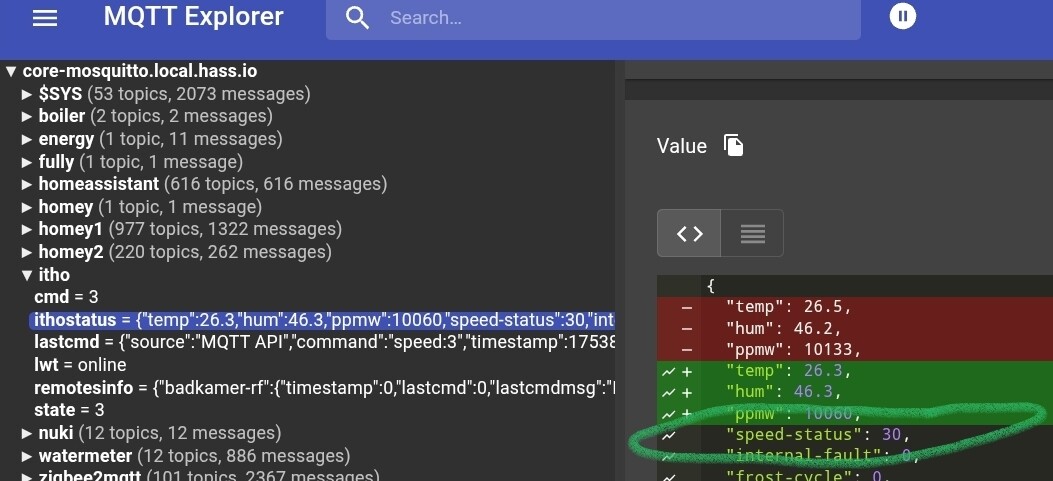
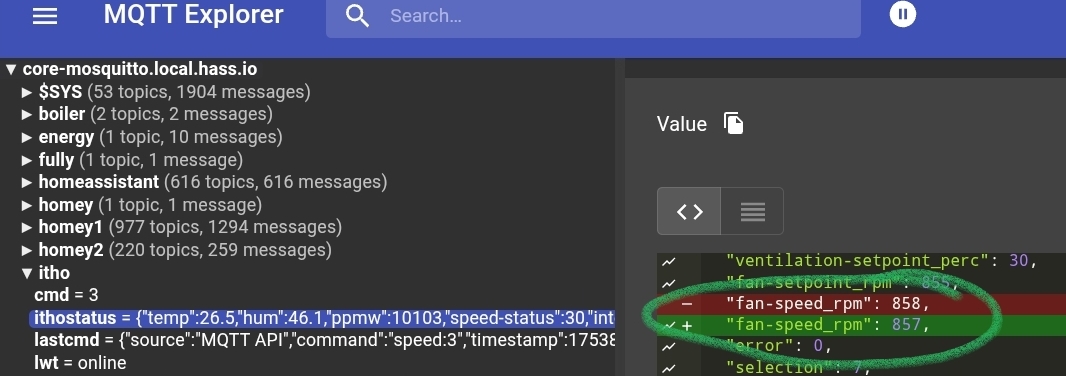


 in terms of (app) code).
 so I am going to pick the values I want and add them. The other part I want to do is make use of the virtual remotes I added. So per room I added a virtual remote that I can set the Itho to High , Low or Auto
  been talking to Gemini all night but we can’t solve it yet hehe
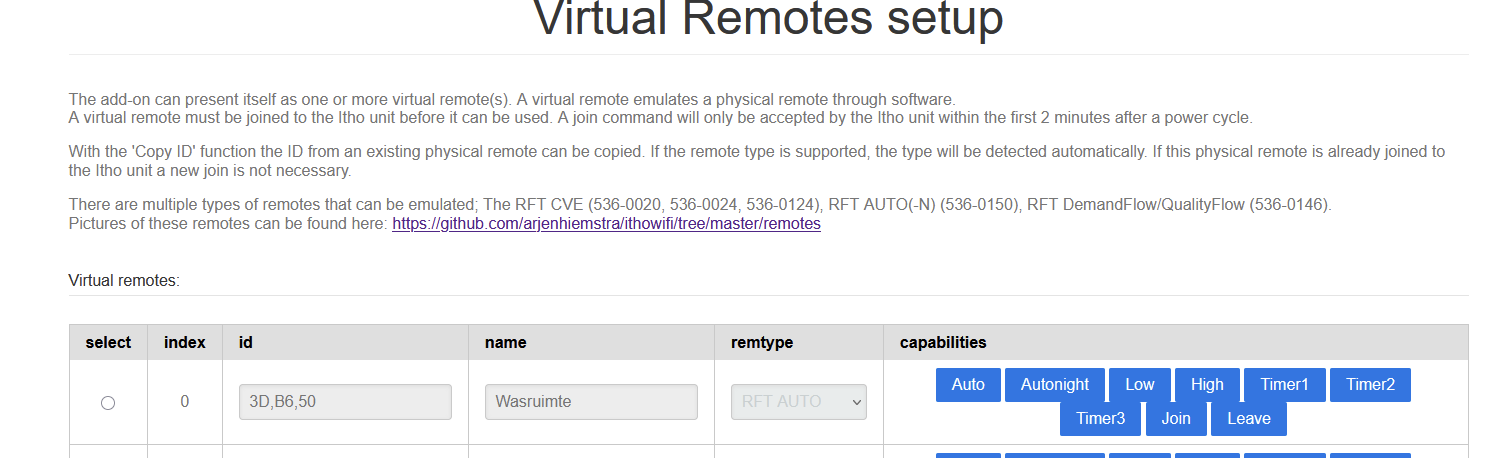

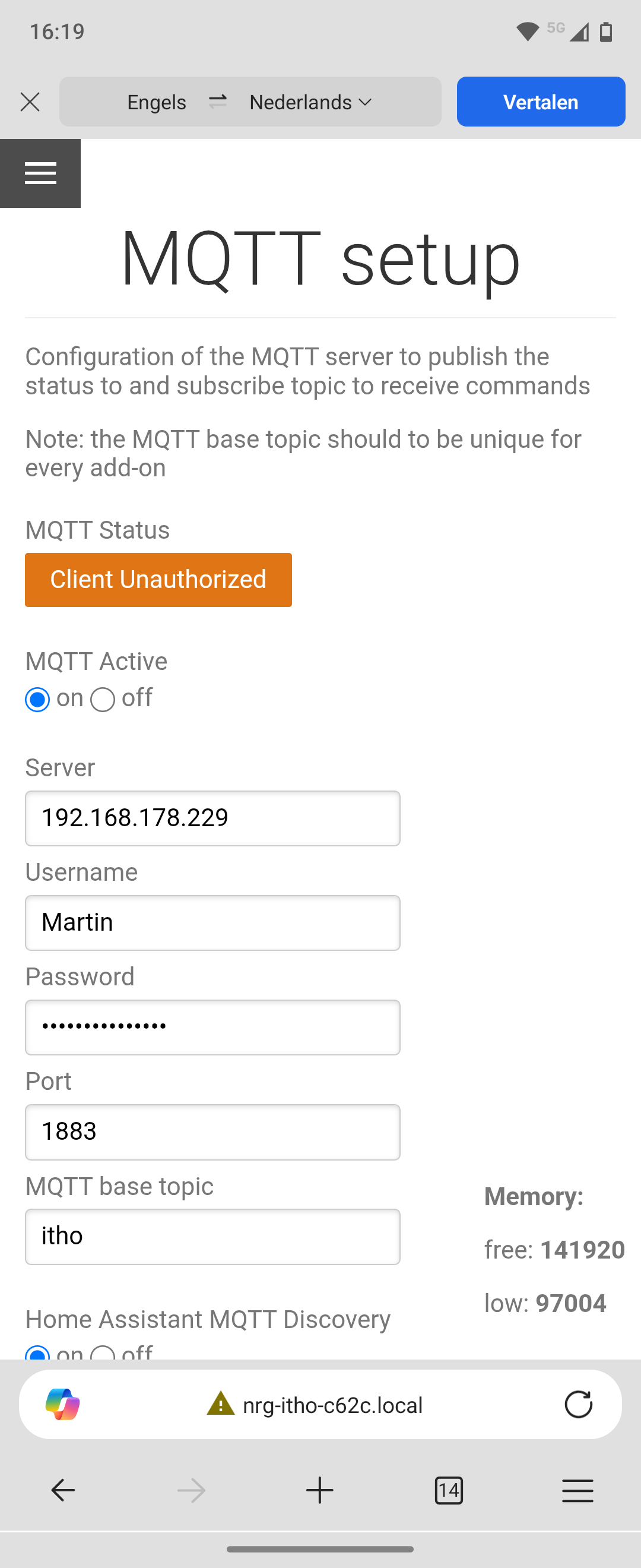


 except for the speed rpm/%. I already saw this in an earlier post, so I need to try this out. If I’m correct; I need MQTT Explorer to check for the correct names: the following:
