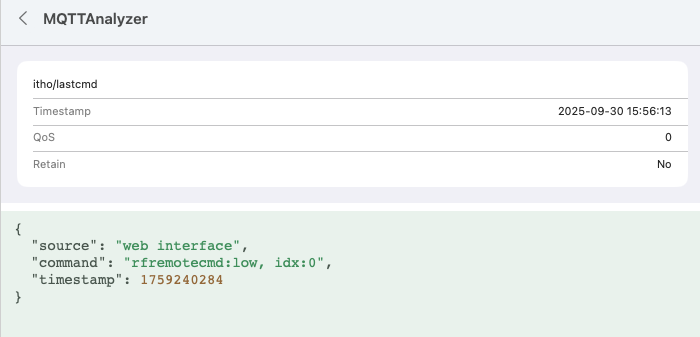
No, the basic commands (http://nrg-itho-A1B2.local/api.html?command=high) don’t work.
This code works : http://nrg-itho-A1B2.local/api.html?rfremotecmd=high
It’s the cmd wich uses the R1101 module.
The new (web api only) doesn’t work either.
John
No, the basic commands (http://nrg-itho-A1B2.local/api.html?command=high) don’t work.
This code works : http://nrg-itho-A1B2.local/api.html?rfremotecmd=high
It’s the cmd wich uses the R1101 module.
The new (web api only) doesn’t work either.
John
I will add later RF commands in the new Itho Daalderop app, @meijberg can you send me a DM i want to know more about your case to make the integration beter.
I think I found it, John.
This should set the mode to high in your case:
{
   "rfremotecmd":"high"
}
( Source by @Arjen_Hiemstra ).
Now I don’t know for sure how to adjust the mode selector in the virtual MQTT devices’ JSON;
My 1st idea would be: in the setTopic line, replace cmd with rfremotecmd, can you test it ?
 {
  "fan_mode": {
    "capability": "fan_mode",
    "stateTopic": "itho/ithostatus",
    "setTopic": "itho/rfremotecmd",
    "valueTemplate": "",
    "outputTemplate": "",
    "displayName": "Fan presets",
    "values": [
      { "id": "auto", "title": "auto" },
      { "id": "autonight", "title": "autonight" },
      { "id": "low", "title": "low" },
      { "id": "medium", "title": "medium" },
      { "id": "high", "title": "high" },
      { "id": "timer1", "title": "timer1" },
      { "id": "timer2", "title": "timer2" },
      { "id": "timer3", "title": "timer3" }
    ]
  },
To check:
Is an “itho/rfremotecmd” topic present when looking at the messages @ MQTT Explorer?
If so, it should work (I hope  )
)
Hello Peter,
Unfortunately it does not work. It is broadcasting (MQTT) but no result.
From the nrgwatch webinterface it is working. I can see the itho/lastcmd
I also tried vremotecmd, because that’s in the Web Api
I have send a message to @ObelixNL . I think (and hope) his App solution will make this work.
Thanks for the support!
Broadcast what gets send with this code:
{
  "fan_mode": {
    "capability": "fan_mode",
    "stateTopic": "itho/ithostatus",
    "setTopic": "itho/cmd",
    "valueTemplate": "",
    "outputTemplate": "",
    "displayName": "Fan presets",
    "values": [
      { "id": "auto", "title": "auto"},
      { "id": "autonight", "title": "auto"},
      { "id": "low", "title": "low" },
      { "id": "medium", "title": "medium" },
      { "id": "high", "title": "high" },
      { "id": "timer1", "title": "timer1" },
      { "id": "timer2", "title": "timer2" },
      { "id": "timer3", "title": "timer3" }
    ]
  },
is giving the next values in MQTT.
{
  "source": "MQTT API-vremote-0",
  "command": "auto",
  "timestamp": 1759242453
}
The virtual remote is not working (C1101 module) with the itho hru 300.
But the RF devices are.
So the question is  : Is there another source like : “source”: “MQTT API-rfremote-0”,
And if so, how do i get this in my json instruction.
Thanks!
I’m unfamiliar with MQTT Analyser, but rfremotecmd doesn’t seem to be part of the standard topics, because it hasn’t a blue dot on the top screen, and no dot at all at the bottom screen.
I’m out of ideas, maybe you can find anything useful here
Wiki: Home · arjenhiemstra/ithowifi Wiki · GitHub
Tweakers.net forum topic: https://gathering.tweakers.net/forum/list_messages/1976492
English manual: https://raw.githubusercontent.com/arjenhiemstra/ithowifi/master/manual.pdf
NL handleiding: https://raw.githubusercontent.com/arjenhiemstra/ithowifi/master/handleiding.pdf
Thanks Peter,
i decided to try Home Assistant.
John
Hi Rob, thanks for the JSON you created for reading the Demand/Quality flow. I copied it and then tweaked it a bit to match my own naming conventions. Have you managed to control the virtual remote controls from Homey yet? I’m really curious; I’ve been tinkering with it for a while.
Small addition for anyone following this from a phone: use Homey’s LAN IP for the broker address, not localhost. Check the raw itho/ithostatus payload before editing the virtual device. The field names vary between the examples in this thread, so copying the template alone can leave the speed readings blank.
AirMQTT is a Stargap MQTT client for Android, iPhone, iPad and Mac if you want that raw view without opening a laptop: AirMQTT | MQTT Client & iCloud Sync