Hi,
I picked up 4 of these yesterday. Homey pro 2023. Insert batteries, orange light blinking. Device near Homey. Add matter device, scan QR code, time-out. With every one if the same story. Ikea Ladda batteries freshly charged. Reboot Homey no difference.
I know this does help, but same here. I also have 2 of the new dimmer controls & they won’t connect either. The Homey finds them, attaches to Thread then gets stuck “Getting Device Data” or something like that.
Guess this a new matter version of the switch. Buttons inside different then what I find on pictures googling.
Mainly see problems after connecting homey to the device. Problem is I cannot get the device (any of the 4) connected to Homey what ever way: Matter App PC/Phone, Ikea App PC/Phone. I have yet to discover the slightest sign homey is aware or the device, I tried 2 meter distance, 20 cm distance, lay on top of Homey.
I bought 2 of them yesterday but having the same problem. What you see (I used the webinterface) that the device is connecting with bluetooth (that is the reason why the device has to be close to Homey) Homey sees that it is a Thread device, switches to Thread and tries to make a connection on the Thread network. Then after a while it times out.
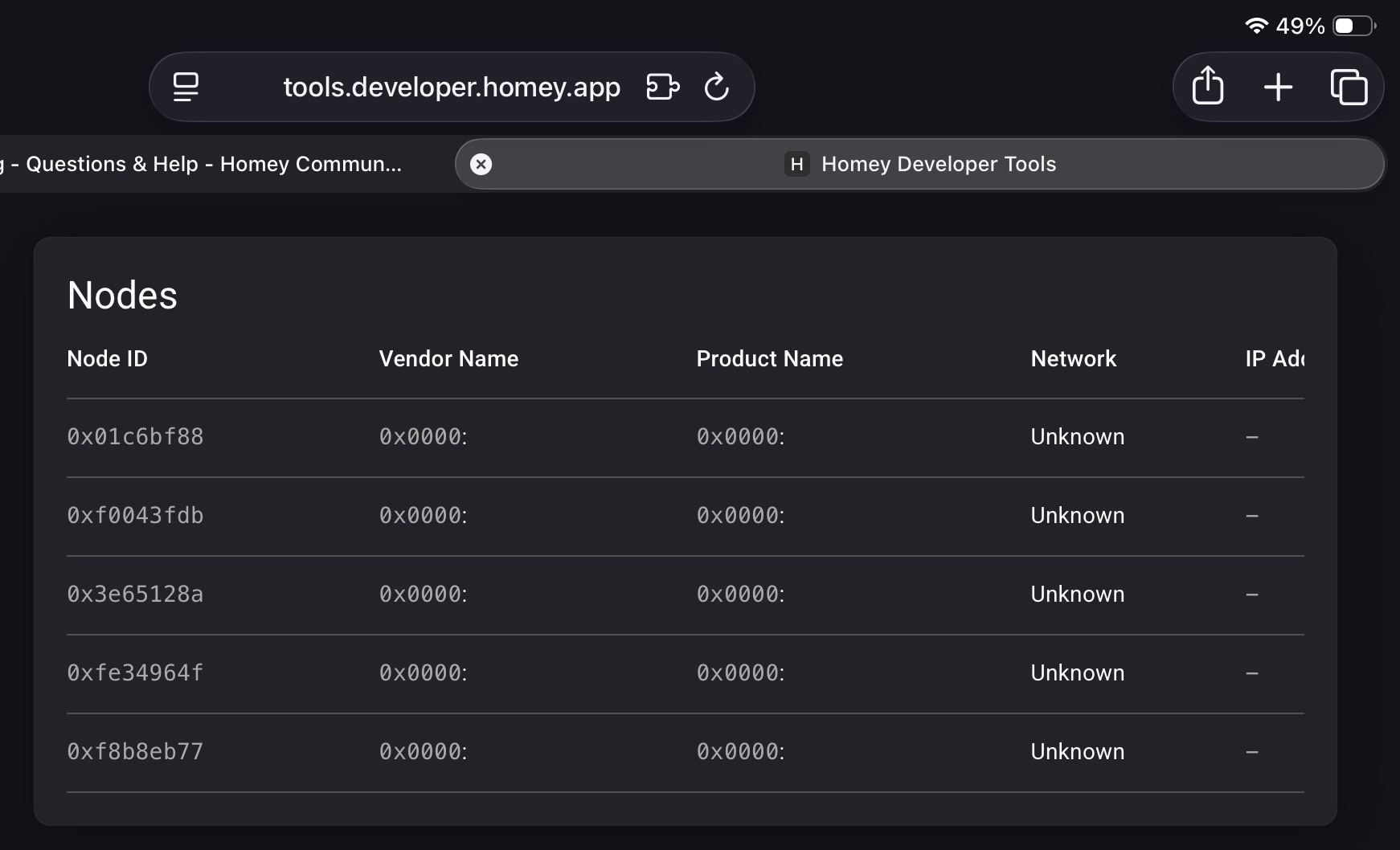
If you check the developer page you see that it tries to connect but fails so there is no information about the end device and no IPv6 address. In the picture you see I tried it 5 times (I did reset the Bilresa each time).
I saw a video on Youtube where someone is adding these Ikea devices to Homey without any issue but he uses an Android phone which discovers Homey as a borderrouter and uses that information to pair the device. Unfortunately this does not work on an iPhone, you have to use the webinterface.
I was able to pair the Bilresa button without any problems. I myself have an Android phone and the button connected via the Homey network (not the Android network). Did you use an Android or Apple phone?
Mine is iPhone
I connected 7 of them using the Homey (near by), not using phone. They are all working fine except one that is on max distance from the Homey Pro. I hope the distance issue will be solved when I purchase some of the new Ikea Matter bulbs. They should be in store within a few weeks in Denmark.
I also purchased 3 Myggspray movement sensors, they are working fine and also on a longer distance from Homey Pro.
It is strange that it works for some people. I also did the Homey “near by” installation but no go.
Can it be related to the number of connected Zigbee devices? Homey uses the same chip and radio (dual stack) for both Zigbee and Thread. I have 30 Zigbee devices connected.
Yes, that could very well be related, which is why many other platforms don’t support Multi-PAN (as it’s officially called).
All hue devices are zigbee too it thought wich would mean i am way over 50 devices already for a long time. Also if this would be the case why is there no message from homey saying this. Doesn’t sound like complex logic to implement. If user tries to install zigbee device and number of devices = 30, show warning.
Are you using a Hue hub? If so, those Hue devices don’t count.
Also, 30 devices isn’t a hard limit. For some people it works fine with 70 devices, others already have stability issues with 20, or see their Zigbee network collapse once they start using Thread devices. And I don’t think Athom will ever admit that using Multi-PAN probably wasn’t a good choice.
Intuitively having a number of devices problem seemed less likely at the exact moment I am introducing a new device type, on top of that a version new on the market. If I try to add another timmerflotte ikea matter temp sensor there is no problem at all.
Same problem here, I can’t connect them to my Homey Pro - both via the Homey or iOS methods fail.
Through iOS method it says it fails to pair. Through the Homey method it get’s stuck in the ‘thread’ step of ‘Reading device data’ (Apparaat gegevens lezen in Dutch) - it just keeps spinning and the remote stops blinking orange.
Gisteren kocht ik ook wat nieuwe matter spullen bij ikea,
de lampen kon ik via de ikea app allemaal simpel toevoegen aan mijn systeem
daarna ga je naar homey software op je pc
klik je op apparaten toevoegen
dan ga je naar “jou merken” en kies je de app ‘ikea diregera’
en kies je “lamps”
en staan ze meteen allemaal in je homey
er ontbreekt wel nog een knop om schakelaars toe te voegen dus iemand zou nog die ikea app eens moeten upgraden
Meanwhile the buttons work without other actions then before so probably there was a software problem.
I read these and other discussions about the new Matter controllers/bulbs from Ikea.
For me, the only working option was to set my Wi-Fi network to 2.4GHz / Wi-Fi 4 only. So no 5GHz and no Wi-Fi 5 or 6 enabled. Really everything off except 2.4GHz / Wi-Fi 4, and then reconnect the phone to that remaining network.
Then I managed to connect to the Bilresa button. The whole process still takes minutes, but it works.
Where have Ikea’s well-functioning and quickly configurable buttons gone? If assembling their furniture goes down the same path, I don’t predict much good for the company 
Unfortunately, I have to report that a day later, both Bilresa buttons were no longer discovered by Homey. Repair didn’t work. Deleting devices and then re-pairing them doesn’t work anymore either. After a long wait, all I got was the message: Unable to connect.
Final verdict: worthless, those new buttons from Ikea.
Same problem with Bilresa after connecting it worked fine for a few hours and then it stopped. I will bring the units back to IKEA.
