Much clearer then ‘Found a great case for it’  Thx for sharing.
I use it to display:
- The gate state
- The Heimdall state
- The lock state
- and some temperature and humidity
(you can show temperature and humidity in the same zone as long as it does not exceed the number of characters)
But actually it is in my workshop because i’m testing the touch screen…
May be reboot your smartphone, reboot Homey. Fix the IP address of your Homey e-paper.
“Battery_Icon” is only need to use to define which battery icon you want. You need to call it just one time to define it and it’s save in flash memory. Then if you are not use deep sleep, you need to call “Battery_Percent” to update the value of battery on the display.
It can happen sometimes. Often when the battery gets low. If you have some problem, you can use “Screen_Repair”
Yes
Yes you can. ESP get the new value and reboot. You need to set a condition otherwise the ESP will reboot in loop.
I think it’s possible with adding a device type. I need to try it
Yes. You want dollar and euro on the same icon or 2 icons?
What do you mean by “open/close window (not door)”? There is already an icon for door and another for window. If you are talking about “Device_Type_Zone_x” you can use it for any device you want.
I need to try it, because when a zone is clearing for the new value, the clear zone is higher than the previous value. So it’s possible that can occure bad things.


@sebyldino The next Weather decriptions don’t look very “English”:
  if (weather == "Pluie légère") weatherIcon = 7;   //rainy
  if (weather == "Sept sept") weatherIcon = 8;      //rainy cloudy
  if (weather == "Huit huit") weatherIcon = 9;      //snowy
  if (weather == "Neuf neuf") weatherIcon = 10;     //storm
  if (weather == "Dix dix") weatherIcon = 11;       //storm rainy
  if (weather == "Onze") weatherIcon = 12;          //two clouds
  if (weather == "Douze") weatherIcon = 13;         //windy
the icons, belonging to 3 and 7 - 13 do not change the icon,
can you please change them in your next release?
ChatGPT? 
Whoops! 

@sebyldino What features are you thinking of?
I think it would be great to be able to touch in each rectangle on the screen and send that as trigger to homey, so in homey you can react with different actions (new screen layout, update/change that value, trigger something in homey itself)
And maybe add another layout with 8 places where you can place icon only. (To simulate this)
Would it be possible with webhooks, so you don’t have to integrate devices. I am thinking of somfy screens, play pause radio, ligths etc. Push button, webhook, and change the icon to (screen open, light on)
Maybe even double push, or is it not possible with this screen.
So suddenly the sreen started working… No idea what changed…
Playing with the settings have some questions,
I cant find the header zone?
How do i change to 6 zone’s?
Would it be posible to add more logo’s? (like battery 100% / 50% 10% or empty… would be cool!)
would like logo’s for mailbox ( closed and open?)


Is there an easy way for me to add logo’s? 
kind regards!
There is a user-manual in your downloaded Source-code-zip: Map called “Guides” > “User guide”
in there you find:
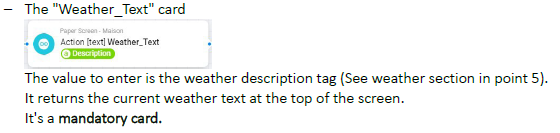
The Header-zone:
For the Battery ( upper right corner )


For the extra Logo’s: no it is not possible to add yourselves new Logo’s others then directly in the Source-code files.
Thank you for the swift respond! but i mean header (top zone of the screen) not weather  i wil check out the user guide! was not fully aware of it and searching my info on the github!
for the battery i mean the screne icon battery, i want to display my home battery.
The field on Top of the screen is called “Weather_Text”, but you can use it for other purpose.
Battery: that’s up to you, no battery icon available, others than “horizontal battery” and “vertical battery”,
This project is still “Work in progress”,
Yes and i already love the project:)!
I got some things working i use the trigger “paperscreenonline” to triger the device refresh.
But from time to time whole the screen is going blank and al labels are loaded again.
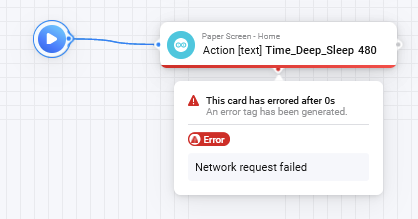
Also Time_deep_sleep is not working when triggering this i get error. ‘network request failed’
I find the screen is making a anoying high pitched sound to. Maybe this wil be fixed when i can activate sleep mode?
This is happening when display awakens from deep sleep (you can recognise this bij the zzz behind last update time)
The homey card gives this error, but time deep sleep is set on the display. Beware the current code has an error. Deep-sleep cannot be reset to zero. You also cannot change time deep_sleep (or other updates) during deep sleep.
Deep_sleep mode is activated automatically when all 21 mandatory cards are updated. After deep_sleep period the screen awakens, refreshes and sends the “paperscreenonline” trigger. Based on that trigger, update all 21 fields, and screen goes back to deep_sleep (as described in the user guide)
Does anyone know how to reset the device. Mine is now stuck at 20 percent
Traceback (most recent call last):
File “esptool\loader.py”, line 365, in command
File “esptool\loader.py”, line 317, in write
File “serial\serialwin32.py”, line 325, in write
serial.serialutil.SerialTimeoutException: Write timeout
During handling of the above exception, another exception occurred:
Traceback (most recent call last):
File “esptool.py”, line 34, in
File “esptool_init_.py”, line 1004, in main
File "esptool_init.py", line 806, in main
File “esptool\cmds.py”, line 502, in write_flash
File “esptool\loader.py”, line 108, in inner
File “esptool\loader.py”, line 963, in flash_defl_block
File “esptool\loader.py”, line 406, in check_command
File “esptool\loader.py”, line 393, in command
File “serial\serialutil.py”, line 372, in timeout
File “serial\serialwin32.py”, line 222, in _reconfigure_port
serial.serialutil.SerialException: Cannot configure port, something went wrong. Original message: OSError(22, ‘Er is een niet-bestaand apparaat opgegeven.’, None, 433)
[13908] Failed to execute script ‘esptool’ due to unhandled exception!
Failed uploading: uploading error: exit status 1
Thank you for the response,
The zzz is not on my screen (i have seen it but i am not sure how i can trigger it to go to sleep mode)
this is not doing it.
Also am i the only one who hears the screen making a teriful high pitched sound?
how do i activate the weather icon? tryed Custom_Weather_Icon but it give’s me a pool now  and its not pooring outside! XD
I have this also, but apparently the call from homey doesn’t get a proper response and therefore shows this error message, but the deep sleep time is set on the e-paper device (unfortunately the only way to check this is by triggering deep sleep and wait the defined number of seconds and see the device awake. So my advice, start with minimum amount of 60 seconds… )
There is no action card to trigger deep_sleep yourself. Follow the example in chapter 4 of the user guide. That way all 21 mandatory (for 6 fields screen layout) are updated and that triggers the screen to go to deep_sleep 
If you got error message “Flow error” (user guide page 6), the updating of fields is out of sync for e-paper to determine if it can go to sleep. Press left most button on top of screen to restart screen and from that moment your flow will be triggerd (bij paperscreenonline), send the 21 fields and the screen will go to deep_sleep
No I hear it also.
The weather icon is shown when you send the “Wheater_text” action card (user guide page 5) with a weather discription recognized by the code (see file functions.ino).

what is the best practice when you don’t use a battery?
now I have an every minute flow trigger and only update the values.
does that have any down sides?
