Like I suggested alr, you can use the Net Scan app

It’s a bit confusing for me, sorry. Maybe because I don’t use the Net Scan app myself.
Why is the device named “Facebook”? Does this device check the connection between Homey (?) and the internet, resp. Facebook URL? Or between the WLAN Router and the internet, resp. Facebook URL, or what?
Because I wanted to find out where the tag Device Online State came from, it could have actually come from Homey’s internal offline warning, but it doesn’t, I found other nice tags.
The following is possible with Device Capabilities and the sysInternals app:
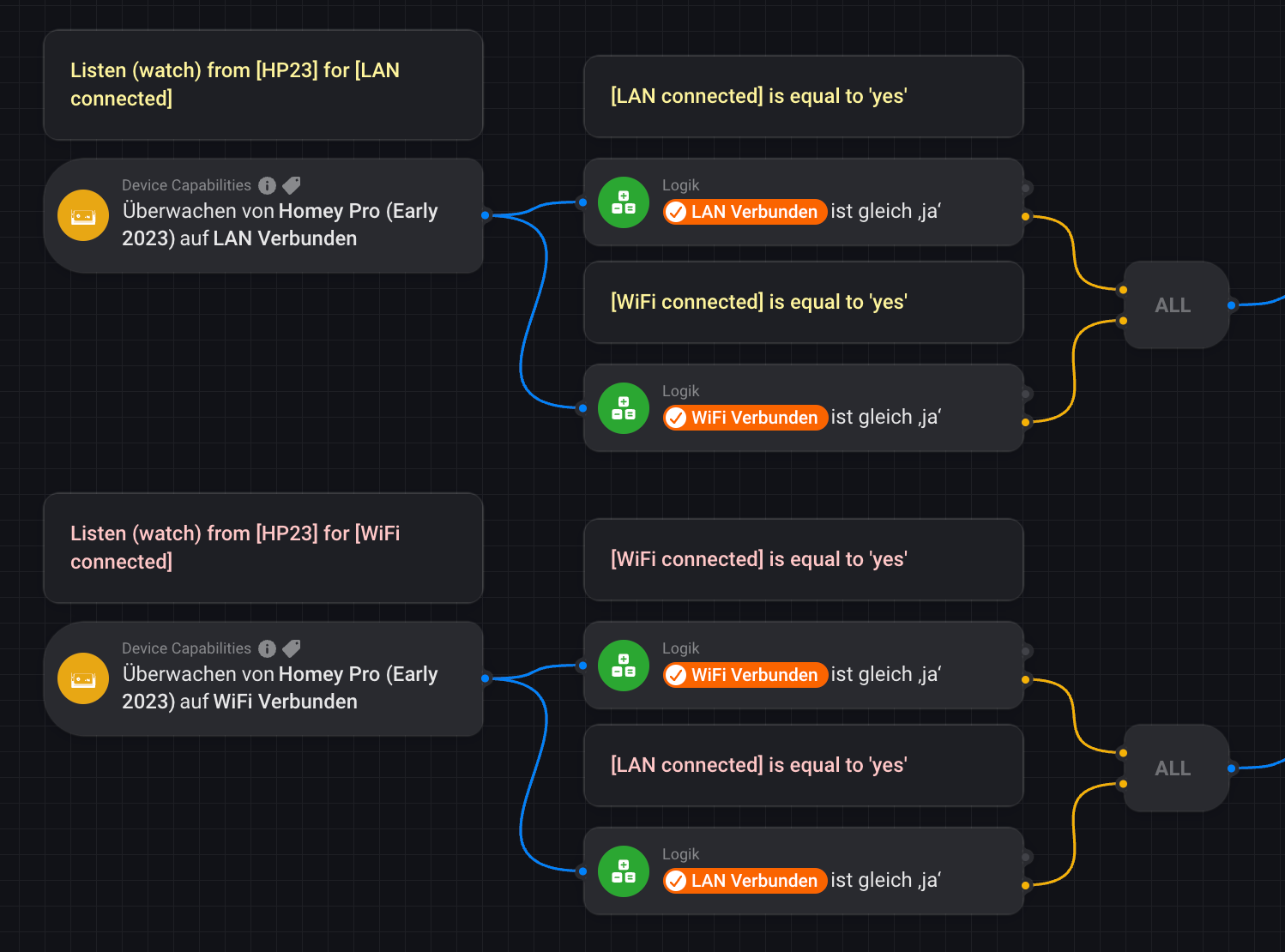
I just tried it quickly with this flow and unplugged the LAN cable and it worked:

I think he means that he uses a set of PowerLine adapters (or comparable devices) that allow you to use the in-house electricity grid to transfer the ethernet signal instead of an actual ethernet/UTP cable.
If that’s the case then I’m not surprised about Homey being offline on a regular basis.
Powerline adapter can be handy but they are not the most reliable network devices. While they work OK for many different use cases, I never came across a single brand or model with 100% availability time.
@Giovanni_Dienstmann if you don’t use Powerline adapter then I made you waste 5 seconds of your life reading this 
This is my set up:
,
And yes I’m using Homey’s official ethernet adapter and power adapter. The hack is that I’m using one of these, since I don’t have an ethernet data point there. If it makes a big difference in stability, I’ll get an electrician to install one.
I’ve never used the Chronograph app before, and didn’t know it behaved differently from the regular delay timers. I might give that a go!
I would be interested to hear what others think but IMO, if you have a good Wifi equipment (Unifi for ex) Wifi would be more reliable than your Powerline adapter. If you want to keep wired, then I would get a real ethernet cable.
I’m using Wifi with my Homey Pro 2023 for about 4 months without experiencing any disconnection (beside the temporarily issue I reported above). I’m considering moving back to ethernet, not because of stability issue but because I’ll be moving the location of my Homey in my server room following other renovation work.
Just an additional info.
I also use UniFi devices for my home network like @Didier_SmartHome and a DSL-Modem AVM FRITZ!Box 7590 CQ (Exposed Host, WLAN deactivated). So, my Homey Pro 2023 is directly connected to the UniFi Dream Router via the original Ethernet Adapter and via WLAN.
Yesterday I had to restart the DSL modem and shortly afterwards I received a push notification that Homey had gone offline.
What I want to say is that it wasn’t Homey itself that went offline, but the internet connection to the UniFi Dream Router and I received a push notification that Homey had gone offline.
Therefore, it is not 100% clear to me whether @Giovanni_Dienstmann’s Homey itself will lose the connection to the home network, or whether the Internet connection to the router will be interrupted, or even between the router and Homey, e.g. due to the connection with the TP-Link Powerline Ethernet adapter.
@Giovanni_Dienstmann, do you know exactly where the interruption occurs?
However, if the connection in the home network or in the internet connection itself is interrupted, you could create corresponding flows using the Network Check or Net Scan app.
If the connection is interrupted by the Homey itself, you could create corresponding flows using the Device Capabilities and the sysInternals app.
From my point of view, the problem/the question is therefore solved/answered.
That’s how these notifications work: when Athom’s cloud server notices that it lost connection to your Homey it will send you a notification about it (perhaps after some delay to allow for reboots, etc).
I use Devolo powerline kit. When I first started with powerline I used cheaper devices which were unreliable. I’ve needed to reset a Devolo device perhaps once a year since.
I use powerline to connect my Homey having had issues using WiFi. I also use it to connect TV, Sky box, media centre (with one Devolo device acting as a switch) and all my WiFi mesh devices.
Andy
Perhaps set a variable with the timestamp when the flow starts, then run a check every now and then to see if 20 mins has passed since the variable was set (flow started). If variables survive an outage that is.
I have the same problem with my Homey 2019, it goes offline for a few minutes every day or so.
It’s WiFi connected. No warning, no regular hour.
I thought it was a regular bug and got used to it even if it can be very annoying to have to wait several minutes before I can switch a light on or worse, open the garage door…
I can’t speak about Homey 2019 but my 2023 Pro is very stable on Wifi. Are you using any mesh, repeaters or have multiple AP? Or just a single AP with a very good wifi coverage?
If you have Zigbee devices, did you manually configure the channels to avoid interference?
Not sure if the fix I mentioned earlier would also work with Homey 2019 but maybe this is worth trying.
So I installed an extra data point behind my Homey now, two days ago. So far, not a single connection drop! While because I’d have them every day… So I think the culprit was the ethernet over power device 
Powerline adapter often gives a false impression they are stable when used with smart tv or other streaming devices because video buffering does its job and even if the connection is droped for a few seconds you won’t notice it. Homey and other specific devices needs something 100% stable.
