If you mean Token Extractror - GitHub - PiotrMachowski/Xiaomi-cloud-tokens-extractor: This tool retrieves tokens for all devices connected to Xiaomi cloud and encryption keys for BLE devices. , this is currently the most reliable way. So you selected ALL REGIONS and yet getting no results? This is weird then… unfortunately no idea what could get wrong in your case.
I previously used this one for Windows (1.0.6 version Windows App) The link is in the bio.
ok
I feel like a total dinosaur..
username (e-mail/Xiaomi Cloud account ID) & password
QR code
What separator should be used between the account and password?
QR code? Where can I find the QR code?
please follow the instructions…. the QR code is behind the URL for authentication, all is described there…
I got a ban from Xiaomi. Better luck next time…
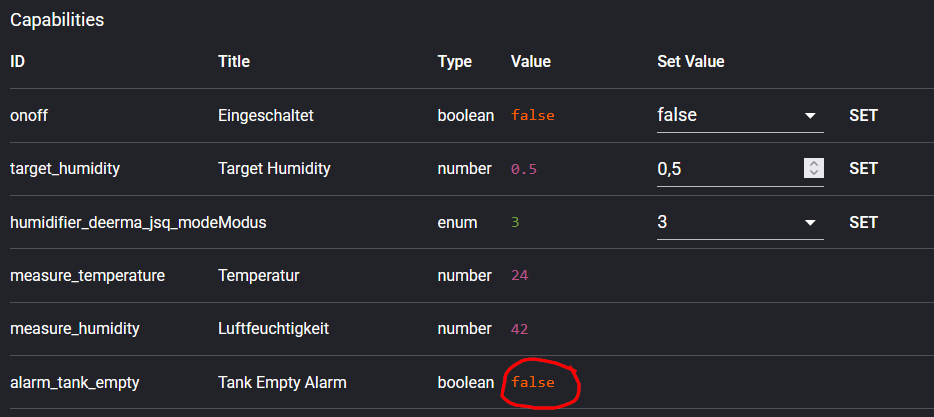
The Xiaomi mobile app tells me that the water tank is empty, and according to the app, it has also switched off.
I’ve also written a corresponding flow that stops and disables the “Humidification” flow.
Unfortunately, the flow isn’t working, and I checked in the developer tools.
The “Water tank is empty” message isn’t showing up there. 
Question regarding Mi Bedside Lamp 2 Integration with Homey Pro Mini
HI there, thanks so much for creating this app. I had a question with regards to the Mi Bedside Lamp 2. I have the Homey Pro Mini, and am unable to find the Mi Bedside Lamp 2.
I have tried to add the device as a Phillips Bedside Lamp (WiFi), and added it as a Mi Home Device entering the IP address and Token, with Polling Frequency as 60. When I test connection it tells me successful, but after I connect and try to access the device, it tells me that “Something went wrong with controlling Unknown model (yeelink.light.bslamp2) - this.miio.setPower is not a function
I am not sure if I am doing something wrong with the setup, and if anyone can advise if they have found a solution, many thanks!


It’s not supported by this app, maybe you can try with Yeelight LAN app if you will see switch to enable LAN control in the Yeelight app on mobile.
That’s worked using the Yeelight app thank you!

Submit the debug log from the app…
4a482e12-86df-4337-8d29-6d2afb9a8545
here is the log
Seems you did not pair the device under right driver as per instructions - the right one is “Mijia Smart Sterilization Humidifier JSQ / JSQ1 / MJJSQ (WiFi)”, while you used “Xiaomi Smart Dehumidifier MIoT (WiFi)”
Well i deleted the device right after i sent the first comment with the picture and re-added the right one.
By the way: restarted the app → readded the device after 1 min→ same thing happened


by the way here is a short video about the issue : https://youtube.com/shorts/F3rziMk8Z3E?si=XcGHlezpBF_pYQDI
Have you shared new log after adding it with correct driver ? Video helps for understanding but not with fixing the code…
Ideally please delete the device, restart the app, add it with correct driver, wait for bug to re-appear and then submit new log.
Yes i shared the the log when i saw your reply. That log was with the correct device. I will delete the device, reset the app , wait for a min, readd and when this error comes i will fill a log sending req
9b8f7de7-bdb7-47c9-84ff-6bd1f19dd8ff
I successfully re-added the device, but I keep receiving a ‘timeout 10000ms’ message whenever I try to control it. The device is unresponsive in Homey For me. When i want to choose for example the highest mode or i want to turn off, there is no connection.

Right now i deleted the device again and now i just cant even add the device because of timeout 30000 ms error. I dont know.. i cant even test the connection now
Have you maybe not deleted to previous one ? Its really a mess in the log, so please :
- remove any paired Mijia Smart Sterilization Humidifier JSQ
- restart the app
- pair Mijia Smart Sterilization Humidifier JSQ with the correct driver - “Mijia Smart Sterilization Humidifier JSQ / JSQ1 / MJJSQ (WiFi)”
- try controlling it
- submit LOG
No log ID or confirmation here is required, I will notice the log when it will arrive.
This is what i did 100%. By the way i deleted the device first every time. I just get error messages or nothing happen at all. I tried to reinstall the app, deleted and wait etc.. I’m not tech illiterate, so I don’t understand what the error is. By the way i sent the log. When i press the on/off button i hear a beep but after i get error message.
Hi @Heinz_Himmel did you ever get this working? I’m still facing the same issue 
