Same here. Have a UDR.
Have followed the instruction to the letter, and I still get “the credentials are invalid”.
Settings says connected, and it shows connected in the UniFi-app…
Goto this location ( where unifi is the of your device ).
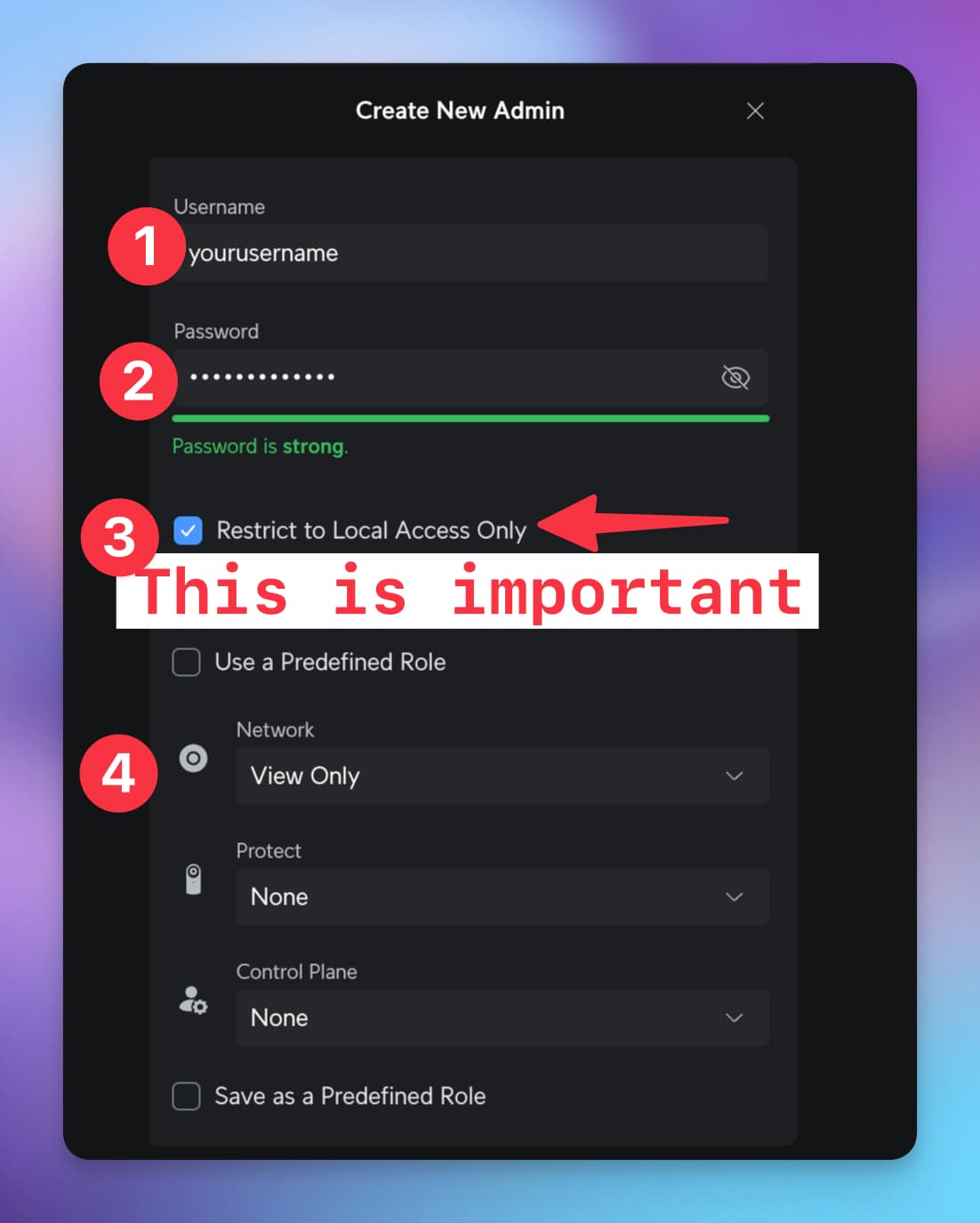
Then, create a “new admin” with the following properties and it should work. You can debate about the ‘view only’. But this should allow you to add devices
Both does not work… I have only the ap… Lockal ip Shows no Homepage? And the unifi Homepage is confusing like hell… Cloud key or what ever… Drives me crazy
I googled s bit further… Seems that it doesnt work with only an ap stand alone… I have no uni controller and stuff… There’s no possibility to configure users
Im using the app “smart presence” to link an ipaddress to a certain user (note: you will still have to give your phone a static ip with your router) (note note" iphone’s have a security enabled by default so you’ll have to go to wifi settings and select something like trusted network)
hi everyone. I’m new to UniFi in Homey, after a bit of fiddling I’ve managed to connect it. But both Homey and UniFi are running at the cottage, I’m not there that often this winter. But is it true that I have to connect locally to be able to manage sites? I first entered the local IP and was able to connect when I was there, but changed it to an external IP to be able to make changes from home. I can add devices but can’t manage the PoE switch I have for power cycling, does anyone have any advice?
Hello. Im new to the Homey system. I have Homey Pro, and Unifi Controller (clockkey). When i try to add a new device and choose “Wifi client” i get the message:
New device found
and the error: Cannot read properties of null (reading ‘getClientDevices’).
Someone who can guide me the right direction to get this work?
Whenever you create a new user in UniFi you’re required to create a local user, so indeed for security reasons you will not be able to logon towards an external IP, and your Homey will only be able to connect. Which is a good thing.
What you can do, I believe (but I’m not entirely sure since I went for a UniFi Cloud Gateway) is to manage your devices via https://unifi.ui.com/. Your self-hosted server should be available from there, which in turn will be able to manage all of your devices such as your PoE switch.
Obviously this is not a Homey limitation, but a Ubiquiti limitation (albeit a good one).
Make sure it’s a local admin user, not a cloud user with Multi-Factor Authentication.
If that’s the case, did you fill anything in under “site” ? If not, try putting default in there, this will make sure that all your sites will get loaded in from UniFi and you should be able to get your connection to work.
Is there a possibility to see if a user/client uses data?
Use-case:
The Homey-Sonos app doesn’t always show the speakers as active while they are playing. I allready added them as a client, but would like to see if they are using data. When they use (an amount of) data I can asume they are active.
Now Homey isn’t always adjusting the volume, beacuse Homey thinks they are inactive. Now Homey doesn’t always play my doorbell-ring, because Homey thinks they are off and I can hear the chime in the hallway…
I thought in the controler there is a number that shows the current data usage… Hope you can get that over to Homey (if it isn’t already somewhere where I can’t find it).
I found that, but thats the amount of data communicated in a certain time, not the actual data usage… I’m looking for the actual data usage per second/minute or something like that.
RX and TX don’t update frequently enough, sometimes it takes a couple of minutes to change. And if Iw want tot use it for my purpose I have to calculate every time is the rates are changed, that means that I have to check every second because the rates are (almost) always changed when I only check when needed.
Issue for me was: the site name is case sensitive. I had some issues finding the site name. Could not find it in the UDM controller interface, but could see it in the Unifi app on my phone. The site name was shown as Default, but that caused the connection issues. Changing it to default (lowercase d) worked!
For others stuggling: make sure that there is no issue with a firewall blocking traffic to ip’s or ports
I have alle my sites managed through the official Unifi hosting.
Is there a way to connect to that?
I cannot find the actual IP address anywhere in the controller. When you check the inform-URL it shows a FQDN.
It looks something like this:
“http://xxxxx-xxxx-xxxx-xxxx-xxxxxxxxxx.unifi-hosting.ui.com:8080/inform”
I’ve tried putting in the local ip-address of my UXG but that doesn’t seem to work…