I will add an option to override the RTSP url in the next update.
As @robertklep mentioned, the stream might be using a codec that’s not supported by the Homey app.
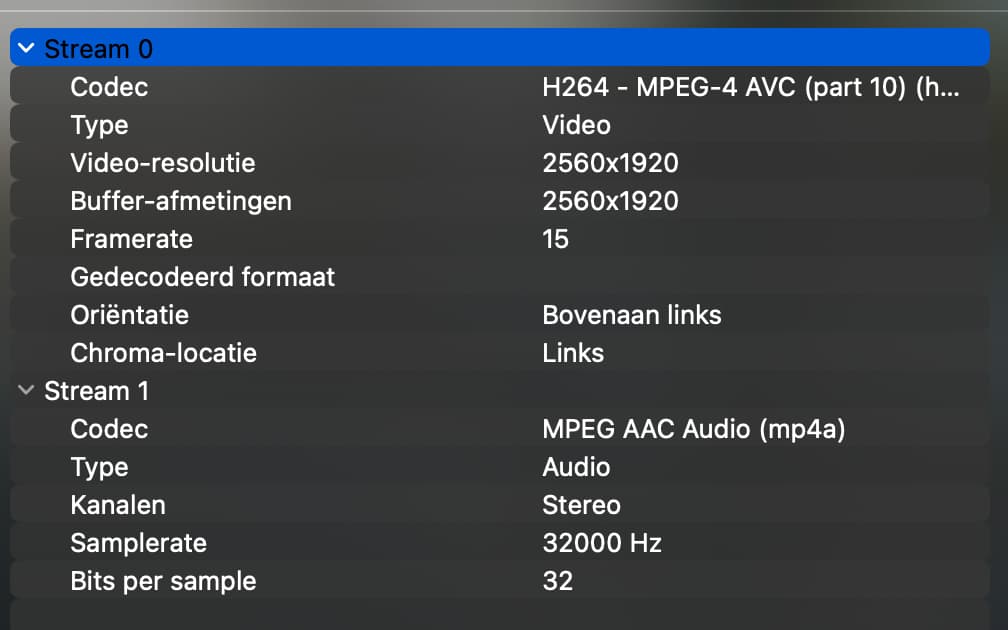
One of my cameras was set to use H265 (I think from memory), so I had to change that to H264 and then it works (hope I got those numbers correct).
Sounds right, I was expecting as well that the camera using H.265 might cause this issue.
Hi Robert,
First attempt failed with this error:

Than I tried exactly the same again (opening the url with Chrome browser, than being suggested opening the stream with VLC) and this time I was asked to enter credentials and… the stream showed up!
This is the screenshot:
Unfortunately, trying the same again after a few minutes gives:

The Homey app is able to play my Reolink doorbell stream if I return the RTSP URL in a test app like this: rtsp://username:password@AA.BB.CC.DD:554
@Eternity you don’t use separate VLAN’s or guest/IoT networks that may cause this issue?
That works fine! If I enter my details and copy the URL in Chrome, it suggests starting VLC and the stream shows instantly!
All wifi devices are on the same LAN. I do run Pi-Hole, but switch that off during testing.
@robertklep Could you try adding /Preview_01_main to the end of the url in you test app?
That is being returned by ONVIF so the URL that Eternity is using will be:
rtsp://user:password@192.168.50.8:554/Preview_01_main
According to Reolinks information that should be OK, but maybe it’s the issue.
Works fine like that as well.
This is the code that I’m using:
const video        = await this.homey.videos.createVideoRTSP({});
const videoWithURL = video.registerVideoUrlListener(() => {
  return { url : 'rtsp://username:password@AA.BB.CC.DD:554/Preview_01_main' };
});
await this.setCameraVideo(VIDEO_ID, 'Camera Voordeur', videoWithURL);
Are you URL-encoding username/password?
I tried that with my credentials
in Chrome, and VLC opened the stream
I don’t think I am encoding them, I just inject them into the URL returned by ONVIF, so maybe that’s it. It works OK for me but maybe my credentials are URL friendly.
I will investigate that when I get home.
I have published a new test version.
This version URL encodes the username and password before adding to the RTSP URL to allow for special characters.
Added an Advanced option to specify a custom RTSP URL.
@Eternity and @Youri_Pasternak could you check if these changes fix your issues?
thank you Adrian for adding the custom RTSP URL option, it works great now!
Working now @Adrian_Rockall. It must have been my quirky password!
Thanks!
Great, and thanks to @robertklep for the suggestion.
Hi Adrian,
What crossed my mind: To prevent Homey users, using pre-2023 models, from posting “streamdoesntwork,why” , I’d suggest to add something like “Streaming is unavailable for pre-2023 models” to these Live Stream tooltips or descriptions:

I’m not a fan of filtering these fields for the ‘older’ Homey models, it’s nice to have the RTSP URL available for use in other applications.
Also in the new version I’ll get the same result. Socket hang up. VLC is working fine.
If you enter the camera IP address into Chrome, does it show anything?
The errors in the log you sent are specific to RTSP, they look more like general ONVIF issues. Have you enabled ONVIF on the cameras?
cant find it on the forum but is it possible to send the stream as a notification.
I would like that when doorbell is pressed i can see that live stream who is in front of my door.
I very much doubt this will be available, but I am sometimes wrong.
That would require an MJPEG stream to be available (at least on iOS), which means using some sort of transcoder.
