I got today a reolink doorbell and added it via the onvif app.
In an other topic is descripted that i can create a flow when the button is pressed.
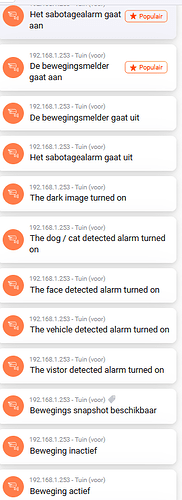
To do this I need to use the trigger: ‘Het algemene alarm’ as shown here:
It depends on what the camera supports.
With some, they only provide the image via http due to certificate complexity. So, if you disable https then you can’t get an image.
@B3rt, did you already manage to get the button working via Homey?
I received my Reolink D340W today and have it up and running now, but I have the same issue as you have.
The ‘general alarm’ is not available. I tried both app versions 2.0.48 and 2.0.49 (experimental), but it doesn’t make any difference.
For now I use the card ‘Visitor detected alarm turned on’ which is triggered by the camera, but I prefer to use the button.
Hello!
Installed a Imou Cruiser Dual 6MP camera. Only one of the two channels are working. Channel 2 gets “bad request” error and there is no picture shown.
Channel 1 works as expected.
Any ideas?
Hello There Adrian! i got it to work a while ago! i have 4 cameras, 3 Reolink RCL 810A and one p330. connected to Nvr RLN8-410. And i can’t get the Motion alarm or any detection to work. I get i snapshot on the camera, on the timeline on the cameras it only says tamper alarm disabled XX Min ago by Onviff Camera / Motion alarm disabled XX min ago by onviff camera. i have the prefer pull events selected to Yes, that worked for a while a while ago. what am i doing wrong?the button on every camera is on and i have cleared the log and restarted the app, and i have walked by all cameras before i sent the log to you if you have time to take a look! Thanks in advance
The app worked perfect for a while but when the NVR changed from 192.168.1.18 to 192.168.0.18 I can not make it work anymore. I have tried everything and this should be the right settings:
I’ve read through these numerous posts but can’t see anyone with my exact issue. I’m trying to add a reolink video doorbell with the onvif app but it fails to add with the following message:
“Error: Discovery error: Wrong ONVIF SOAP response”
So it is obviously all ok credential-wise, etc. But I’m not sure how I can go about seeing the internals of the log and/or the SOAP message, else I might have a better clue what is failing. I’ve installed your latest version and have restarted all apps etc but no joy. I’m not connecting via an NVR, rather my reolink is poe to a shared switch with the modem and various other devices. I assume this is ok, i.e., the Homey Pro is on the shared wifi but not connected by ethernet cable to the switch.
Note that your onvif app searches for shared devices during the “add device” process but then only has the manual add option; just mentioning this in case I’m missing a step or have screwed up somewhere.
The log is also showing the connection is being refused. Have you enabled the ONVIF protocol in the doorbell?
The combination of not being aitomatically detected and that error suggests the doorbell is not ONVIF compatible or is not enabled.
You can view detailed logs in the app settings pages, where you can also change the log detail level.
That helped me narrow down the screw up I made, so I’ll post here in case it helps someone else. Basically I hadn’t enabled RTSP which meant I never saw the option to enable ONVIF. Once I updated this then all worked as expected, in so far as the camera was found automatically and I could select it etc etc:
You can’t tell from the screen grab bit ONVIF doesn’t show on this screen until RTSP is enabled; would have been nice / more obvious if it was simply grayed out… But there you go.
Thanks again for your help, Adrian. The support and efforts you put into this community are very much appreciated by all, I’m sure of that.
Hi Adrian, is there any way to update a snapshot via Flow? I only have the motion snapshot option there, but it doesn’t appear in the dashboards, where there is only a classic snapshot.
I thought there was a card for that but I have just checked the code and I deprecated it nearly three years ago. I can’t remember why though.
Edit: It seems I deprecated it in Version 0.1.1 when I added a card to update the motion snapshot, so maybe at the time it just seemed more logical that way. I will enable it again and update the test version.