Hey, I set up the Onvif app and added my Reolink NVR with all ports. I put in the info, but no video is showing up. Any idea why?

Can you check to make sure the HTTP protocol is enable on the NVR. The URI for the snapshot requires that and that is getting the connection refused.
Thanks, you’re awesome.
New test version is in the store now.
I tried updating snapshots via Flow, e.g. every hour, which works, but then when I next turn on the Home app, snaphot reverts to an older one… e.g. a few hours ago. After a while, the new snapshot is saved, but it seems pretty random to me. It’s weird
I had this error initially with the same doorbell, it was because I made a mistake on the ports used I didn’t have the same port configured for Onvif on both the app and the camera
Hi
And thanks @Adrian_Rockall for creating the Onvif app.
I have 8 Onvif cameras, I started to create flows that sent a message and a snapshot image for each camera but that started to get complex very quickly after trying to setup a message for a pet detection another one for a car detection a person detection, etc.
So I ended up with at least 24 (8 x 4) branches, possibly more after some other conditions.
I saw the following card, “Motion was detected”, I was hoping to create a script to capture the details of the trigger in a more dynamic was using a script.
My question is: are there any ways to grab the details that triggered the card or other simpler options to capture and send notifications using the Onvif App. Cheers.

Hi,
Homey Pro 2023
Onvif 2.0.48 & 2.0.50
Camera: Reolink Trackmix POE & Reolink RLC-822A
having a really simple flow like this:
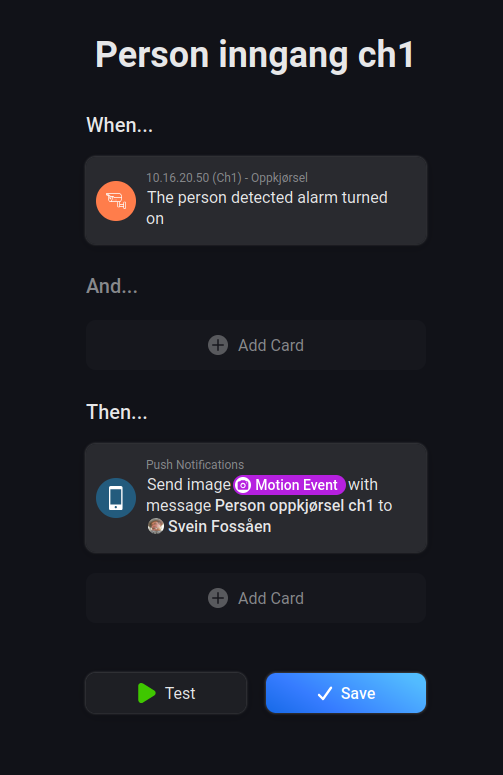
When this flow is trigged it always send two identical push notices, with identical motion snapshot and timestamps. When using the test button in the flow it only sends a single push.
The trackmix config is:


Doing push messages with any other of the apps installed works as expected, and only send a single push.
Any way to fix the issue with duplicate push messages, either with my config if I have set something wrong?
Svein
@Adrian_Rockall In my dashboard I often (but not always) see a wrong date. See here: the date shows that the snapshot is 5 days ago, but this should be the current date/time (see top left corner of the snapshot). Do you know how I can fix this?

To answer myself; I’ve seem to have found a workaround, that might help others with Reolink Trackmix camera.
As mention, I receive double push from flows involving motion detection using the Onvif app on this camera. Trying out with another Reolink (822A), this problem didn’t trigger, and worked as expected with a single push.
This led me to try and figure out what is happening. I first created a lock variable to try and not run the flow twice if duplicated alarms was received in from the Trackmix. (only run if lock variable is ‘no’ and change it 2 min after alarm to allow for new run). This didn’t help, both push notification still triggered.
Then I added a homeyscript, with a timestamp to see if they triggered exactly the same time. And they seemingly did. Then I wanted to know if they was triggered 100% same time, so I added a homeyscript capture time to 1/100 sec precision, and the two flows was trigged to the millisecond the same time.
This led me to try and add some sort of delay, but since they triggered at the same time, they needed to get different delay, so one of them got to the lock variable and set it first. Right after the “when” person/car detection triggered, I added a homeyscript that added random delay between 0-1 second. This seems to solve my long going issue with the trackmix. Both flows/alarms are still triggered, but one is now enough ‘ahead’ to take the lock variable, and prevent the second with a slightly longer delay to run due to lock set. Now I’m only getting 1 push notification on my TrackMix.
My theory is that since the Reolink Trackmix is really a 2 lense (standard + zoomed) camera, that they both trigger/sends alarm via Onvif when they essenially see the same, just that one of the lenses are more zoomed in as standard. I have no evidence that this is the case, but the only thing I can think of since other single lense reolink works fine with the app. I’ve also tried the Trackmix with HomeAssistant, and HA does not seem to have the issue with double alarms, but not sure if HA is using Onvif in their integration or not.
Maybe something could have been added to the Onvif app natively to work around this, to stop reacting to two motions of the same type (car,people,pet) at the exact same time???
I can’t remember if you sent a log of the issue from the app settings?
The log should time stamp the events to 1ms precision. It would be interesting to know if the events are identical or two different types.
You will probably need to set the log level to Basic or maybe Detailed.
I think I sent some last time I looked into this, but that many months ago. I will do a revert of my workaround tomorrow afternoon, and try capture some logs for you to take a look and see what you capture. (to me they seem like to identical events for the same type of AI detection) . I’ll inform you once they’ve been captured/sent. Thank you for your time.
-Svein
Probably no need to revert your workaround.
Detailed report: 15c6012f-27d6-4d88-ac90-e7a26c51e553
My flow:
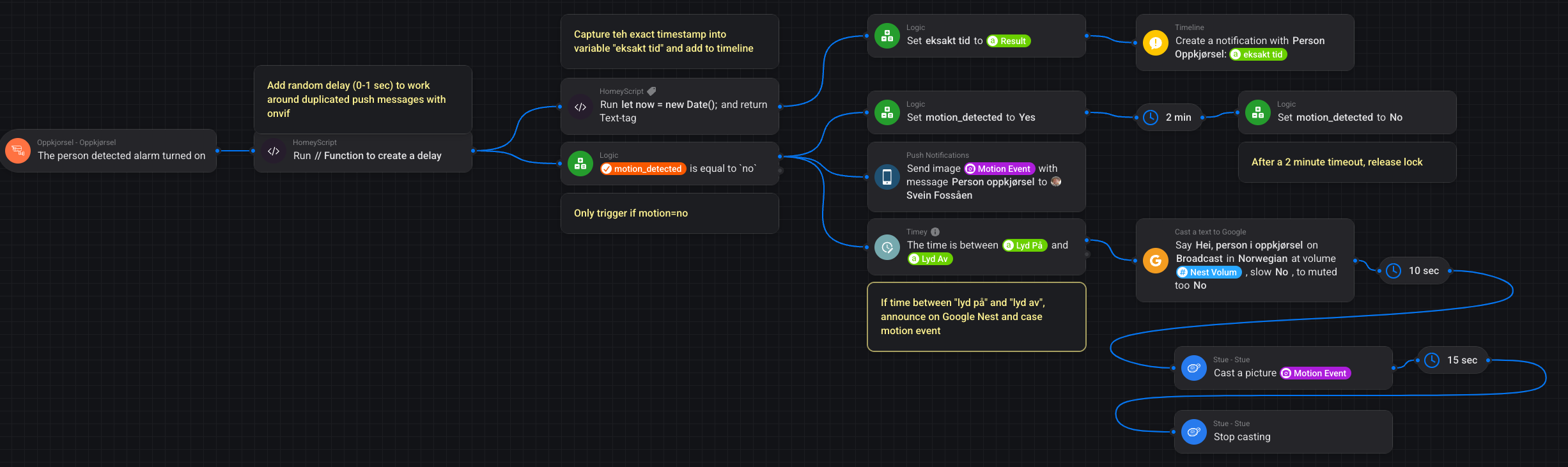
Timeline from flow (not sure if its the 20.11.50.613 or the 20-12-10.944 which is captured in the log, I expect the first.
See if you see anything of interest.
-Svein-

Sorry, could you send the Log from the app settings page as the Homey log doesn’t contain much information.
Sendt from Onvif app now. marked “Trackmix”
Hello, thanks for your work ! Its a great community app 
I have a PTZ camera, do you know if its possible to control via onvif on homey ?
Thanks in advanced for the reply 
Welcome to the community.
I haven’t really looked into it much as Homey’s interface is not great for that and I don’t have any cameras that support PTZ.
When I get some spare time I will take a look, but life is hectic ATM.
1 Like
Continuing the discussion from [APP][Pro] Support for ONVIF compatible cameras (Release 2.0.41):
Hi Adrian,
Did you see this message? Is this datetime generated by the onvif app or is it a dashboard bug that the datetime is not correct?
I think that comes from Homey as I don’t add any date or time to the image. Homey does record when the image was last updated so I guess it comes from there.
1 Like
