Yes, I did and motor 2 setting do nothing with this model. Motor 1 can only be revert. In short, if you want the first shade closed, you must set motor 1 to 99% or less. If you want the second shade close, you must set motor 1 to 100% close. There is no possibilities to have share 1 100% close and shade 2 less then 100%. Setting motor 1 to 100% close both shade.
@YSL thanks. However i won’t be able to change this in the app. I really need the info from you how it works in the native app as I already asked twice. without that I can’t help you. Please share some screenshots
My apologies, I did not matched that you needed Screen capture from the native app.
The way I understand is that both shades are being control by only 1 roller and one motor. You can control the transparent share for 0% to 100% but the only way to control the black shade is to have the transparent one completely close.
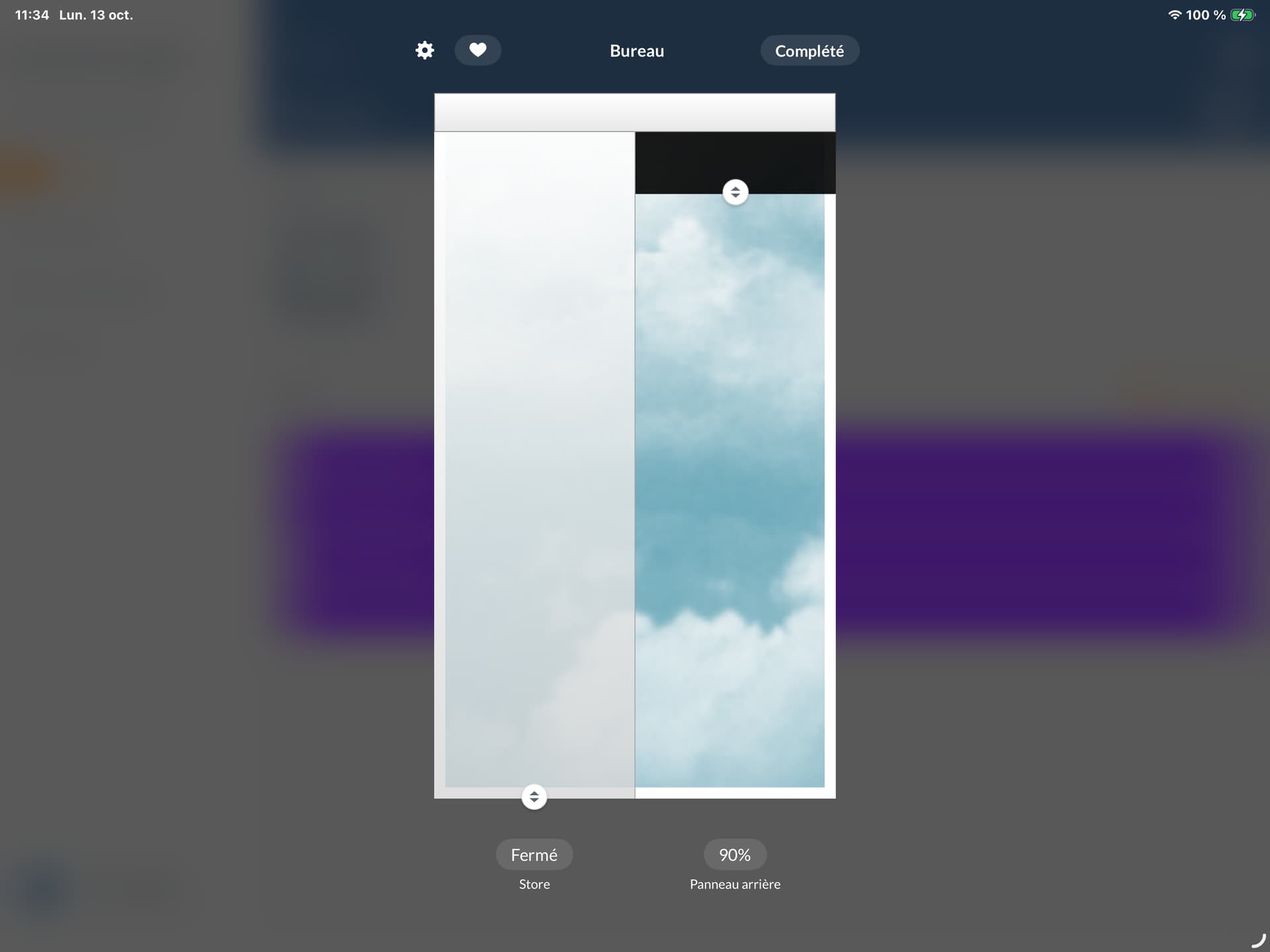
I’m this exemple, transparent share is close, that allow to control the black one

In this exemple to have transparent share 50% , the black one must be close.
I hope it help.
@YSL can you do the following?
- click update shades in the hub device in Homey
- send a diagnostic report (more - apps - powerview - settings wheel right top - send diagnostic report)
Done, 305c9606-35f8-4a1a-9a47-520a05725c60
@YSL thanks
However your report is full with errors 
Seems like the IP is not correct. Can you check the settings of the powerview hub in homey and make sure the IP is correct?
Once you did that can you do the same steps again?

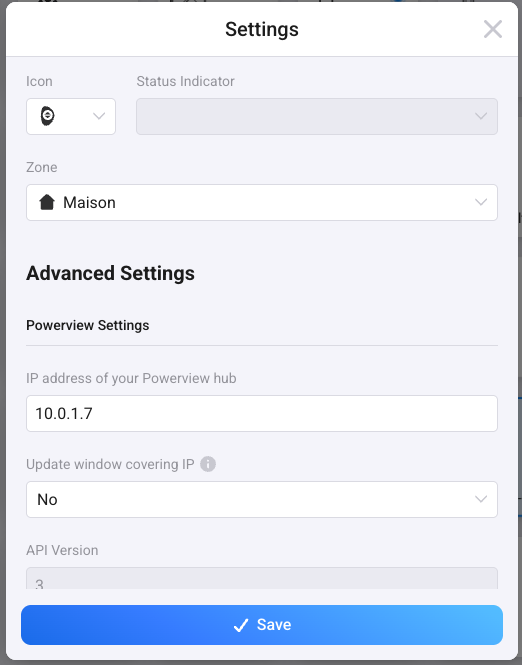
@YSL strange,
this is what i see:
[log] [Device] PowerView-G3 - updateData error => Error: Unable to retreive shades
[cause]: Error: connect EHOSTUNREACH 10.0.1.7:80
      at TCPConnectWrap.afterConnect [as oncomplete] (node:net:1555:16) {
    errno: -113,
    code: 'EHOSTUNREACH',
    syscall: 'connect',
    address: '10.0.1.7',
    port: 80
  }
}
can you validate that this url works?
http://10.0.1.7/home/shades?refresh=true
and are Homey and the Powerview hub in the same network?
Homy (5.4 Ghz) and Hub (2.4 Ghz) are on the same IP range and network but on a different SSI.
http://10.0.1.7/home/shades?refresh=true
[{"id":2,"type":79,"name":"Q2hhbWJyZSBHYXVjaGU=","ptName":"Chambre Gauche","motion":null,"capabilities":8,"powerType":2,"batteryStatus":3,"roomId":1,"firmware":{"revision":3,"subRevision":0,"build":359},"positions":{"primary":0,"secondary":0.9,"tilt":0,"velocity":0},"signalStrength":-58,"bleName":"ROD:0726","shadeGroupIds":[],"serialNumber":"0726D55349DF0E6D"},{"id":9,"type":79,"name":"Q2hhbWJyZSBEcm9pdGU=","ptName":"Chambre Droite","motion":null,"capabilities":8,"powerType":2,"batteryStatus":3,"roomId":1,"firmware":{"revision":3,"subRevision":0,"build":359},"positions":{"primary":0,"secondary":0.91,"tilt":0,"velocity":0},"signalStrength":-60,"bleName":"ROD:0574","shadeGroupIds":[],"serialNumber":"05748CF477E10AD7"},{"id":17,"type":79,"name":"QnVyZWF1","ptName":"Bureau","motion":null,"capabilities":8,"powerType":2,"batteryStatus":3,"roomId":16,"firmware":{"revision":3,"subRevision":0,"build":359},"positions":{"primary":0,"secondary":1,"tilt":0,"velocity":0},"signalStrength":-52,"bleName":"ROD:21A3","shadeGroupIds":[],"serialNumber":"21A37145A50978C3"},{"id":28,"type":9,"name":"U2FsbGUgRGUgQmFpbg==","ptName":"Salle De Bain","motion":null,"capabilities":7,"powerType":2,"batteryStatus":3,"roomId":27,"firmware":{"revision":3,"subRevision":0,"build":359},"positions":{"primary":0.02,"secondary":0.75,"tilt":0,"velocity":0},"signalStrength":-62,"bleName":"DUE:C4E8","shadeGroupIds":[],"serialNumber":"C4E8181ADA93F29B"},{"id":40,"type":52,"name":"c2Fsb24=","ptName":"salon","motion":null,"capabilities":0,"powerType":2,"batteryStatus":3,"roomId":39,"firmware":{"revision":3,"subRevision":0,"build":359},"positions":{"primary":0.87,"secondary":0,"tilt":0,"velocity":0},"signalStrength":-52,"bleName":"R23:8CE1","shadeGroupIds":[],"serialNumber":"8CE151FE509CEAB6"},{"id":48,"type":52,"name":"c2FsbGUgw6AgZMOubmVy","ptName":"salle à dîner","motion":null,"capabilities":0,"powerType":2,"batteryStatus":3,"roomId":47,"firmware":{"revision":3,"subRevision":0,"build":359},"positions":{"primary":0.88,"secondary":0,"tilt":0,"velocity":0},"signalStrength":-45,"bleName":"R23:F38A","shadeGroupIds":[],"serialNumber":"F38A1E8EC10D5831"},{"id":53,"type":26,"name":"UGF0aW8=","ptName":"Patio","motion":null,"capabilities":3,"powerType":12,"batteryStatus":3,"roomId":61,"firmware":{"revision":3,"subRevision":0,"build":357},"positions":{"primary":1,"secondary":0,"tilt":0,"velocity":0},"signalStrength":-51,"bleName":"SKY:8239","shadeGroupIds":[],"serialNumber":"8239093B748330E7"}]
New report: 0818e895-9c6b-4505-a732-0ed93e1a4724
I have a second Homey that I use for testing before deployment on the main one…. I can try from the second one if you think it can help.
Homey detected the Hub on its own.
@YSL actually the response you gave me is enough and i can check what to do.
Just for me to know, does Chambre Gauche or Chambre Droite work? Or same as the other?
Chambre Gauche (BedRoom Left), Chambre Droite (BedRoom Right) and bureau (Office) are all the same model with 2 blind on the same roller. All 7 store works with native app and with Homey now in addition to Siri under Matter.
Bathroom is Duette Applause honeycomb shade
Living-room and dining room are Desiner Banded Shades
Patio Door shade is Skyline Gliding Windows Panels
@YSL Thanks! Let me check what I can do. will come back to you once i have a update 
@YSL did some investigation into other powerview integrations accross github.
but as far as i see you should first try to change position 1 in Homey and then try the second position in homey.
In the device settings the settings should be:
- 1st motor setting: primary
- 2nd motor setting: secondary
if that’s correct, it should be possible to set position 1 to 100% or 0% and when you did that position 2 should move as well
can you try that?
I know you already did something like that, but keep in mind that I don’t own this device and have to make up how this should work.
New app update ( LIVE: 2.11.1):
Changelog:
NEW:
1: NoneFIXES:
1: FIX: Gen 3 - wrong position
If you find any issues, send a report via the mobile homey app
More - apps - Powerview - settings wheel right top - send diagnostic report (put your email in the input field to make it easier)
Hey, just created a report in Homey (and I put my e-mail adres in it as mentioned).
not sure if I also need to post it here but better safe then sorry, When I change the setting of any shade in the luxaflex app or with the pebble it does not automatically update the value in Homey, When I manually run the “Update window coverings” it does update the value.
Edit: You can just ignore this I’m to impatient it seems there is an update interval so it only updates every X minutes (or you can do it manually with the update window coverings button 
Hi Martijn,
I may have found a bug using TDBU Duette’s with Gen3 PowerView. I have manually set the motors to primary / secondary and flipped the direction for the top. When adjusting the bottom it appears it automatically adjusts the top to the non-flipped value of the top, moving both at the same time. I have filed a report for your convenience - but I may be doing something wrong.
Geert
55845ef5-5a51-4696-9b37-6cf3bb62c61d
Hi @gwouwerling
Make sure to enable ‘control separate from position 1’
This was enabled - I checked again and doesn’t make a difference.
Thanks for the quick response!
@gwouwerling I don’t really see a solution unfortunately as this is how the gen3 hub works. If you reset the settings back to non-flipped does it work as expcected?
