@Erik_Rutten yes correct see [APP][Pro] Powerview- Luxaflex & Hunter Douglas - #379 by martijnpoppen
Is this the same issue? The venetian blinds should show 60% for position 1, the tilt position, but the indicators jump to 0% after executing bijwerken raambekleding. The roller shades are ok,
@Erik_Rutten please provide screenshots. Currently it’s unclear to me what you mean
And please send a diagnostic report and let me know which gen we’re talking about
Hi Martijn,
7e2902d7-be9f-48fa-92a0-6b8ac7495836
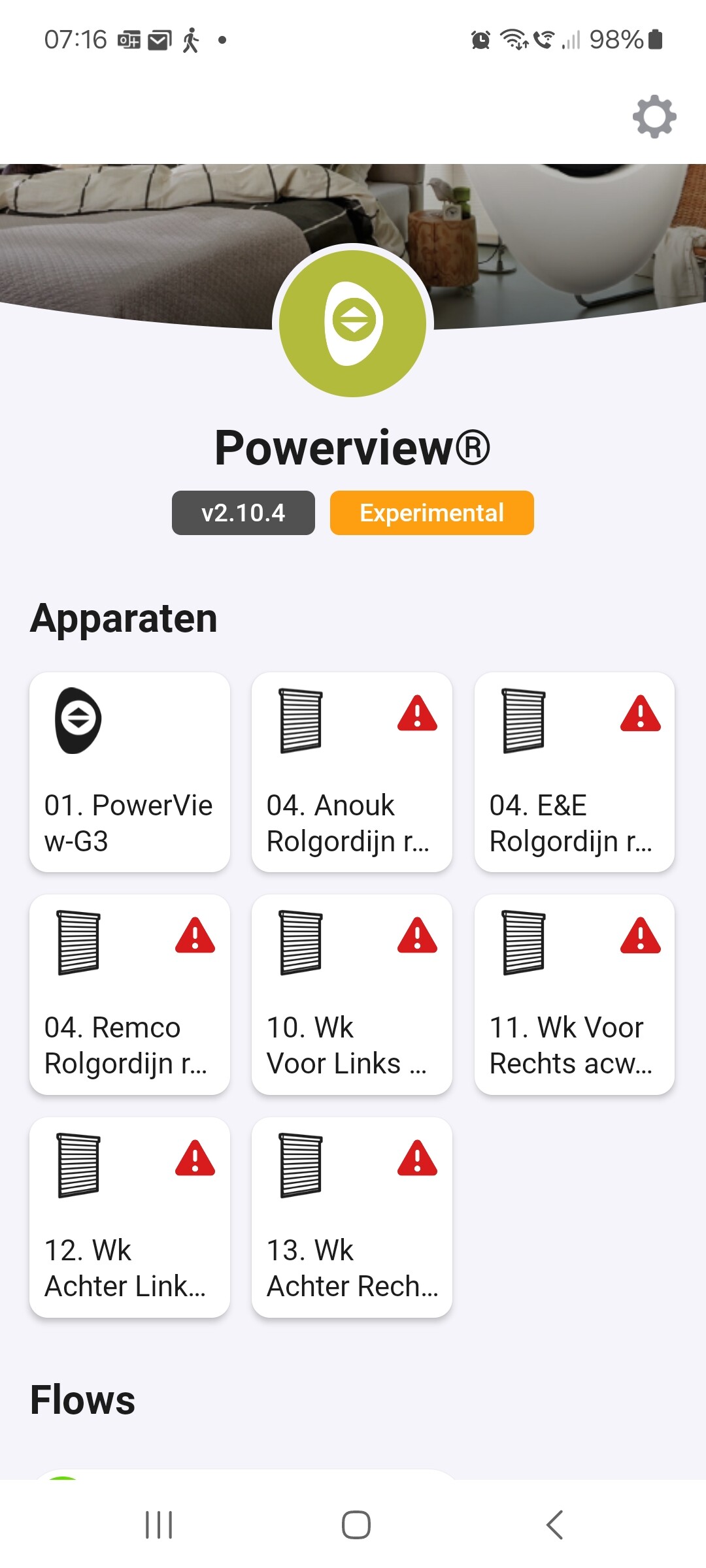
Picture 1: just after restarting the app (red warning symbols)
Picture 2: restart completed, correct % displayed (approx 60% for the venetian blinds)
Picture 3: wrong values displayed after executing bijwerken raambekleding.
Rgds,
Erik
Verzonden vanaf mijn Galaxy
-------- Oorspronkelijk bericht --------


Gen 3
Rgds,
Erik
Verzonden vanaf mijn Galaxy
-------- Oorspronkelijk bericht --------
- This is normal. If you click the device you can also see what the warning symbol means

- and 3 as far as I see it comes back wrong from the hub. Somehow it doesn’t know the correct status
Can you try this:
- change position from the homey app
- Update window covering button
- Check result
Hi Martijn,
Done, same issue.
Rgds
Erik
Verzonden vanaf mijn Galaxy
-------- Oorspronkelijk bericht --------
Restarting the Powerview app in Homey gives the correct percentages. However after changing the tilt position using the pebble the percentage is not updated in Homey. That’s the main reason to push the button: “Bijwerken Raambekleding”, but unfortunately with the wrong outcome.
Rgds,
Erik
Verzonden vanaf mijn Galaxy
-------- Oorspronkelijk bericht --------
Hi Martijn, the Venetian blinds show the wrong position for the tilt position. I use position 1 for the tilt position as I prefer to have the tilt position displayed on the tile. After changing the tilt position via Homey it initially looks Ok, but after some time the tile shows the high-low position of the Venetian blinds. Also the wheel of position 1 (used for the tilt position) shows then the high-low position. The wheel for position 2 remains unchanged, it displays the high-low position as requested. I tested this earlier this week setting the high-low position to 30%. Hopefully this helps to analyse the issue. Rgds, Erik
@Erik_Rutten sorry it’s really hard to understand like this.
Please send screenshots and provide a diagnostic report
Also as said before the data is wrong from the hub. So as far as I see it’s an internal PowerView issue and not really an issue for this app. This app can only show data it receives from your hub
Hi Martijn,
See attachment for requested screen shots and explanation
Diagnostic report: 40ed37f5-dabe-46d8-a8f8-4b25e1ab7d6d
I have Gen3 devices.
Rgds,
Erik
(Attachment Homey Luxaflux display issue 2025May11.pdf is missing)
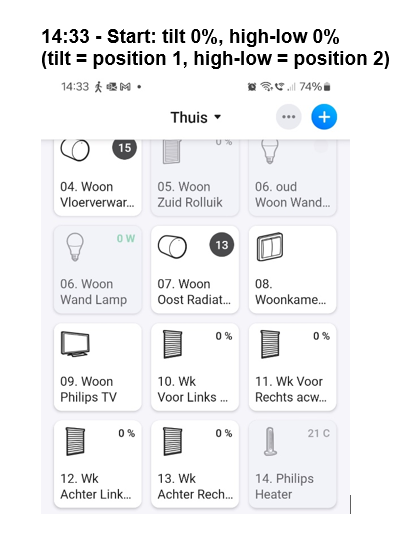


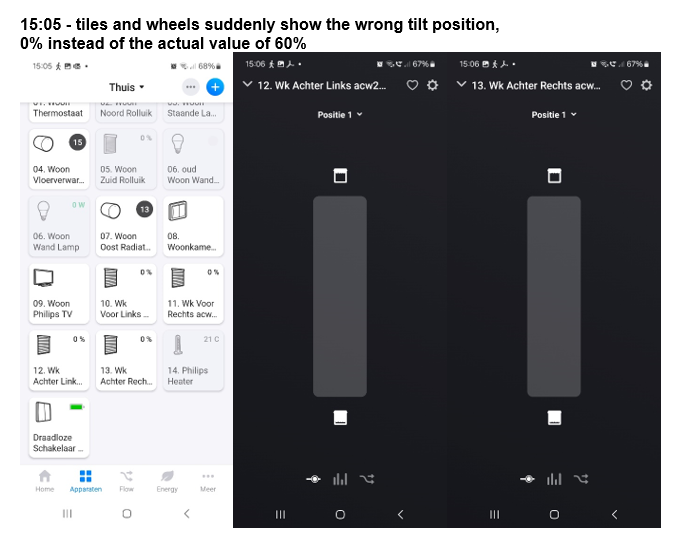


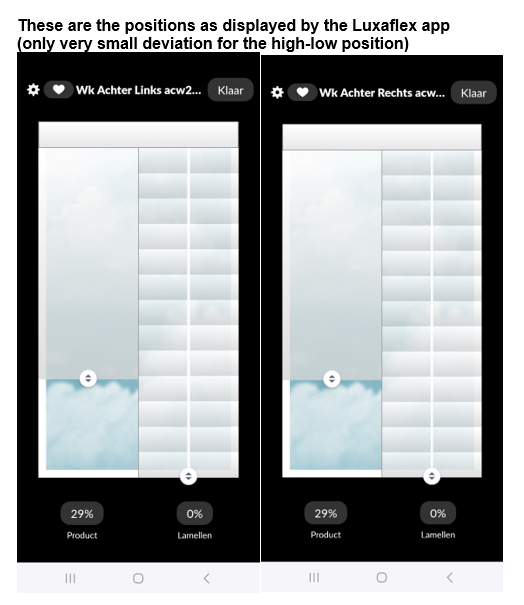
@Erik_Rutten I did check the log and your screenshots. But as already said before the data is coming back like this from your Hub. There’s nothing I can do to change that. It just looks like the hub is not showing the correct values
You can check it yourself if you want:
Hi Martijn,
Thanks for providing this link.
I checked it myself:
- the Hub is providing the correct values.
- Homey is displaying the wrong values.
See attachments for more information.
As explained earlier
- I use position 1 for the tilt position (on your advice to get the status of the tilt position displayed on the tile)
- I use position 2 for the high-low (=primary) position
I use position 1 to change the tilt position of the Venetian blinds, this works perfect, however,
after some time position 1 shows the status of the primary position instead of the tilt position for which it is configured => not OK
Position 2 shows the status of the primary position for which it is configured => OK
Rgds,
Erik


@Erik_Rutten got it. The update function is not taking into account that you swapped position1 and position2
Like the feature I introduced I while ago. I’ll make a fix for that
However I don’t have time in the coming 2 weeks so I expect end of may beginning of June
Hi Martijn,
Thx, end of May/begin June is perfect,
Rgds, Erik
I have installed PowerView on homey pro.
Homey sees the powergen 3 gateway. I haves defined scenes in the PowerView app.
If I create a flow in the homey I can see the scenes I created.
I run the flow and it gives green V that is seemingly ok. One problem the shades are not responding at all.
It worked before but not anymore….
I rebooted both homey pro as well PowerView gateway already.
Homey is operational because it works fine with TaHoma at the moment
Hi Peter, and welcome,
Most apps have their own topic, with lots of info.
The developer gets nudged as well, when you post your questions into those topics, thanks.
When the Powerview hub hasn’t got it’s reserved IP address, and the IP changed, it’s veey well possible Homey can’t find the hub anymore.
This is a big Homey “bug-ish” downside.
Try to manually re-add or re-pair the hub on Homey.
Hi Martijn, as i wrote it seems that Homey sees the hub because when creating flows I can see the scenes I created in powerview. Even when I create a new scene now in powerview, I can see it immediately in the homey app. So i can see it, I can implement it it in a flow, i can execute the flow and it shows green V’s , but… no reposnse from teh powerview devices. When activating the scenes from powerview directly it works all fine.
