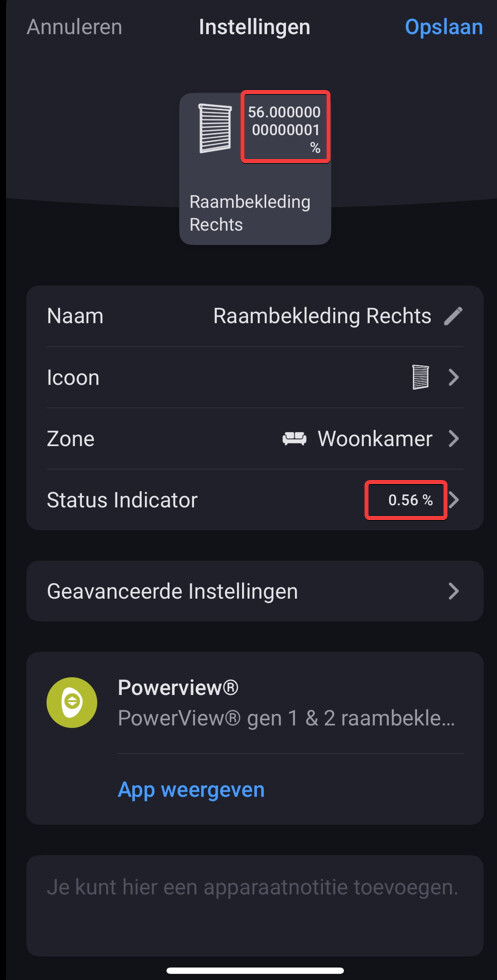
@martijnpoppen I have set the screens to a different position, restarted the app and it showed the new position 54%. But when I set the screens back to the previous position, I again see 56.0000000000001%
Hi Martijn,
I have set the screens to a new location and updated the value. Next I set the screens to the previous position and again updated the value.
This is tge new dagnostic report:
1928782f-da20-4e93-bd07-22bb622e2b0f
@Jos_Stultjens Just checking everything, but how did you get those percentages on the device tile in the first place? that shouldnt be available sensor
Edit: wow there’se a difference between webapp and mobile app in the optins. Reported that to athom.
Next to that will check if i can even influence this as this is default homey cards which im using for this
@martijnpoppen : Indeed, in the webapp you only can select the battery status, or "“None”.
In the Mobile app (iPhone), I also can select “Positie 1”.
In the device tile it is not formatted nicely(rounded), but in the status indicator field it is formatted.
But there it shows as 0.56% instead of 56%. This also seems not to be correct.
after the automatic powerview update 2.10.3 last night the contact with the powerview hub is broken.
Restarting of the Homey, Powerview and the router doesn’t fix the problem.
@martijnpoppen i saw that in this app there is sometimes a percentage of about a lot of numbers after the comma.
I have a Aqara humidity sensor thas has the same issue.
Maybe it is a Homey thing?
Hi Martijn, the position indicators show the wrong percentage. After restarting the Powerview app the position indicators are ok, but after executing: “bijwerken raambekleding” they change in 0%, the wrong percentage.
 LIVE: 2.10.4):