This is my kettle-temp graph…

Does this look normal?
Does not look strange to me.
But I do not know your situation.
Looking at your insight:
If your cv temp is indeed 70, is it needed (do you have very old radiators?) reducing the max temp can increase the efficiency of you cv. (But onlybifnyour radiators are capable of producing enough warmt at lower temp.
(My max temp is at 45c)
Max temp for heating is set at 50, as i only have floorheating. Max temp for tapwater is 62.
That is strange, in your insights the temp seems to be way over 60c for a long period (not just a shower)
Ok, had some trouble with my heating today. Water leak, faulty O-ring. While trying to seach for a replacement or other solution I powered down the whole sytem, incuding the OTGW.
When starting up again the OTGW app kept saying the OTGW was Offline. But it was reachable on http, it even got data from the thermostat. Just not from the Heatpump.
The indoor-unit did not turn on. But the OTGW itself was not offline, the CV/Heatpump was…
Does anybody know if it is possible to limit the amount of updates OTGW is publishing?
Either to limit the type of messages or the interval?
I see many, many updates, even multiple per second being published…
I created a flow to check if my heating gives a error (IE Offline Alarm or Storing Alarm)
I can use a WHEN as a trigger for Alarm On and off, but there doesn’t seem to be a tag IF alarm is on/off ?
Yesterday I got a ‘Offline alarm’ and a second later a ‘Online again’
I’d like to pause/wait about 30 seconds before I send a notification, but without a way to check if the alarm is still active I don’t know how to do that…
I already created a variable to prevent multiple notifications…
That would be the logic card AND OFFLINE is TRUE
Ok, more coffee… 
I was looking for a logic Text/number card instead of a yes/no.. 
Anyone? 
Why is it a problem?
There are so many (sometimes 10-20 a second) that they are flooding my mqtt and Homey.
Athom suggested to get them down, probably to reduce load on Homey as well…
“Simple” users like me don’t need every update, so choosing which ones are being published (or read) would be great…
Ok, so my Homey Pro 2019 died 2 days ago… I ordered a Pro 2023 and installed it yesterday.
Apart from the known issues with Zigbee devices, the OTGW also doesn’t work..
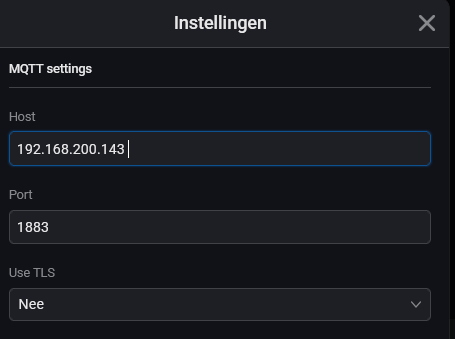
This morning it dawned on me: the new Homey has a different IP adres, so I need to change that :
But I can’t save the change, it gives a timeout.
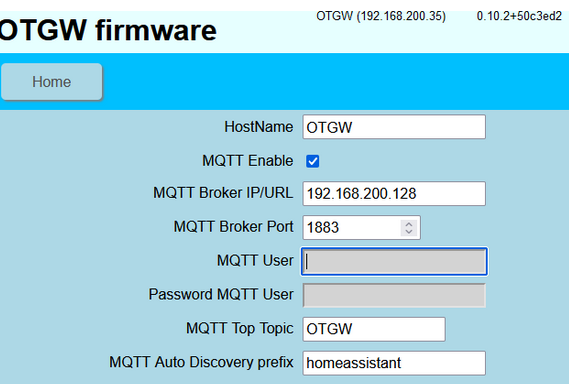
Should I change the IP in the OTWG webinterface, pointing to the MQTT Broker first ?
Because it does say :
Changed IP adres on the OTGW so it points at my new Homey Pro 2023
When i try the same in the OTGW device in Homey, so no go and a timeout.
Tried ti add a new OTGW but got :
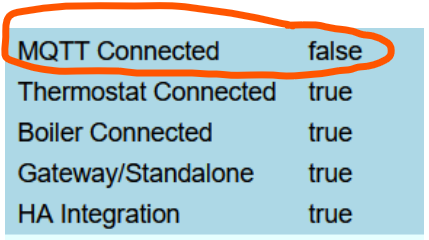
On the OTGW page it keeps saying :
Altough I changed the IP of the MQTT Broker to that of my new Homey.
Any help is much appreciated…
I prefer to bind IP addresses to MAC addresses (a.k.a. fixed IP’s) on my DHCP server, instead of entering IP addresses on clients > chances on using duplicate IP’s.
Here’s a little howto about setting up MQTT, and connect a client;
which should get you going:
Hi Peter,
All my devices have reserved IP adresses through DHCP on my router.
The IP on my Homey changed because it’s a new Homey dnd thus device.
I thought changing the ip on the OTGW config (the device) to have it point to the new Homey and thus Homey-MQTT broker and in de OTGW gateway device on Homey would do it.
But changing the IP in the OTGW gateway device on Homey gives a timeout and changing it on the phisical OTGW still tells me there’s no MQTT connection.
Adding a new OTGW gateway device on Homey gives me above error.
I’ll tey and revert everything back to the previous IP adresses and give the Pro 2023 the same IP my Pro 2019 used to have.
If not, I’ll probably need to remove everything and start from scratch 
From Tweakers :
Three years after the last stable release, the OTGW Firmware v1.0.0 is finally here.
This release introduces significant updates, including:
A modern Web UI with real-time graphs, statistics, and responsive design.
Integrated dark mode.
Live OpenTherm message log viewer with WebSocket support.
Simplified firmware flashing with automatic health checks.
New MQTT command to override the outside temperature sensor.
Memory optimizations for improved stability.
Updates to Wi-Fi reconnect logic and fixes for critical crashes.
Thank you to everyone who contributed and tested along the way. Read more and download the firmware:
I’m wondering, can we just update w/o breaking flows or config ?
Hi, I bought this week a OTGW with WiFi at the nado-shop. I’m having dificultie to conected it my home WiFi.
I succeeded to fill in the home WiFi iD but it only connects for a short time.
Can someone give me an adivce how to have it stable on the WiFi?
The WiFi AP’s are UNIFI’s and I connect to 2.4 Ghz
Thanks, André