No problem. But you need to manually set a different mqtt base topic, both in the otgw and in the homey device.
Ok. Nodo otgw, Homey bbr[quote=“Gruijter, post:121, topic:77190, full:true”]
No problem. But you need to manually set a different mqtt base topic, both in the otgw and in the homey device.
[/quote]
Nodo otgw , Homey broker app and Homey mqtt otgw app up and running. Easy install procedure.
My DIYLESS thermostat can handle Jason and plai next . Which is the best to use?
Nodo otgw , Homey broker app and Homey mqtt otgw app up and running. Easy install procedure.
My DIYLESS thermostat can handle Jason and plai next . Which is the best to use?
Is it possible to show the OpenTherm gate way as a thermostate under climate?
@Gruijter Hi Robin, is this possible? It would make this great App more greater 

I’ll think about it. It is caused by Homey not being able to use subcapabilities in a number of applications.
new version 2.0.0 is ready for testing: OpenTherm Gateway MQTT App for Homey | Homey
- Changed room target temperature to Homey defaults.
- AI translation to all Homey languages.
This update will show the room temperature in Homey Climate. @Paul_Hemels please test.
BREAKING CHANGE: You need to update any flows where you trigger or set the room temperature.
Hi Robin,
Thanks you, I have installed the App and update my flows.
Controlling the thermostat works, also the temp steps are now 0,5 grd (instead of 0,1grd) whitch is good.
But it’s still not visable in Homey Climate. (it’s not in the list to choose)
Let me know if I need to test something.
yeah, It was a lot more work then I hoped  , but I think I got it now.
You manually need to set the behavior to Thermostat in advanced settings now. Also I added the option to set the temperature step.
New version 2.0.1 is ready for testing: OpenTherm Gateway MQTT App for Homey | Homey
- Added option to set device class to Thermostat.
- Added option to set room target temperature step.
You great, it’s fixed 
. And many thanks for your donation. Much appreciated! 

Ok, guess I’m into the Opentherm gateway because my eTwist RF (wireless) is missing al lot of option, but:
I have a Heatpump with CV, so a Hybrid system, will it work also ?
The CV is connected to the control of the Heatpump and the control of the Heatpump to the Remeha gateway.
Do I connect the gateway in between the thermostat and the heater or parralel ?
Also, not sure what to order from Nodo so I don’t have to solder or flash firmware.
I’m guessing :
- OpenTherm Gateway WiFi
- Wemos D1 Mini 3.0
- Housing
- Programming service
and the soldering service ?
USB Cable and Adapter i have avaliable
yes all of that.
Just try if it works, I only tested with my hot water / heating boiler (combi-CV).
I’m waiting for an Elga Ace All In One to be installed, and from what I’m reading, you need an R-Bus to OpenTherm gateway from Remeha if you want to use the OTGW with Remeha’s (hybrid) heatpumps. See this post (I assume you’re Dutch  ).
).
The heatpump is not Remeha, it’s a Weheat Blackbird, and is already connected and working with Opentherm…
Juist read it in the pdf… in between it is..
Ok, ordered device at Nodo.
n anticipation of delivery, I have already installed the OpenTherm Gateway MQTT app and the MQTT Broker.
I just have no idea what I need to fill in or adjust here, is just Port sufficient or do I need to create a user?

edit: translate from dutch to english… It’s friday you know 
Ok, that went well…

Let’s see if I can put it inbetween the Controller of the heater and the Remeha gateway somewhere tomorrow…
Edit (can’t treply 3 times ?)
Right, and here’s build into the housing…
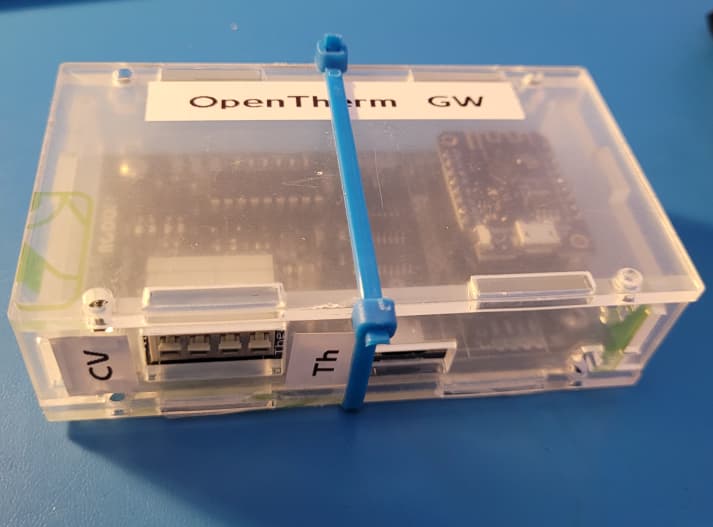
Would have been nice if the bottomplate had extentions so iI can schrew/nail it to the wooden back that holds my CV , Boiler etc…
Oh well, enough velcro here…
Hi there, I tried to get this OTGW with wifi from Nodo shop to work with my homey. The problem though is that It seems not possible to save the settings on the OTGW itself via the web interface. When I try to change the MQTT settings (enabling it and give in the right ip/user/port) it fails to save it. When i press save, it waits a long time and than the settings have not been changed. I tried all browsers I could think of, like chrome/firefox and ie, but no luck.
Any idea how to get this to work? Am I doing something wrong here?
And if I cannot get this to work via the webinterface, is there another way like with telnet/ssh?
Would the upgrade of the firmware to 6.6 (it has now 6.5) maybe help? And if so, is it save to upgrade the firmware via the web-interface (as it seems not to stable configuring the settings for now).
Thank you.
I did not change anything on the webinterface of the OTGW, just entered the settings from the interface in the Homey MQTT broker…
btw, got a lot wiser from this :
https://otgw.tclcode.com/matrix.cgi#thermostats
Find your thermostat, and the ID’s needed for the information you want.
In my case : returnwatertemp = ID 28
then in a flow :

and test-run it so the command is executed once.
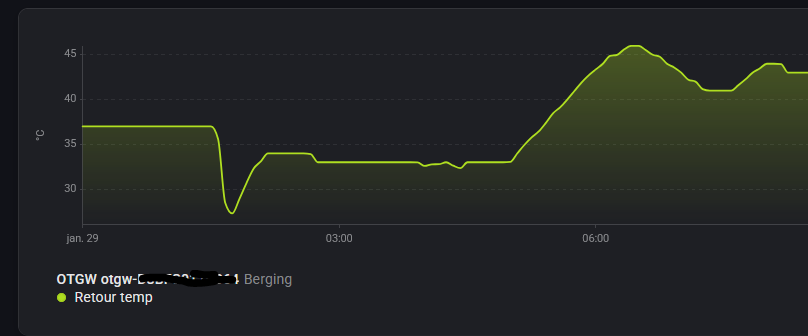
Data comes in.
unfortunately for me, that was the only one working :
Brander starts ID 116
CV waterdruk ID 18
Tapwater brander ID 119
tapwater Flow ID 19
Brander draaiuren 120
Pomp draaiuren121
Heet water pomp draaiuren 122
Heet water Brander draaiuren 123
Boiler temp 25
DHW temp 26
Did not work.
I don’t really understand how I can get the otgw connect to the mqtt broker without adjusting the settings. It by default uses 192.168.1.1 as MQTT broker address. As my lan ip range with Homey in it, is 192.168.2.58/24, this is never going to work. So i really need to change it.
Maybe you are lucky with the default ip address?
Maybe anyone else knows what to do. The main issue here is that I cannot get OTGW settings saved. I change them with the details of the MQTT broker, but after I press save, it takes some time and than if I go to settings. The same old values appear.
Could it be something with the flash of this OTGW, which is faulty? I’m just guessing here, but it seems to be quiet straight forward to change settings and save it.
I don’t see anything coming in at the logging of the MQTT broker in homey , so it doesn’t really change it.
