I have released a new TEST version that has a different broadcast signature, with a numeric ID that is capped to 16bits integer. This might be the issue with the Venus 3.0 firmware. Please also check if you have the latest firmware installed and let us know what version you have? Please try and thank you!
Hi Edward,
Tested today with the new test version 0.8.2 but still no data is shown in the device.
Firmware version Marstek up to date (v122)
Tried the following:
- Updated app on homey to 0.8.2
- Restarted homey
- Checked for data pull in homey –> no data shown
- System restart of marstek snr 5c6 (through BLE tool)
- Checked data –> unfortunate not shown
Screenshot:

Diagnostic report:
416e2755-d402-4d19-a45d-ee269f545a73
Thanks for the effort! Kind regards
Dennis
Hey Stijn I noticed your V3 now works, only difference I saw was your firmware version (v139). Seems mine is still at v122. Where did you look for the firmware version?
Kind regards Dennis
Same problem here. Venus 3 with firmware v139. It worked for a short while a week ago, but then the data stopped again. A reset via the BLE tool has no effect either. I’ve created a diagnostic report: ca2f4698-d4f0-4171-976e-fa521afd4b2b.
Hi Edward, today did some further testing on the app. I noticed I was still on Marstek Firmware Version V122. After contacting Marstek I got it upgraded to V139. Nevertheless still no readout in on the values. Switching modes still works with flows.
Details can be found in the diagnostic report: bf7ab448-d5ad-46d6-8240-5c7c82926d5d
With kind regards, Dennis
Unfortunately I haven’t been able to get any data as well. I really hope this won’t discourage you to continue this project. I’ve sent feedback to Martek about the API problems. I suggest others do this as well, as the problem seems to be on their side.
I have a Marstek Venus 3 with firmware v139 combined with a Marstek P1 meter CT003 with firmware V118.
As mentioned earlier, I’m not receiving any data. However, controlling the different modes—manual, auto, and AI—works just fine via the flow cards. Now i can control my Marstek by myself.
Would it be possible to add the API port to the settings?
I can’t change the port number with the BLE tool, it seems locked.
Venus E v3, 1.39, ethernet connection.
Or as an alternatieve, maybe publish the source on GIT so I can change it myself and test.
I will include the port number in the settings for a future release for these edge cases. The source is also available at my Marstek Venus Connector Repository.
Please check if you have enabled polling; a setting available per (local API) device. I have a new version ready for release with more debugging details, might the problem be with the communicated string. Additional question; have you also configured a CT003/002 to communicate with the battery?
Retrieving data from the battery together with a CT003 seems to be problematic; other users (and myself) also have problems; one of the two will stop communicating with the battery. Please note that I’ve included a setting that you can stop the data polling, check if that is enabled of you want to poll data from the battery. The setting is included so that you can send mode change commands (Homey flows) without interrupting local API communication.
@DaanV @Erwin_DeB @Dennis_Poeth @Stijn_Van_Heeswijk I’ve found a stupid error I made in previous release that caused received data to be ignored. I’ve removed the bug in the new TEST version, the data should appear again… Apologies for the inconvenience, and thank you for the diagnostic reports!
I’ve looked into configuring the port number in a early release. The problem here lays for multiple devices; because the local API works with a UDP broadcast to a port number; all batteries must be listening on that port number. I will make the port number read/write for a TEST release and look into creating multiple broadcast UDP servers when different port numbers for devices are configured…

Thank you for the diagsnostics; it seems the interval setting for one of your devices could not be determined; can you remove the device and add it again to determine if that is the problem please? (I will integrate a fall-back value for this situation)

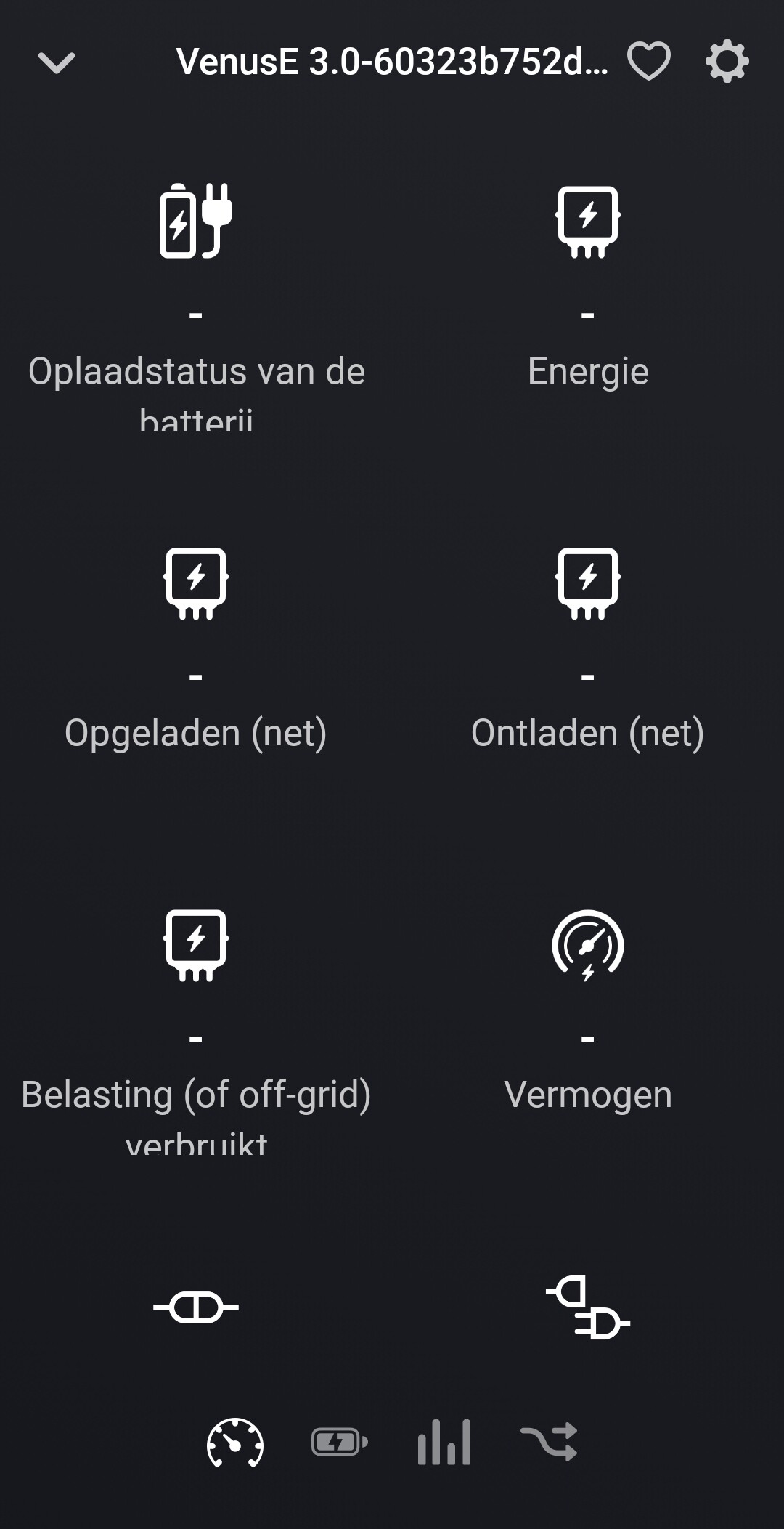
I’m using the latest test version 0.8.5 of the app. After that, I re-added the device and restarted the battery via the BLE tool. However, it only reports two values once (energy and temperature only) and then nothing anymore. I’m using a Homewizard P1 for the CT connection with my Marstek 3 v139.
781547ff-8111-4867-a27b-e55c490733e6
Fantastic app. Communication to the batteries works fine I have 3 Venus E 3.0 batteries. Wit advanced flows I made a peak shaving system so I do not go above 2,5kW import from the grid ( I have everything electric at home). I don’t need 0 in tue6 meter I want to limit the max peak
What I noticed;
No communication comes back from the battery (but for now that’s okay since i solved that with some logic in the flow)
when you send to many times the same command to the battery the communication overflows and it doesn’t react anymore. The battery will seemingly reset itself. For example whe you ask the battery to activate the auto setting more then once.
It’s solvable in a flow when you work with some yes/no variables. Since I did that the batteries work fine with the app. No crashes anymore. But it became a monster of an advanced flow. When 2 way communication works it could be better (but I guess it’s not that easy) now I only hate to keep an eye on the marstek app to notice if a battery would go up nader 10% charge (what I want to avoid for the life cycle of the battery)
Thanks for the good work 
Hi Edward, thanks for all the efforts so far. Tried with the latest test version (8.5) but still missing the important data. Only Temp and Capacity are shown.
Details see diagnostics: 55db6449-9919-4b73-a2a9-27c3033c4662
Beside above, is it possible to add a flow chart that can reset the battery. Sometimes the connection is lost which results that you need to reset the battery. This is only possible physically or through the BLE tool. Would maybe be nice if your not at home to able to reset is remotely with a flow or setting in homey.
Kind regards Dennis
