I’d also be very interested in a modbus version. I have modbus working over TCP on my inverter (no, it doesn’t require an ethernet cable, works just fine with wifi, you just need to be on a new enough dongle firmware) and am currently using a Docker image with some scripts to create MQTT topics for the most important values, and then some HomeyScript to set variables and such. But having this in the/an app would be very useful, especially if it would also enable some write-back to change certain inverter/battery parameters. I’d certainly be happy to donate some money to make it happen - unfortunately I’m not enough of a programmer to take it on myself…
you can try this app: [APP][Pro] Modbus
@Valentin_Ciopei
the app works and finds the inverter without any problems. But where can I get the register number?
Huawei provides documentation for modbus. https://support.huawei.com/enterprise/en/doc/EDOC1100050690
Here is an example (I’m still testing):
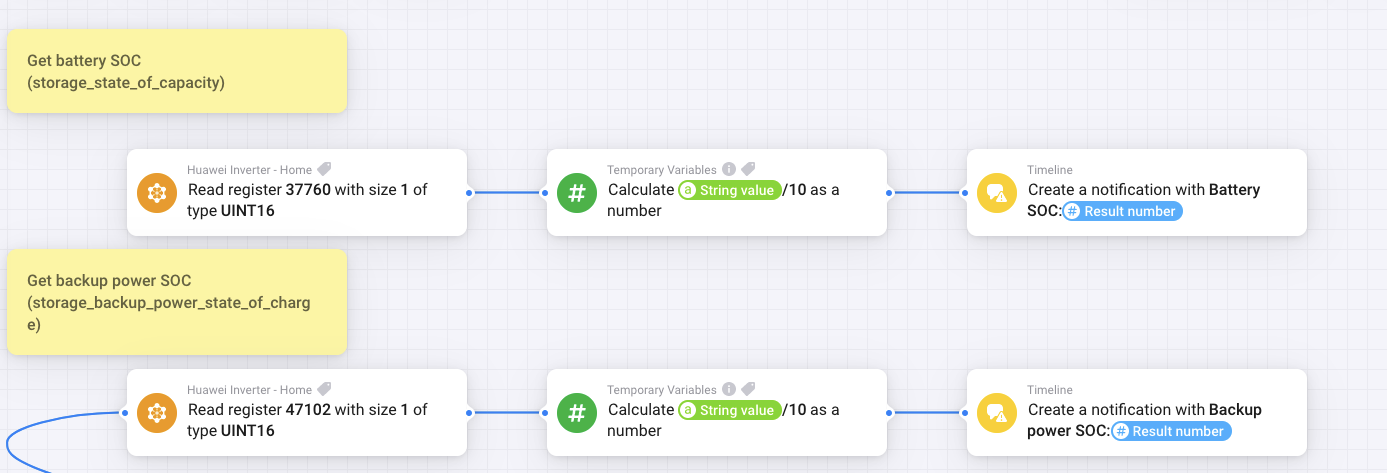
@Valentin_Ciopei
Does you have the opportunity to make their inverter accessible via VPN for testing?
We can test TCP Modus here: [APP][Pro] SolarEdge + Growatt TCP modbus - #829 by Edwin_Biemond
what do you mean?
We want to expand the SolarEdge app to include Huawei.
Coming to the inverter via TCP works, but you can’t display anything yet. For this @Edwin_Biemond needs an inverter that he can test with. My network currently doesn’t allow the inverter to be reached from outside.
A temporary access to PV
I’ll try to see if I can reach my inverter via wireguard vpn.
That’s exactly what doesn’t work for me.
I recently got a new router and it is not yet set up correctly
I sent an invitation
I second on “cannot read property ‘name’ of undefined” using the Homey App, the API User and the module “Systems before 2023” for my Sun converters.
There’s a new app coming soon.
As read only and with full control
Good evening,
As stated before, I still receive a lot of issues because the app is not working.
But I’m not able to support the app anymore and I’ll not release any updates.
If someone would like to take over development, that would be great!
submitted for release or try this now already SolarEdge + Growatt TCP modbus | Homey
you need to have modbus working.
Edwin’s app runs great.
Everything can be read out and many flows are possible
Your app looks great, good job @Edwin_Biemond !
Thank you so much! Works perfekt!!!
Info: Search Google for Modbus Huawei.
There you will find a lot about how the inverter needs to be set up.
And then the IP is enough to use the new app.
Hi Edwin,
Thanks for the great job!
Unfortunately, when I add my Huawei system, no values are shown. It seems not to receive the information from the inverter.
I added the IP but it doesnt communicate. Am I missing something?
What does the parameter „Device ID“ mean? Is it the MODBUS ID or…?
Thanks a lot!
Alex
Please ask the question here: [APP][Pro] SolarEdge + Growatt TCP modbus
Some questions are already answered there.
Thanks.
Alex
