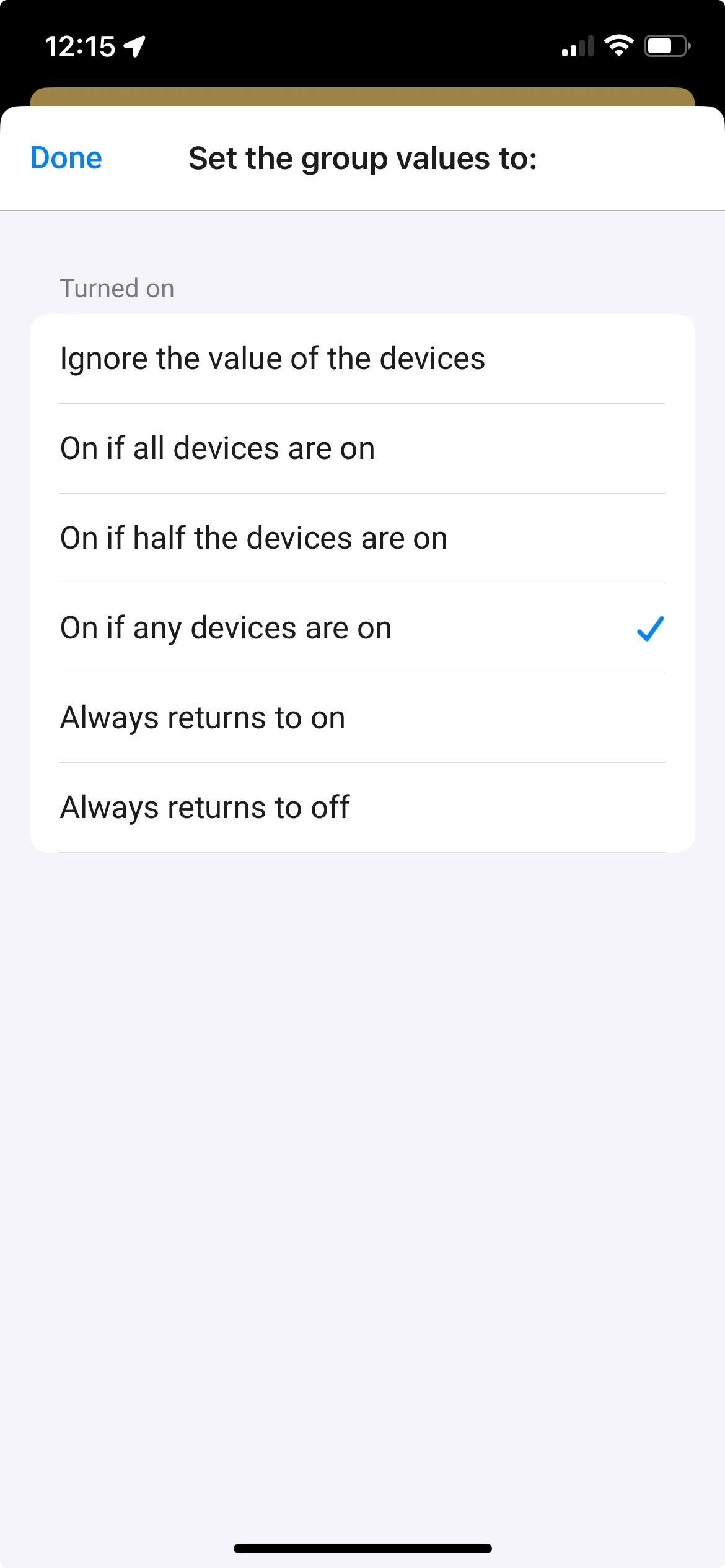
The capabilities which exist for each device type are define by Athom. (Many moons ago).
The powerful thing about the group app, is that it is written in way which allows for it to be completely generic and thus work for all devices and all (default) capabilities.
Over the last 6 years or so I’ve managed to no put in any custom code for specific devices or apps or even device types - that hard line is what keeps this app maintainable.
—
Regarding the new flows. It’s a great idea and I see the value but I don’t think it’s practical due to the way that flows are created and managed by homey.
The must be defined, along with all possibilities in json before the app starts and they can’t be altered.
So I would have to create flow for every possibilities - which would always be available - ie each of action … for each device type …… possible I guess but pretty messy.
The the very first thing people will ask for is additional capabilities to be added, and it won’t work with the more flexible “advance items”
Thanks for the suggestion - I’ll think about how to make the flows work …. Perhaps two tags, once for the capability name and one for the device name could work
Hi Jamie,
I really like the app so I happen to find myself in a situation where I had to remove a not-responding lamp and add it to homey again - same name but of course a lot of flows will have issues. Also a group had issues, but hé I thougth, just try maintenance-try to repair But no, since the device has a new internal id it cannot be found and that is treated as an error. I hoped the repair screen would still open, so I could reselect the devices and the not-existing one would get removed from the group when saving it.
The error is saying it can’t communicate with the device (that I have deleted and added again) and I stay on the Maintenance screen with the “Probeer te repareren” button.
I can’t make a picture anymore because I did it the hard way. I deleted the group, added it again with the same devices/setting/name and just manually corrected all the flows where the deleted group was involved.
I would want the error being ignored, when pushing the “probeer te repareren” button not existing devices in the group should be fully ignored - and of course you cannot select them anymore so when saving the group you end up in removing them from the group device list.
You had a group
The group had multiple devices in it
One device was removed from homey
When changing the values of the group you received an error saying “unable to communicate” with deleted device
Sorry I only speak English was there another error also on the repair screen?
I would like a way to show if a window sensor is open and which one it is. I made a group with all my window sensors and this wil show if a sensor is activated. But I cannot see if 1 or 10 sensors is open and not which ones it is. Do you know if I can use a virtual device to show this, can the I made tell a virtual device, via a flow, what sensor was activated?
Played bit with the app and did not manage to make it work as expected. So maybe ask
I have group of 5 wall plugs. I expect:
all goes off, if one goes off
all goes on, if one goes on
Especially deriving off status is difficult with current options app provide. Is there a away to achieve this with app without extra flow wrapping everything to toggle states?
I can do what I mean using just a flow(maintenance nightmare), so maybe I clarify bit my question. Not sure why this breaks the time continuum - something internal for devices?
Precondition: 5 wall plugs in group
Use case 1:When I toggle one of the devices on, rest 4 goes on too
Use case 2: When I toggle one of the devices off, rest 4 goes off too
I think I would need for this new advance option or new device type to mirror on/off states within a group.
Yes @Jamie that’s scenario, infite loop I solved with flow by ignoring events that could cause it - like Click race by two switches. My setup currently works ok, but is hard to maintain. Need to think bit what latest value proposal would help.
Let me try screenshot examples on next few days when I have time.
@Jamie@Nick_Van_gerwen
I think it it this that happens, I took a screenshot during my repair.
I also had a light bulb that broke and mounted a new one, and want to go in to repair so it is added to the group again. (I took a diagnostik and sent to you also)
Hello.
I use Group app with only Hue lights and sockets with Hue without birdge and get this error. Is it something with the group app or the Hue app? Grateful for answers.
This is probably leftover from previously existing device, but the entry still exists in the Group but can’t be removed - developer would need to implement some additional checks upon group re-saving.
Redone all groups, blended groups and still same problems. I am using flows and dimmers to control my groups. Is there any setting to ignore the ”info” because everything works so just enjoying info
 But no, since the device has a new internal id it cannot be found and that is treated as an error. I hoped the repair screen would still open, so I could reselect the devices and the not-existing one would get removed from the group when saving it.