Hi!
First of all, I´m new in Homey and I’m trying to integrate Wave Shutters for blinds. I integrated the wave shutter through homey and I had no problem, but only the up and down works, not the percentage.

The relay sounds when it indicates a percentage but it does not move the motor.
Someone knows to that can it be?
Did you calibrate the device from the device settings?
Right! was it that. Sorry, I didn’t see the option in the settings.
Now the blinds work perfectly.
Thank you!!
Hi,
I updated to Shelly 3.25 on my Homey Pro, and noticed that the ‘history tab’ is missing in Shelly Pro 4PM since (or maybe since the update 3.24.3) this update. I only got one shelly device so no possibility to check others. My fibaro devices still got this history tab.
Is this normal/planned behavior? Is this on the roadmap to bring this back? I used it ‘often’ to check what flow triggered my shelly device.

Thumbs up for the shelly app btw!
Sincerely,
Nico
Unless explicitly configured through custom capabilities this history tab should be available at least for the default onoff capability. Why it doesnt show in your case I have no clue. I have not changed anything in this area for some time, it’s just using the default onoff capability. So it sounds more like a Homey issue which you should report to Athom.
Just to make sure, restart Homey and the smartphone app and check again before doing so.
Hi,
Thanks for the info. Just rebooted the shelly is app itself on the homey, and history tab re-appeared. No onoff history events were lost. Should have dan that before posting.
Thanks for the tip!
I have a new found issue with Shelly. Im running Shelly v3.25.0
I have around 60 devices in Homey today. When the app made the major change last year I readded them all which was a insane hassle, adding one at the time and redoing all flows.
Now I have seen a new issue. When I want to add a new device i select “Any Shelly WiFi Device” and then I get this image bellow:

This shows all my shelly devices. Adding it will create a duplicate of the device.
So to my questions:
- Why do they show up again?
- Why do they not match my existing devices?
- Why do they not sync the name det for the device when you have Sync Name setuped
I really hope I dont have to readd all of them again to get rid of this. With named it would work but without its gona be a nightmare.
Before I start answering your questions, try this first. Reboot Homey, wait 5 minutes after reboot and try again to see if paired devices still show up.
Rebooted, waited, same behaviour (have tried this before a couple of times). Have also gotten this issue for some time. So its not daily fresh.
Before I answer questions it’s good to explain how filtering in the discovery screen works. It might give clues as to why you are seeing this. The Shelly devices broadcast their existance on the network over mDNS. These broadcast are done under the device model ID and device identifier. These are the “names” you are seeing in the discovery wizard including the IP address. When a device is added this “name” is added as unique device identifier in Homey as well. When discovering new devices the pairing wizard will compared discovered devices with already paired devices for that driver. When there is a match it will not show the device in the pairing wizard.
So to answer your questions:
- These devices showing up again would mean Homey does not match the discovered unique “names” with the already paired devices. This could be multiple things like a 1.) bug in Homey, 2.) a bug in the app, 3.) the device broadcasting a different identifier compared to what they where paired with or 4.) the devices paired under a different driver (like the previous device specific driver instead of the generic any WiFi device driver). Since I havent seen other reports about this yet for now option 1, 2 and 3 dont seem logical. I’d have to check the behaviour myself though to verify if I can reproduce. You yourself can check option 4 and see if the devices are paired with the driver called
shellyor a device specific driver under the Homey developer tools. If devices are not paired with the Shelly driver it seems you did not re-pair them already with the generic driver. - See explanation above.
- The sync names option is unrelated to their discovery and the information in mDNS broadcast messages. Having the device name show up in the discovery wizard would mean an extra HTTP request to each device when doing a discovery scan. For users with a lot of devices this could result in performance issues on Homey during pairing and is therefor not desirable.
Please let me know the outcome of the drivers the current devices are paired with.
Thank you! Had the same issue and this work around fixed the issue!
Can someone explain to me why I see different temperature values (measured and target) in Homey compared to the web interface of the device itself?
Example:
The web interface reports 20.0° set (incorrect) and 21.1° measured (externally supplied and correct):
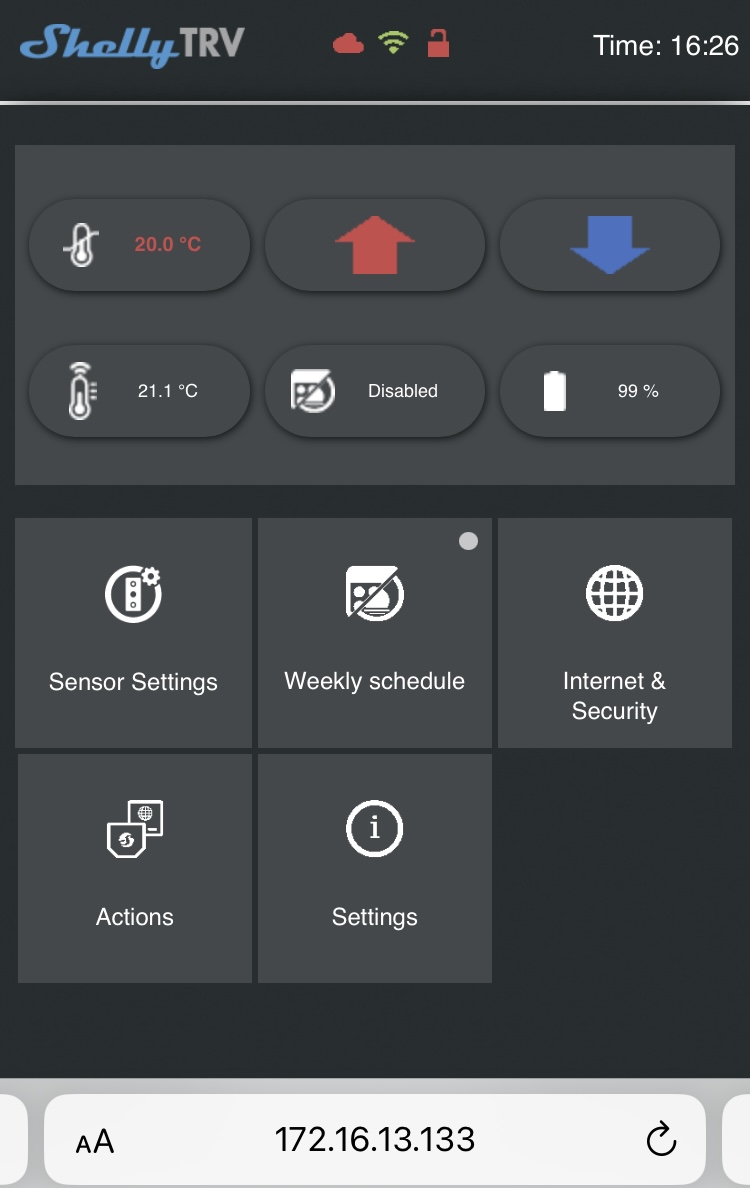
Homey shows 20.9° (set via flow and correct) and 21.00° measured (incorrect).

Actually, the measured temperature in Homey is always displayed with two digits after the comma, which are always 00, which seems odd.
Thanks for your support. Just heard about another user with the exact same issue on a Facebook group. Sad to him to write here so you see more with issues.
Interesting to me is this line “different driver (like the previous device specific driver instead of the generic any WiFi device driver)”. When did that change? I remember getting this issue when I first saw that new button for searching for devices.
So If this is the case I guess the only way is to re-add every device under the new way to get rid of them?
Is there anyway to check what driver Im using?
Hi, just installed the new H&T Gen3 into the Shelly App, but it won’t pair with Homey. Any ETA?
“No suitable device config found. This device might not be supported yet, please report this to the developer. Device has hostname:ShellyHTG3-”
thank you
Mark
Homey just shows the values as returned by the device. To further troubleshoot have a look at the data under https://yourshellyip/thermostats/0
Probably because you supply this externally without decimals or something goes wrong when supplying it with decimals. You should be able to see the value as returned to Homey in the same endpoint as mentioned above.
This changed 1,5 years ago on August the 7th. As mentioned back then re-pairing with the new generic driver is not required but recommended. To make sure only already paired device show up in the Discovery wizard indeed requires re-pairing of the device.
Yes, I already mentioned that in my previous post, see the link there. Use the developer tools to check the driver.
Allterco Robotics failed to send me this device or even details of this device to have it integrated before launch. I just asked for the details again and will integrate it in the next release.
Sorry. Checking devices under developer tools it say: homey:app:cloud.shelly:shelly both on “old” and “new”
I now added a device from the “new” and I see the id is “ shelly1pm-B9894C.local”
And the. I checked the other one and see
“shelly1pm-B9894C”
So what’s changed and I guess is the issue is that ids miss the .local part.
Maybe one can do a id update with script to add .local? Then it should work I guess?
We just got back from CES. They provided samples of some of the new devices. HT was one of them. Frankly it looks just like the old one, except for having that new chip. I’m wondering if you used the current identifier if it would work just the same. In any case if you need me to test just let me know.
That’s the reason, I guess that at some point Shelly changed the way the device announces itself over mDNS. Unfortunately there is no way to programmatically update the device identifier in Homey. If you want to get rid of the already paired device you will have to re-pair them.
