v1.35.0 - 2024-01-07 - CURRENTLY AVAILABLE IN THE TEST CHANNEL
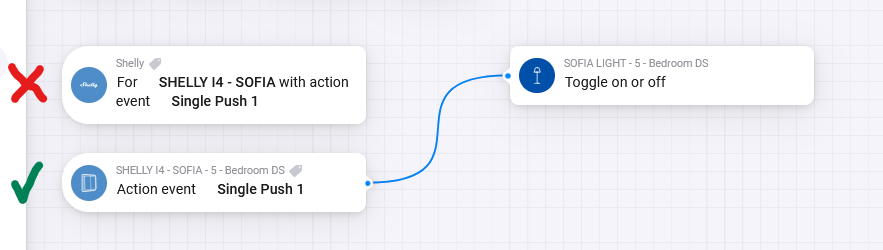
Important change: the generic “action event” trigger card has been replaced by device specific “action event” trigger cards. Currently the generic action card is deprecated but still works. But after some months it will be completely removed and will break your flows. So update your flows to prevent this from happening.
This release also adds support for setting values of, and triggering flows based on changed values of virtual components from Shelly Gen3 devices.
It adds an action card for Shelly Plus Plug S for setting color and brightness of device LED ring.
Under the hood it adds some logic to add missing capabilities upon device initialization.
This is a big release with lots of changes. The change with the most impact is the deprecation of the generic action event trigger card available under the app. It has been replaced by device specific trigger cards available under each device which support action events.
The reason for this change: the generic card was created when the number of drivers was growing and I had to add this to each individual driver. Some time back the app was restructured with generic drivers reducing the number of drivers drastically. This paved the way for using device specific action event trigger cards. And since the use of the generic action event trigger card is still confusing for people who do not read instructions I have decided to make the switch back to device specific trigger cards for action events.
The current generic action event trigger card is deprecated but still works. But after some months it will be completely removed and will then break your flows. So update your flows to prevent this from happening.
I would appreciate it if some users would test this release in the test channel. I have requested this a couple of times before without much response but if you happen to read this and are able to test this, please do by installing the test version.
Important change: the generic “action event” trigger card has been replaced by device specific “action event” trigger cards. Currently the generic action card is deprecated but still works. But after some months it will be completely removed and will break your flows. So update your flows to prevent this from happening.
This release also adds support for setting values of, and triggering flows based on changed values of virtual components from Shelly Gen3 devices.
It adds an action card for Shelly Plus Plug S for setting color and brightness of device LED ring.
Under the hood it adds some logic to add missing capabilities upon device initialization.
This is a big release with lots of changes. The change with the most impact is the deprecation of the generic action event trigger card available under the app. It has been replaced by device specific trigger cards available under each device which support action events.
The reason for this change: the generic card was created when the number of drivers was growing and I had to add this to each individual driver. Some time back the app was restructured with generic drivers reducing the number of drivers drastically. This paved the way for using device specific action event trigger cards. And since the use of the generic action event trigger card is still confusing for people who do not read instructions I have decided to make the switch back to device specific trigger cards for action events.
The current generic action event trigger card is deprecated but still works. But after some months it will be completely removed and will then break your flows. So update your flows to prevent this from happening.
Can it be that for the Shelly Button 1 there are no Action Trigger Cards available (short push etc.) after removing the generic cards? The Buttons are the first Shelly devices I have included in my Homey as the Fibaro Buttons worked not smoothly all the time. I’m asking as I would like to replace more Fibaro Buttons, but if Trigger cards for When will not be available anyhow I need to think about other alternatives.
First of all, thank you for this really great app and I appreciate your work. Two questions:
Is there any possibility to easily identify where I use the deprecated action flowcard? I’ve more than 50 devices with a lot of flows,… of course I can wait until you remove them and I’m getting an error, but then they will be broken.
I’ve got it multiple times now that your shelly app reconfigures my shelly gen1 with the unicast ColoT IP from homey, which probably is great for most of the people. But I do use the Shellys as well in Homeybridge, so I need to have ColoT in “mcast” Mode for the Gen1 Shellys. Is there a special reason that you trigger with updates again and again this change on the gen1 shellys? Or is this done by mistake? I’ve to always manually configure them back to “mcast” to get Homebridge work…
Not sure if you can call it special but it’s done for those users that do not use fixed IP in their network and where Homey’s current IP doesnt match the CoIoT peer of the Shelly device. If that does not match it updates the Shelly device with the correct Homey IP address. This saves me from having to point these users to the troubleshoot guide when their devices do not update their status anymore. I’ll see if I can have this mechanism ignore the difference if it’s set to mcast.
This explains why the ColoT Option on Gen1 always goes back to the unicast IP of homey. I’m guessing you are doing that after each start of the app? Could it make sense to have a global app setting or at least an option to turn it off on the homey device itself? For myself, I do need it only for a few devices and I’m only doing that because there was no useful Homekit Option on Homey itself…
As mentioned, I’ll have this mechanism ignore devices that are configured as mcast.
Upon adding it to Homey it will be updated from the default mcast which is actually an empty string in the device settings. I can just check for coiot is not empty && coiot does not contain homey ip then update it to Homey IP. Your devices set to mcast will fail this validation and will not be updated.
@R5Turbo When i use “mcast” after some time and updates it also changed to the Homey adres an port number.
“mcast” is not a defolt i think of the Shelly, if that is what you mean.
I use “mcast” because i use my light at the frontdoor with 2 Homey’s.
I have a problem.
My Homey Pro app is giving: Apparaat onbeschikbaar (app unavailable). And this is sinds the last update from 3.24.3 - I have a Shelly Pro 1PM. What do I have to do to fix this?
Do i have to reinstall Homey Pro app?
It is only the Shelly who gives the problem. Or do I have to reinstall Shelly app?
When I click on restart in Homey Pro (shelly) I get the same problem. Can’t restart is I think I have to reinstall Shell on my Home Pro?
Change my information: Yes, I have restart Homey Pro and restart Shelly on the Homey Pro and it is working again. I don’t know why it is wrong but it is working again. Thank you for all your help!
It’s not possible to add on Homey Cloud as Shelly Cloud does not have the functionality to implement this on Homey Cloud.
No, this is only implemented on Homey Pro, at least for now. The logic as currently implemented on Homey Pro will also not work on Homey Cloud but I can probably create something less fancy that will work on Homey Cloud.
I’m not denying that. On Homey Pro however the device are queried for their latest status and combined with some static config defined in the app the device in Homey is updated on device initialization. On Homey Cloud and cant query the devices like that but can still update them based on the static config. Less fancy buit still works.


 I think I have to reinstall Shell on my Home Pro?

