Hey, thanks for taking the time to help me in understanding or sorting it up, highly appreciated.
Ill try to explain my issue as detailed as I can,
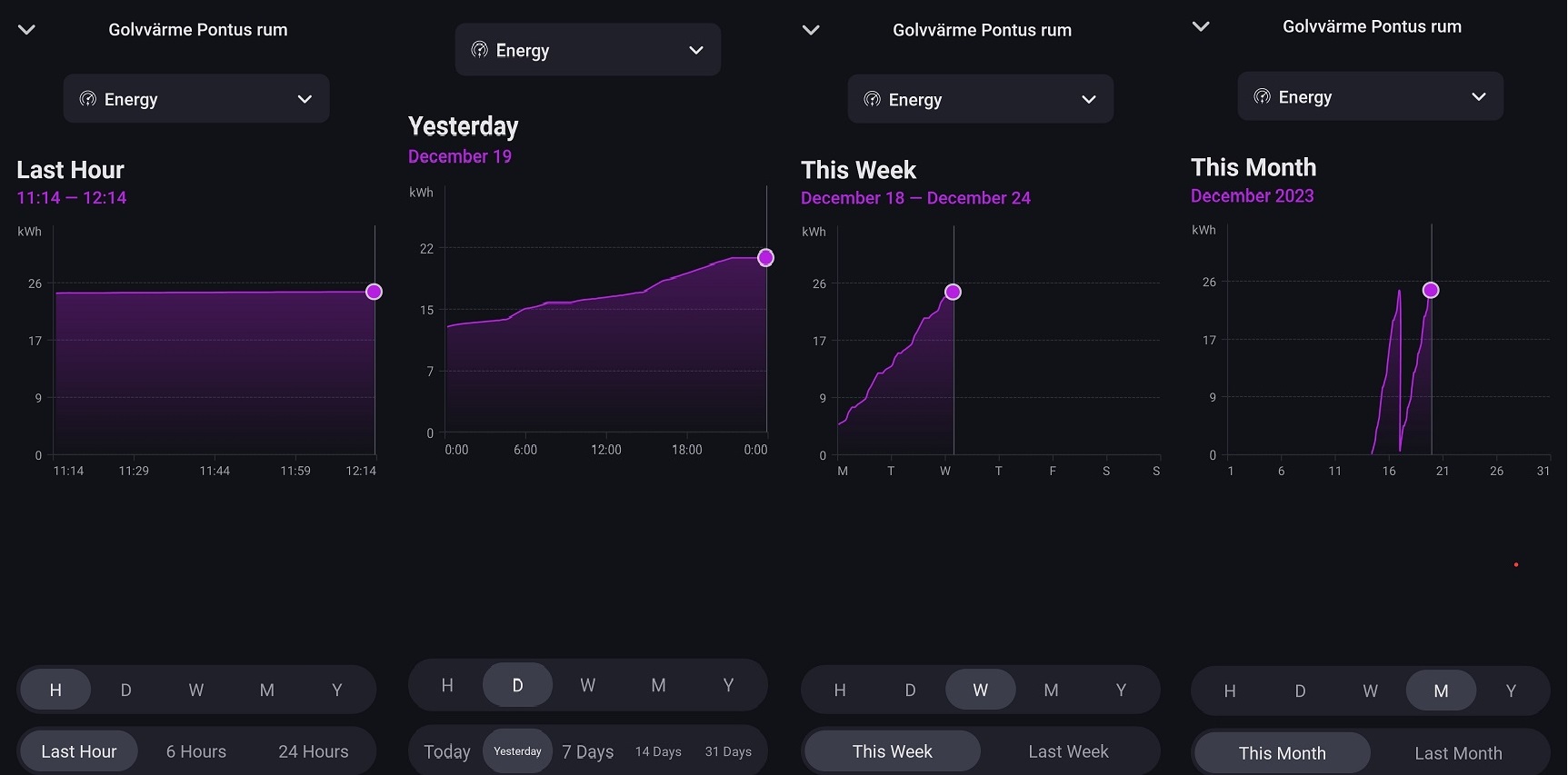
So when looking in the homey app at one of my Shelly plus pm mini (connected to floor heating) and selecting insights/energy to see the energy consumption (kWh).
If I for example select D (Day) and yesterday I would like it to start at 0 kWh at 0.00hrs and then the kWh value should increase through out the day and ending with the total (daily) consumed energy at 23.59.
As it is now, at the start of the “day” 0.00 its already at 12.8 kWh (which it ended with the day before yesterday) and then the kWh value increases through out the day just adding to the total consumed power.
Hope my included picture can clarify a bit also.
The daily value (kWh) should start with 0 not the value it had by the end of the day before.
The weekly value (kWh) Monday should start with 0 not the value it ended with the Sunday before
you will need power by the hour for that.
the view is last day but those will not start at 0 unless you reboot the shelly at 00:00
this will give you daily insights.
also keep in mind whenever you remove power from the shelly the counters go back to 0
power by the hour has a daily reset option that will make that less painfull but you will need to reboot it every day 00:00 as well.
if not the total cumulative values will be screwed in Homey but would still be fine in the shelly app
just my 2 cents
This not how this works. Energy measurement is cumulative. As mentioned by bug you can of course use something like power by the hour to create different statistics. But this is not a question for the Shelly app.
For Plus/Pro devices the energy measurement will be persistent from firmware 1.1.0 and will survive a reboot.
Hello,
I’m new on Homey and still using the Cloud with Shelly devices.
For now all is working well with Shelly Cloud and Home Assistant.
Today I tested to disable HA automations for Shelly I4 and tested the flows on Homey but didn’t work.
Any flow standard or advanced using Shelly I4 don’t work.
But as soon as I disable the flow and enable HA automation works fine.
Can be because I’m only using Homey in the Cloud?
Thank you.
I’ve just installed the wave 1pm, everything is working fine. But the power consumption has steps from 0.1 is it possible to change it to 0.01?
Hello, i want to add the shelly 2.5 to the homey. it does see the switch but got timed out 30000 any idee what steps i need to do? the switch works with the shelly app.
i did read the write up at the start post to add.
Dont think the device reports more than 1 decimal.
Time out usually indicates networking issues where Homey can’t reach the device. Either because of bad signal or
because of network configuration (not in same VLAN, isolation is enabled, etc).
Thank you i forgot it was on a VLAN.
I added it and reacts, only the up and down button not the % with the logo shutter open/closed.
Hello @Phuturist,
Do you have any idea if actually there are issues with Shelly I4?
I really wanted to remove Smartthings and Home Assistant to just Homey, but the first tests are not working well. 
Thank you.
What does that mean? You really need to provide more information. Can you control the device from the devices tab?
Hi, i am using several Shelly RGBW2 controllers in my Homey Pro. Everything has been working great so far. I have noticed that when I use the ‘Dim white channel to 0-100’ card in the advanced flow, the dim level for white is the exact opposite of what I would expect. A dim level of 0 leads to 100% white on, and a dim level of 100 leads to 0% white (off). In the Shelly Web Interface, the value 0-100 is synchronized with the brightness. Am I doing something wrong? For R, G, B, the dim level is ‘normal’ - 0 equals 0% (OFF), 100 equals 100% (ON).
Regards, Christian.
Thanks, that’s a pitty but can live with that
Hello @robertklep,
I will try to give you the best info as possible.
On Shelly Cloud, the device Shelly I4 in “Input Settings” is the option “Button” selected.

On Homey Devices Tab, the only information regarding Shelly I4 is Wifi Signal. Can’t do nothing more.
But with this kind of device for me is ok, because we only need it for the flows.

The flow is really simple, because it’s only to turn on one light.
Standard Flow:
Advanced Flow:

Note:
This Shelly I4 was updated yesterday with the last firmware:

And is working without any issues with Shelly Cloud and Home Assistant with all 4 buttons.
Have you followed all the instructions and trouble shooting steps in the first post of this thread? Are any other events besides “Single Push 2” available? Have you tried any of them?
Does anyone know why the setting with % open and/or close is not working?
The other option open and close is working properly.
Hi @robertklep,
Yes I followed the troubleshooting steps before writing the 1st post.
-
Rebooted Shelly I4: Didn’t solve
-
Can’t reboot Homey device, because I’m using only the Cloud.
-
Factory Reset Shelly I4.
-
Remove Shelly I4 from Homey App
-
Add again to Shelly Cloud
-
Add again to Homey App
None of the actions solve the issue.
Yes, there are more events. 4 for each button and one general named “With any action”.

The only event that works is selecting “With any action”.
But only work with button 1 of Shelly I4 in single push.
I’ll look into it when I find some time.
Did you calibrate the device properly?
Sounds like a bug, I’ll look into it.
Hi, I think so.
Used the original app, there was no “calibration” button so did it manually with the manual.
Or is there also an option in homey to do so?
Thank you for your reply.
No, and I can’t really help you with this either. I don’t have roller shutters. Someone from the community that also uses this device might be able to help you.
