I cant really help you with this. My Zwave knowledge is limited and the implementation in the Homey app is really basic and nothing fancy.
So I have no clue why the device would be flooding the network other that you having changed the Zwave parameters of the device resulting in the device reporting it’s status to often (for instance to strict change percentage for energy).
Hey, thank you for an excellent app! I have one problem however, when working with flows and my Shelly 3EM. It seems that the first of 3 devices created for each phase, tracks Power (and some other stuff) for that phase as well as the Total power for the 3 phases together. The problem is that when using the flow cards, I cannot tell the difference between these. Most often I want to use the Total power. So it would make sense if the naming in the flow cards were correct accordingly.

You should use the has changed trigger card which holds the name. These less/more cards seem to be added by Homey themself (even though the SDK documentation says that sub capabilities don’t have flow cards) and don’t contain a proper description.
I have some issues with my recently installed Shelly 3-EM,
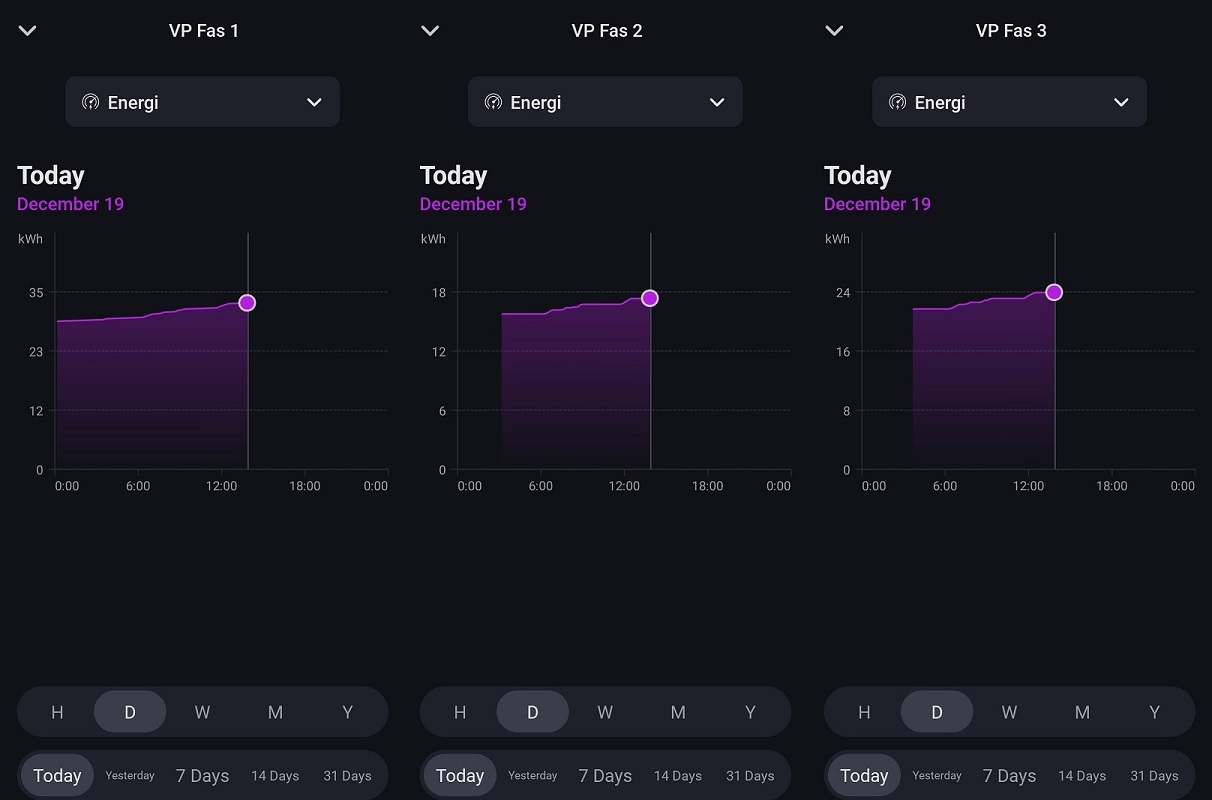
When I want to look at power consumption of just one day (today) it shows the accumulated consumption since the device was installed, as an example phase 1 starts at ~29,2kWh instead of 0 as i believe it should. Phase 2 and 3 acts the same and are also missing some data during the night.
Any ideas of why this is ? The Shelly 3-EM is running FW 2023-09-13-114244/v1.14.0-gbc84623 and its connected to my Homey bridge.
Not sure but start with updating to firmware 1.1.0 to rule out firmware issues.
And btw, Shelly devices are not connected to the bridge. They communicate from Homey Cloud to Shelly Cloud and visa versa. There is no communication with the bridge.
No, but I haven’t looked either.
Please help me out here. The Total Power has changed only gives me a value for Wh, where I am actually expecting a W for Power.
Ok, so on second look, it looks like the Wh reported is actually the Power, ie should be W. So the unit shown in the flow parameter is wrong, and thus very confusing.
I’ll fix that with the next release.
App version 3.24.0 crashes on Homey cloud.
It doesnt crash on my Docker test instance, there are no crash reports in the developer console (and even if there where, the stuff that actually gets logged is so limited as Homey Cloud hardly logs anything and it’s limited to only the last 100 lines) and after reviewing the code changes in this release I cant explain why this would crash on Homey Cloud. So I’m in the dark here and cant rule out this is an issue with Homey Cloud itself.
I’ll report this to Athom but feel free to do this yourself as well.
That definitely looks like an issue with Homey Cloud.
Ok, quick action from Athom’s side. It’s indeed a Homey Cloud issue and a fix has been applied. The app should become available shortly.
Hi,
The 1.1.0 version does not seem to be released to the 3-EM yet, (it does not show as an new version in the device), so nothing there yet,
But anyhow, I also got 3 Shelly plus pm mini, all of them are updated to 20231219-133934/1.1.0- and all of them also have the same issue with only showing accumulated values.
Can this Shelly Plus Plug S API be used for this?
You will have to explain your issue in more detail. The Plus PM Mini doesn’t have accumulated values. All the Shelly app for Homey does is reports the measured power in Watt and measured energy usage over time in kW of a single channel of this device.
This works when it’s configured in switch state and you can then update the on and off color. But it’s to cumbersome and dependent on the configuration of the user and will only work on Homey Pro.
On Homey Pro, with some advanced logic you could ofcourse create this yourself in a flow (or use any other tooll which can send requests). You would:
- call rpc/PLUGS_UI.GetConfig to get the current config
- check if it’s set to switch
- update the response with the new colors
- post the new config to /rpc with the following data:
{
  "id":1,
  "method":"PLUGS_UI.SetConfig",
  "params": {
    "config": << insert new config here >>
  }
}


 tnx
tnx