Seems to be a bug, I’ll look into it.
[EDIT]
There seems to be a new hardware revision for the Shelly Plus 2PM with a different device code. I was not informed about this by Allterco Robotics. I’ll fix it in the next release.
Seems to be a bug, I’ll look into it.
[EDIT]
There seems to be a new hardware revision for the Shelly Plus 2PM with a different device code. I was not informed about this by Allterco Robotics. I’ll fix it in the next release.
Hi,
If I understand your question the Shelly device in question the +2PM has been added to my Shelly account and is on line & connected to the Shelly cloud. I can communicate, see & control it through the Shelly web ui as well as directly through it’s ip address.
I’m also getting the memory leak issue, this are my devices;
8x Plus 2PM
3x Plug S
1x Plus 1

How do you conclude there’s a memory leak when the app’s memory usage seems quite constant?
Shelly Plus H&T working in Homey
I bought a shelly Plus H&T and tried to connect it with Homey. On this forum I found out that this is not so easy caused by the Shelly Plus H&T unit, which is not reachable via IP all the time. I found a workaround that works, and I like to share it here.
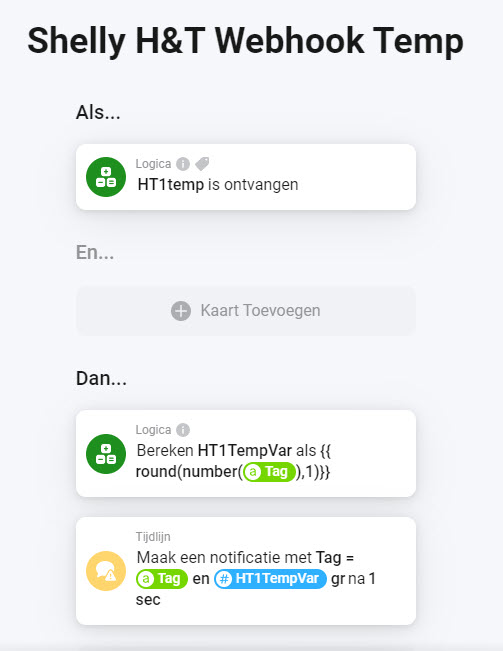
In the Shelly Plus H&T I send the temperature and the humidity data via two webhooks to my Homey, like:
https://Your-Homey-ID.connect.athom.com/api/manager/logic/webhook/HT1temp?tag=${ev.tC}
and
https://Your-Homey-ID.connect.athom.com/api/manager/logic/webhook/HT1humi?tag=${ev.rh}
In Homey I convert that received data with two small flows to the numeric vars “HT1TempVar” and “HT1HumiVar” and that is it.
Maybe there are other ways to get it working but for now it works for me.
You could also use MQTT from Shelly H&T to update MQTT topics that you can the read to MQTT Hub device to get a virtual device for your H&T sensor.
Ok thank you, i never worked with MQTT but i will try it.
I don’t know. But sometimes, days or weeks the apps paused. I must restart it before the connected devices are gonna work again.
Is it possible to restart the app sometimes trough a flow?
Yes, that’s possible if you enable the “Power User” experiment in the Homey mobile app settings.
@Bjorn_L
Open the Homey app, more, settings, experiments, switch on Power user.
Go back to the beginning. Make an IF card with a starting time.
The AND card is System, restart app, choose the app you want to restart.
I hope I did this correct.
Hi, is the new Shelly Pro 3EM supported?
Yes (there is a list of supported devices in the app store description)
Also having an issue adding a Shelly Plug S to Homey today.
Last month I added 10x 1PM without issue.
The pkug is available on the network and controllable with the Shelly app.
When adding to homey, it finds the plug as ready to be added.
But when it asks for an icon, I select use default.
Page becomes blank and it hangs there forever!
Hi
Is it possible to connect Shelly devices to Homey outside the local wifi network? For example Homey at home and Shelly at work.
From Håkon
Inhad the same issue with a motion device. Make sure that in settings the device is set to discoverable and reboot device. After I enabled that setting pairing was done very quickly and easy.
After pairing I disabled the setting again.
Setting set using the web gui of the device itself.
Only using nat and port forwarding and narrow firewall port/ip programming. And that is not easy to acomplish.
Or using a VPN.
I would be rich if I got a nikkel for everytime a user asks about this … 
By default only with Homey Cloud, not with Homey Pro unless you create an advanced network setup to support as mention by Marco above.
I just added Shelly 3EM with Homey. It connected easily, like all other Shelly devices, but I see 2 instances of 3EM. I would expect 3, one for each phase, correct?
I like to monitor the 3 phases separately, to ensure we not overload one of the fuses.
What am I doing wrong?