Could you restart the app, wait 2 minutes, try and control the lights from Homey so the issue occurs and then send me a diagnostic report from the app settings.
After restarting the app its working like 80%’ish of the time, and found a funny error while testing, if you change to a colour, go to brightness, and slide Down to zero, it changes to bright White instead of turning off (and changes back to colour when pullimg up again), if you do the same when using White light it turns off as expected
Diagnostic report 1d377df7-a24d-421e-8e0d-8585525a66be
There is nothing in the log about the bulb but there are numerous EHOSTUNREACH errors in there for the following devices:
- Shelly Plug S at 10.14.12.192
- Shelly Plug S at 10.14.12.196
- Shelly Plug S at 10.14.12.193
- Shelly 1 at 10.14.12.176
If these devices are actually online in your network it indicates networking issues with Homey and would also explain the delay with the GU10’s as well. Not much I can do about that. It’s either the WiFi signal for Homey or it’s flaky network stack.
If these mentioned devices are not online you should remove them from Homey. There would still not be any proper explanation for the delay GU10’s but having these EHOSTUNREACH popping up might effect performance as well.
It would be nice if another user of GU10’s could confirm theirs to work as intended to make sure it’s a local issue on your end, anyone?
The issue you mention with dimming in color mode seems related to Shelly firmware. I have nothing in my code that turns of the light when dimmed to 0% so that’s a Shelly firmware feature. If that does not work as expected when in color mode you should report that at Allterco Robotics (the company behind Shelly). But I might be able to add something in the code to have it turned off also in color mode. Could you test this command: http://yourshellyip/light/0?gain=0&brightness=0 and see if that turns of the light in color mode.
yeah, thoose 4 shellys are without power in the winter, as they are for my pool, so they are supose to be offline, if the app struggles with this, i will remove them untill summer 
you are right about that direct command to the bulb… it triggers the same white light 
only reason i didnt remove them was to not fuck up my flows…
yeah, if anyone else have theese, please tell if you have theese problems, or had to do anything special to make them work
@Phuturist is it a known issue power_meter sometimes resets? This is my insights of ‘last’ year. It seems to be resetting with a FW upgrade, but maybe with a app update too?
Power by the Hour devices base their calculations on power_meter apparently. If it get’s reset, the PBTH device resets. Mine for example now thinks the dryer has consumed minus (-) 33kWh… that would be neat, but don’t think it is realistic.
Is this a setting of some kind?
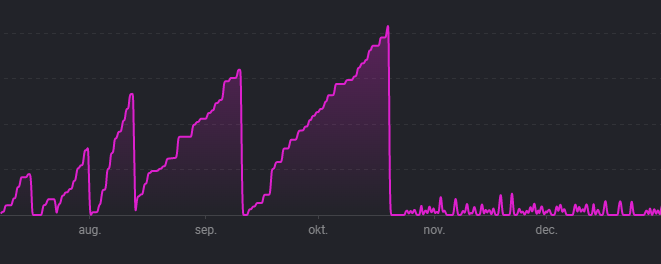
I’m running latest test version of the app. FW of the homey is 7.2.1 and latest FW of the 1PM device (with cloud connected  ).
).
My app just reads out the value returned by the API. Shelly resets this value upon power cycles of the device. For more info and a possible workaround see Keep power meter values as they reset when power is lost to the shelly device · Issue #102 · jghaanstra/cloud.shelly · GitHub
1 Like
Hi,
During the night my shelly 3em , h&t and 2.5 relay lost connection and went offline in homey but not in the shelly app…now I can not install them again?
Only shows this when I try…
Error: request to http://192.168.1.35/settings failed, reason: connect EHOSTUNREACH 192.168.1.35:80
What went wrong?
//P
Probably Homey’s unstable network stack. It’s telling you Homey cant reach the devices. Try rebooting Homey.
Ok,thanks for the fast respons…
Is it only to turn it off and turn it on with the powercable or can I rebooting in the homey app?
//P
You need to pull the plug (PTP).
Hmmm…dont work…still the same problem…I try to reinstall but no respons
//P
Everthing else works like tp-link , ikea , aqara , aeotec and dlink…only shelly 3em , 2,5 relay and h&t that lost connection but I have a 1pm that still works.
//P
Did you follow the steps from the networking troubleshoot guide from the first post in this topic? Have you for instance assigned static IP addresses for these Shelly devices?
You could create a test flow as shown below where you need to replace the IP address in the condition card with the IP address as saved under the device settings. If it gives an error when checking the condition it’s really not related to my app but either Homey’s unstable network stack or your network configuration.
Thanks,
I have try now but no luck…I will try again after dinner and christmasgifts tongiht or another day  .
.
But what can happend?..it have working perfect for a long time and have no problems at all and when I installed them it works perfect with that to…I have not changed anything more then that I have two more unifi ap’s and everthing else works with that.
Hope my poor english is understandble 
//P
You changed your WiFi setup and are now wondering why your devices have connection issues? Wouldn’t you think those two are related?
Yes, but It works 4 days perfect with the new ap’s and suddenly this night 4 of 5 shelly items have no connection …what can I do?
Sounds to me you have nmisconfigured the access points and they are not within the same WiFi network as Homey. You can confirm this by checking which Shelly is connected to one of the new AC’s and they trying out the flow I shared above. If it fails you should try and make the Shelly connect to one of the existing WiFi AC’s and do the test again. If it works you have misconfigured your AC’s.
I think I have tried most things now but I can not do it …
-Tried 3em and put it in static ip in the router but it is still not found via homey.
-All my ap’s together with homey play under the same network UniFi
- Uninstall 2.5 relay from shelly and install it again BUT it was terribly difficult to get it installed again but went in the end
-Tried to reinstall a smart plug s in shelly and it works well but when it should show up it never does it in the app … can see it trough the router
This is too difficult for me
// P
