Negative … not in a beta dashboard.
Just in devices … not in a homescreen
Negative … not in a beta dashboard.
Just in devices … not in a homescreen
 TEST: 1.4.0):
TIP:
Read the FAQ → [APP][Pro] Apple Find My - #4 by martijnpoppen
Changelog:
NEW
1. NoneFIXES
1. FIX: FindMy to ESM
2. FIX: duplicate instances
3. FIX: auth decyrption (possibly causing extra logins)
If you find any issues, send a report via the mobile homey app
More - apps - Find My - settings wheel right top - send diagnostic report (put your email in the input field to make it easier)
@Dennis_H74 see above. Can you test it out? 
Not sure if this will fix it, but 
He Martijn 1.4.1 installed
Will let u know if i get a login mail ( received one but that is the install that caused it i assume )
Nice let me know!
@Dennis_H74 not much to see in the logs.
I also think the TestFlight version doesn’t have to do anything with it. I think it’s just the apple account.
How are the emails currently?
I’ll monitor as well this weekend
Hi Martijn
15 mails so far after the update.
So its not working.
Not sure what could have changed in my apple account … nothing changed or adapted. Only the testflight version
I have reverted back to the latest stable software 8.4.4. To test that
Will let u know 
He Martijn
Had 8 mails in 11 hours reverting back to the stable. That is way less then with the test flight versions. In the past test flight nights it was more like 20 to 30
BUT … it clearly shows it is happening with stable also like you expected
b758e7ad-42fc-434b-a229-4e274781b407
Hey @Dennis_H74
Strange. Still weird with this testflgihtversion
As I expect your wife would get emails as well as she is connected to the same homey right. So if you update to the TestFlight version it’s not only your account who’s getting emails
But alright I’ll also ask athom if there can be a connection
As the app is doing everything it can to keep the session alive. So there’s something bricking your sessions
@Dennis_H74 btw this time I see some failed fetches
The app tries to connect to apple via ipv6 and that seems to fail sometimes causing a login.
Also the session resets itself sometimes so a couple of emails should be normal. But still seems quite a lot
He martijn …
Well i think its “normal” she is not getting them
Yes the same homey
But a different test flight and a different apple id.
so i suppose it can happen there is something happening with my software and not with hers ?
Or us a broken apple session homey based ?
@Dennis_H74 yes but I don’t think a mobile app can influence the application Which is running elsewhere
But will check in with Athom for this one
Because I have no clue how this can happen
Hi,
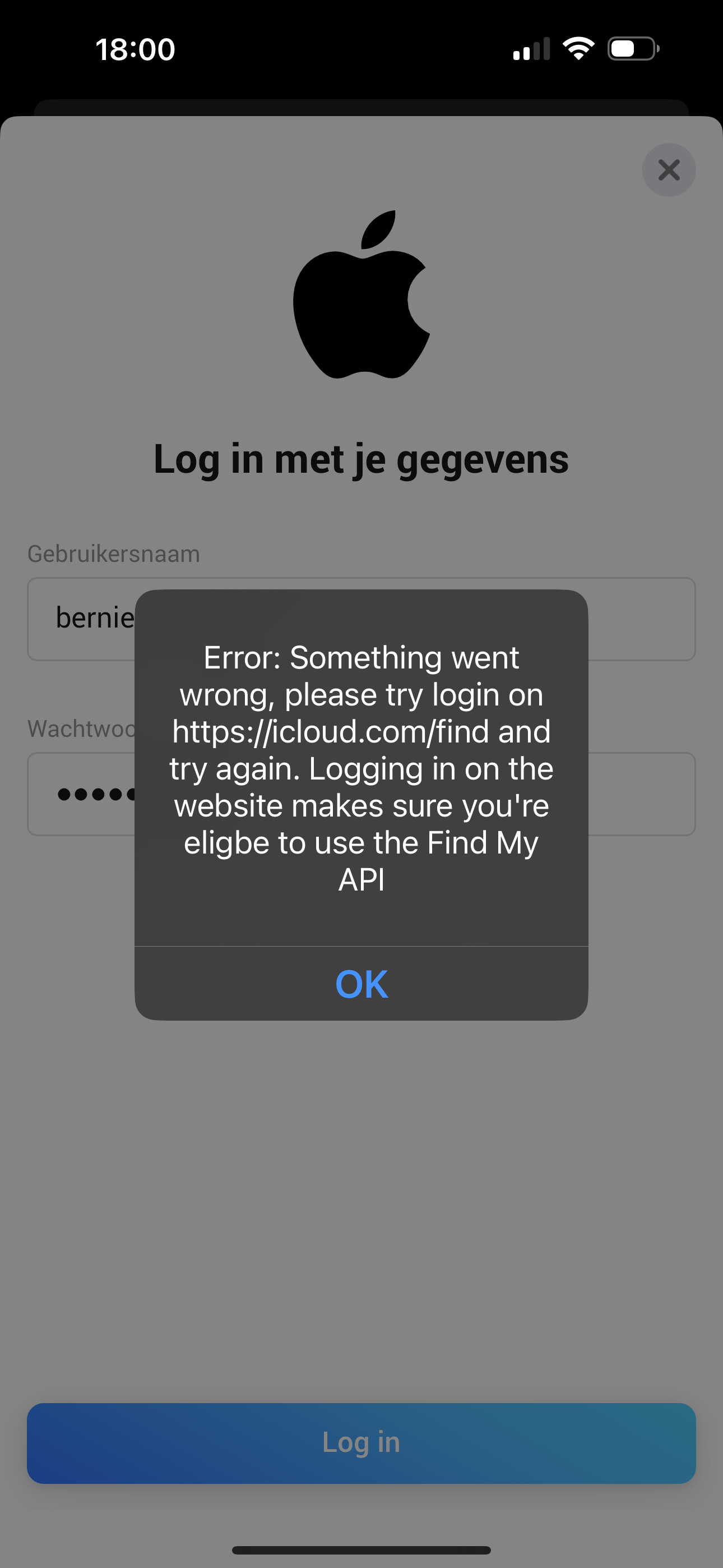
Yesterday I installed the Find My app, all went well. Today I wanted to add my account, but I keep getting the following error. The login and password are correct, have tested this by logging in at Find Devices - Apple iCloud, that works fine.
The text of the error message is:
—
Error: Something went wrong, please try login on Find Devices - Apple iCloud and try again. Logging in on the website makes sure you’re eligbe to use the Find My
API
—
I’m using the most recent TestFlight version of the homey app on iPhone with iOS 18.1 on an early 2023 Homey Pro
Anything that I can do to solve this? Is any more information needed from my side?
Thank you for your support!
Created a diagnostics report:
266597cb-a5d8-47c4-9c51-ec65684836cb
@SmilingNL you can try logging in via another device for example via the homey webapp on your computer that sometimes fixes the issue
Adding the device on my MacBook worked without any problems. Thanks for the tip.
@Dennis_H74 checked with Athom but they also
See no connection between the mobile app and a app that runs locally on the homey
They did ask of you use dashboards and if yes what kind of widgets you use
He Martijn.
I reverted back to the stable .
That has no widgets.
I had 10 mails overnight 
@Dennis_H74 and what did you normally have?
And can you try to login to Find Devices - Apple iCloud ?
Maybe that resets the session
And what widgets do you have? (If you install the TestFlight version)
He martijn .
I did login online with no issue 2 mins ago
I normally used the testflight versions and always ran the latest versions.
In the testflight version i used :
That was all i added