Yep same issue. Even with updated app it crashes. And not only does the Philips hue app crash, it also disconnects me from my Homey and it is a royal pain in the butt to try to get reconnected. When this app crashes it cause my homey pro to go offline…At least in my case. And this time I have not been able to reconnect to it either through the app or website. Have an open ticket still so see what support says.


Contact homey.app/support
Thanks. I did submit a support email 3 weeks ago and they are still working on this issues. No solution yet. But have an active email chain/discussion taking place so hoping for a fix soon. Will post results when it’s fixed.
No Problems. Hue-Bridge with more than 50 Devices. Has your Bridge a fixed IP?
I have 3 bridges, approx. 75 devices and no problems. As @CyberSponk has asked, does your bridge have a fixed IP? What is your network setup?
My Hue devices are frequently not available. A restart of the Philips Hue app solves the problem. Since this occurs almost on a daily basis it is very annoying. I use Homey (Early 2019) Version 12.3.1. Is there a solution? Thanks René
I also have this issue. Need to restart Hue app daily since a few weeks.
I also have this problem, came home yesterday and all Hue lights, plugs and sensors were unavailable. Had to restart the Hue app and now scheduled it again to do this weekly.
I have 2 bridges and around 90 devices in total. Can’t pinpoint when and how this state gets triggered.
I think I’ll built a flow to detect if lights are unavailable and at that moment restart the Hue app. Or does someone already have this running (so, can I copy it? :-))?
Least to say that the Hue implementation is buggy for over a year now and this takes me to the point to consider something else then Homey (maybe back to Home Asssistant again?).
Same issue here, need to restart every night at the moment.
It crashes so often. And “app has crashed” flow isn’t working for some reason. So I have to manually restart app.
Hi.
The Hue app can activate a scene from within a flow. However, selecting scenes is impossible as only the Bridge name is shown (which I really don’t care about). I think the name of the Room or Zone should be displayed if it is set. Hue has default scenes in those rooms/zones, which are all named the same across rooms/zones. This makes it impossible to know which scene is selected.
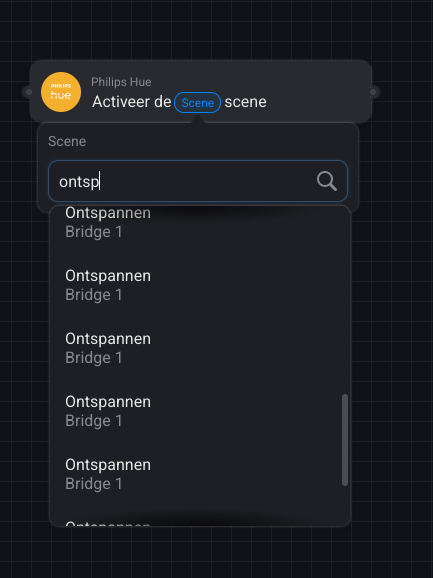
I have the same issue.
Here is one way to handle it
I know there is a workaround, but I have more than 20 rooms. In my opinion, this should be addressed in the official Hue app by Athom itself. The information is available in the API.
Since the recent update of the Philips Hue app (6.3.13) all my Hue devices cannot be found. Restarting the app does not solve the problem, restarting the entire Homey doesn’t either. The Homey (Pro23) and Hue bridge are both connected to the same network and the Hue Bridge works using the Hue app. When I try to ‘repair’ one of the lights it says ‘Hue Bridge Not Found’. Anyone having the same issue and/or a solution?
Diagnostic report: e19ff3d2-d327-429c-a33c-1c3f135724aa
A full router reset solved the problem for now. 
The activate scene card is missing the special scenes. The ones that run the whole day. I use these because these scenes can handle transitiontime.
Please add this to the activate scene cards.
Yes, I’ve been waiting for this since I got my HP’23. Got it working now, but in an annoyingly complicated way.
Can you elaberate on how you did this?
Of course. Do you want the Very Detailed Version (I have to look up some stuff because I forgot how I did things exactly), or the General Description Version, which says what I did, but not how ai did it? 
