Most probably at Device Settings > Advanced
Where did you look for these presets?
Most probably at Device Settings > Advanced
Where did you look for these presets?
It’s not in advanced settings or app settings.
I have problems with the rotating function. It works fine some times then it doesn’t work anymore.
Thanks for your reaction and pointing me to other sources that provided even more explanation.
My reason to switch to Homey Pro was that it includes radios for all supported protocols. As I still prefer to use Zigbee as much as possible I am now confronted for the first time with the incompatibilities in the implementations of the Zigbee devices of different manufacturers.
I’m now considering whether to dump the Aqara dimmers and take the loss, or spend a similar amount on buying their hub in hopes that it will solve the issues.
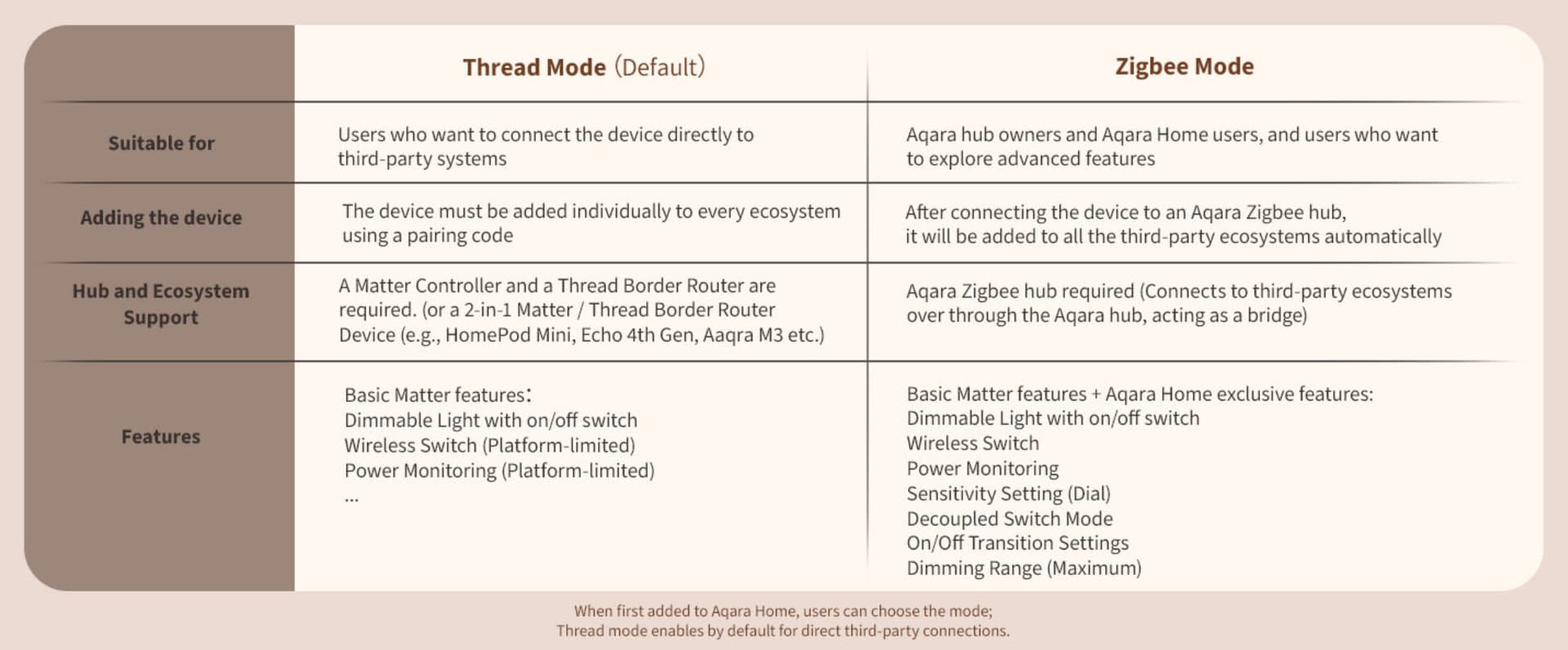
The problem is that the Matter-over-Thread option doesn’t give me the option to set minimum and maximum values for the dimmer, nor would it hive me the power metering option.
Do you think there is a possibility that the dimmer would be added to the Aqara Honey app at some time?
If I look at the specifications of this dimmmer, then the functionality offered in Matter-over-Thread vs. Zigbee mode differs (regardless of using Homey or another smart home platform). Based on their information the extra functionality should be available when using an Aqara hub + their mobile controller app (Aqara Home).
I don’t know, but maybe the developer does  .
.
@TedTolboom: Are you planning to add support for the Aqara Dimmer Switch H2 EU? And if so, which capabilities will be supported in Zigbee mode?
Why is the function for Roller Shade Driver E1 to ‘Stop’ not available through the Aqara app?
Its a critial function which the device has to enable flows that stop the shade in its current position when in motion.
Is there a way to add this?
The real problem is the requirement of Athom for window covers, which is specified in the Homey Apps SDK (link).
Either you have to use a slider (windowcoverings_set), i.e. the positioning between 0 and 100 %, or you have to use the up, down, stop variant (windowcoverings_state). Both at the same time are not allowed to be used:
And it seems that most app developers have chosen the windowcoverings_set variant, for whatever reason.
Other curtains like switchbot curtain has stop available and I know from my home assistant that the aqara roller has this function
It has already been explained why app developers cannot add this functionality to their apps. If you don’t agree with Athom’s “rules”, you should submit a support request or open an issue here.
I’m not upset about how they set it up. I just don’t understand how that is true.
I have another device connected to honey called the switchbot curtain 3. This device is the same type of device as aqara and it has the ‘stop’ function.
From what you told me this is not allowed by athom but yet it’s on another device which I’m very confused about?
Thanks
That’s because the developer of the Switchbot app gave that device both the windowcoverings_state and the windowcoverings_set capabilities, so it’s basically in breach of Athom’s “rules”.
I have posted the issue: [Issue] Athom window coverings limitations · Issue #407 · athombv/homey-apps-sdk-issues · GitHub
i have 4 motion p1 sensor at home, and non of them want to connect to my homey network. maybe it is related? i have 2 who i want to migrate from my homey 2019 to the 23 but that is not working and i have 2 brand new one but they also don’t want to connect.
since yesterday i have a homey 2023 because i had problems with the temperatuur t1 sensor on my pro 2019 what is solved by the switch to the homey 23
for me it’s not a big deal the motion p1 is nog working, i hope there wil come a fix and til that time they are just for show
No. it’s not listed in the apps supported devices list. Its being asked here for years (search this thread for ‘doorbell’).
(I’m also looking to switch from the google/nest systems and the Aqara doorbell caught my eye. But the lack of Homey support might force me to Eufy or something.)
A reason could be: I think this app is about zigbee devices only, a cam-doorbell often uses wifi for streaming.
According to Robbshop the G410 Select works with Homey Pro already:
Probably over Matter. But it’s not a Zigbee device, so the Aqara&Xiaomi Smart Home app is not the right one anyway, as you already suggested.
And it officially works with Home Assistant:
Look at the posts above this one; there’s some indication it can/should be doable. No explanation exactly on how though. Your post is from 2 weeks ago. Did you manage something in the meantime?
Please consider adding support for the Aqara Vibration Sensor T1 (model VB-S01D). I recently bought two of these and was surprised to find that the app doesn’t recognize them. Is support for this device planned in a future update, or should I consider returning the products?
Thank you!
You should consider to read the first post of this topic. And/or do a search for Aqara T1…