Hi, I have tried to search, but cannot find any relevant topics with the same issues I have. My apologies if I am mistaken and there are already topics on the same issue.
Short description is that I am using my Homey to wake me up in the morning, both with radio and lightning before my phone alarm going off. I am having issues with the flows not being run some days.
Problem description:
Running on Homey Pro (Early 2023)
Using the built-in Alarms function set as a morning alarm clock (currently set to 05:00 / 5am). NB: the alarm is not scheduled, but are activated manually each day (with the checkbox)
I have two separate flows triggered 5 minutes before the specific alarm clock goes off
Flow 1 should turn on the radio, and also send some pictures to my phone
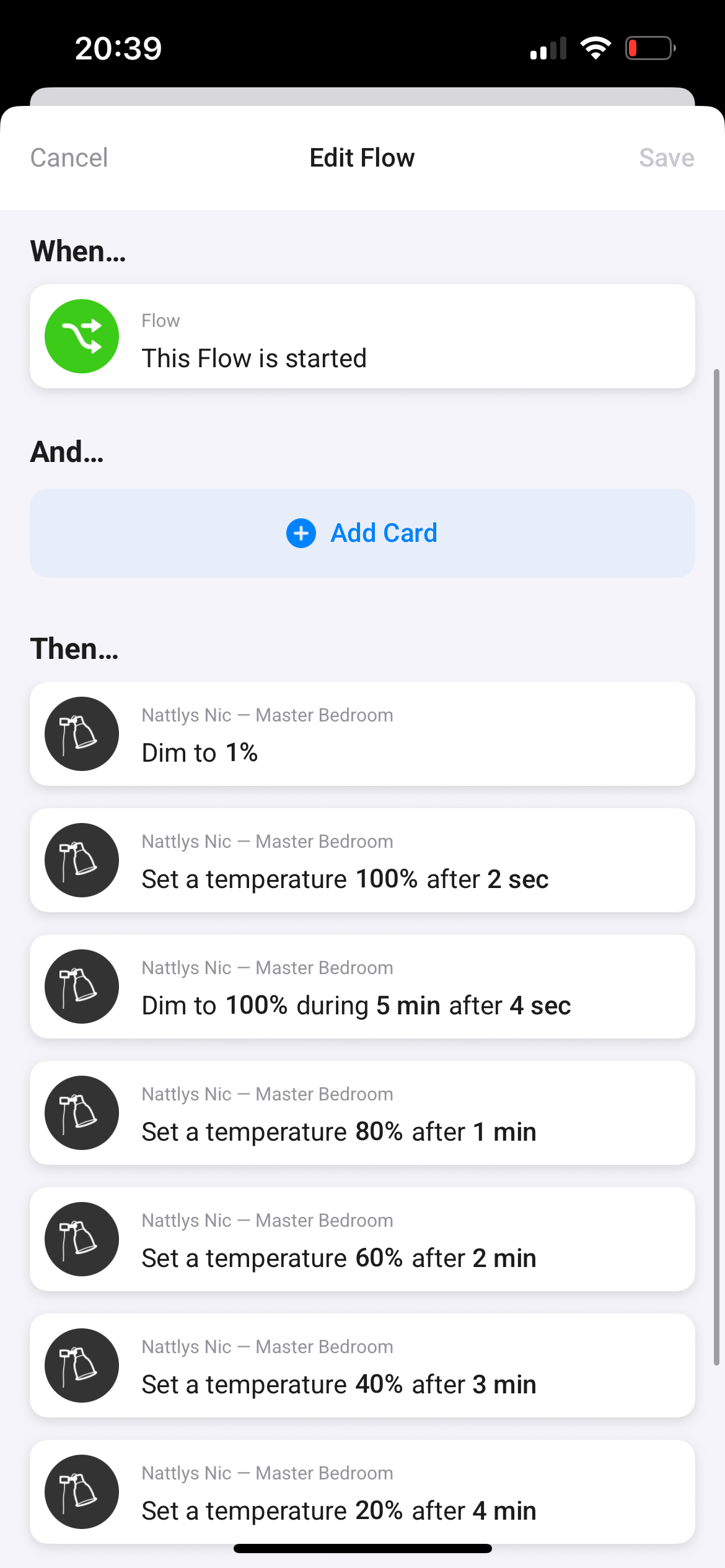
Flow 2 should trigger a morning light with both temperature being changed each minute and dimming changed from 0% to 100% with a duration of 5 minutes
This flow has been unreliable for some weeks, where neither the radio nor the light starts in the morning, including the last two days
Current troubleshooting and hypothesis:
I thought perhaps the 5am alarm was sensitive to wether the alarm was activated before or after midnight, I made sure to activate it before midnight today, but it still did not go off
I have revised the flows and made sure the connections to both the alarm and devices was OK
I do not have anything in the Timeline that indicates a temporary outage on the Homey, neither as push notification
I have not restarted the Homey Pro, as I am not experience issues with any other flows and or any other unreliability
Based on the little I could find in the forums related to the native Homey Alarm, all flows triggered by the alarm fails if one fail. So current hypothesis is that any of the flows fail.
Do you see anything that could explain the current behaviour?
As I don’t use the alarm function myself, I created an alarm and a really simple flow.
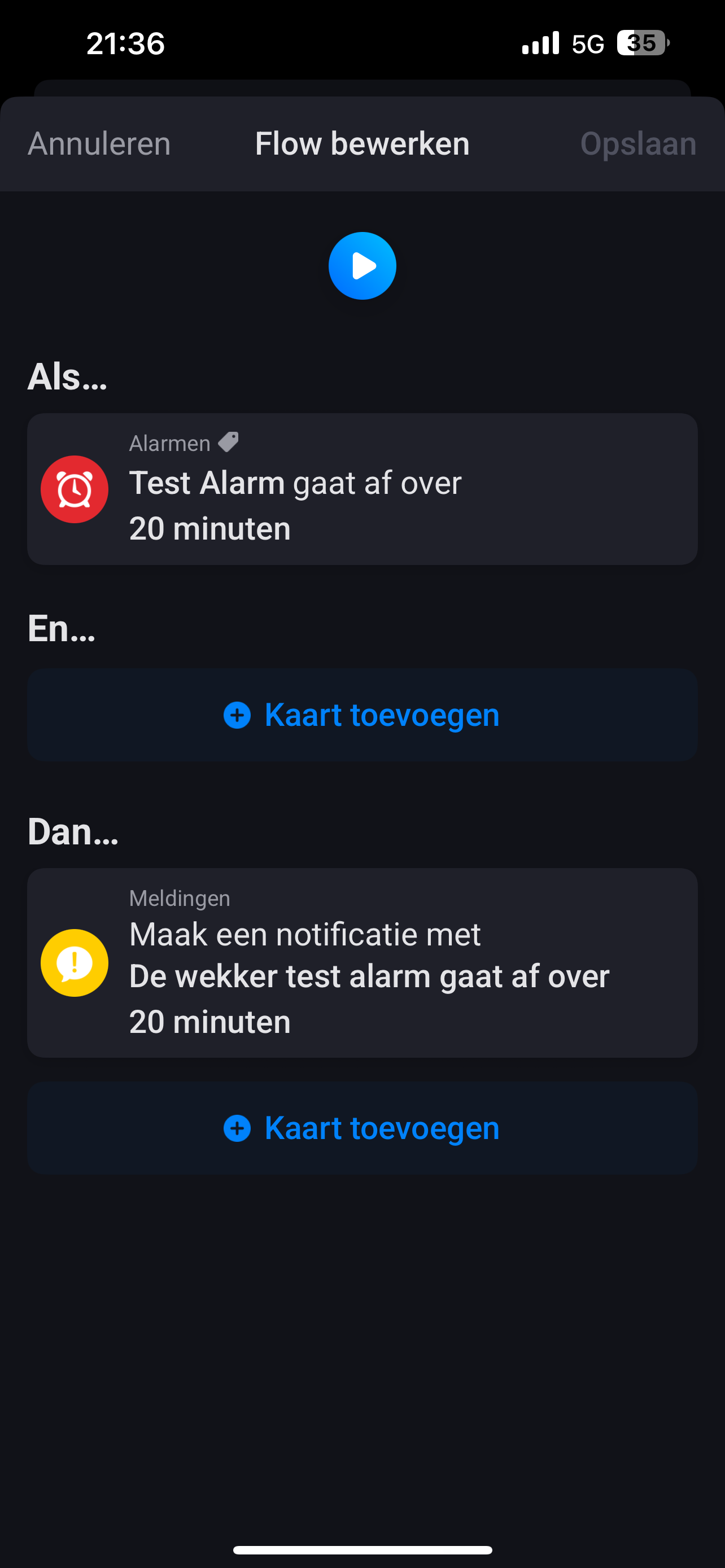
When… – Alarm “Test” goes off in 5 minutes Then… – Send a Timeline-Notification
This flow didn’t work for me either!
But when I pressed the play button, the flow worked perfectly.
So I replaced the alarm flow card to check whether the problem might be caused by this flow card.
When… – Alarm “Test” goes off (without “in 5 minutes”!) Then… – Send a Timeline-Notification
This flow worked as it should!
Can you please try the other flow card as well? If the changed flows work, then it’s most likely due to the “in 5 minutes” alarm flow card, and you/we should report this bug to Athom Support.
I tried to replicate, but the trigger WhenAlarm Xgoes off inXminutes did not fail on me despite 10+ attempts.
I then added the third flow showed in the pictures within the When state. At first, with 10 seconds delay it worked again in all 10 attempts, but when I changed from 10 sec delay to 1 minute delay it failed consistently.
I can’t remember alarms failing without the reference. I wanted to easily adjust the alarm time for let’s say tuesday without changing the advanced flow.
This way I only have to change the alarm time in the alarm-tab on my phone.
Update: The alarm failed this morning as well, despite having removed the delayed flow-trigger (Morgenbilde Trafikkamera) in the Then-card.
Issue has been reported, waiting for follow-up.
Next troubleshooting is to avoid having two separate flows triggered 5 minutes before alarm goes off, and instead trigger the Morning light flow within the Radio flow
Since last update I followed Wim_Posts’s suggestion and switched from direct reference to an alarm, an instead had the alarm actions to be triggered with “WHEN any Alarms go off”, “AND Alarm name contains”.
Since this the Alarm failed 1/2 times, it worked on Thursday but not on Friday.
Troubleshooting that has not helped this far:
Making sure to activate alarm before midnight
Removed the delayed flow triggered within flow
Combined the two flows triggered 5 minutes before Alarm in one flow, the one triggering the other
Replaced direct reference in WHEN card, to “WHEN any Alarms go off in 5 minutes” + “AND alarm name contains X”
Not sure whether relevant, but maybe the time/date of your Homey is incorrectly set? You can check this by creating a flow that sends a message to the timeline, which includes the Time and Date tags (from the Date & Time section in the tags list).
Looking at your screenshot, the THEN section contains multiple actions. Homey will (try to) start them all at once. Sometimes not all those parallel actions are processed correctly.
What happens if you add a 1 sec delay to each of those cards, so they are executed after each other? You’ll find the delay option in each of the THEN cards.
Alternatively, if you have and are willing to use Advanced Flows, you can set up the same flow and connect each of the THEN cards after each other, so that they are executed in series (delays are not necessary then).
Update, I tried your suggestion this morning, but it still failed.
I have a feeling that maybe it is the Sonos Radio action that is failing and stops the flows. I am going to try the Sonos action “Play URL” instead, with a URL i have verified to work. Will update tomorrow!
Note that in an Advanced Flow you can check whether and which card errors. E.g. you can send yourself the error message or put it on the timeline, by connecting such a notification action to the red connector at the bottom of each flowcard. As far as I know such functionality is not available in a Standard Flow, unfortunately.
Also curious for resolution on this. My simple flow here is not working. I have a timeline notification set when it activates (to confirm it is NOT working)
Any resolution on the alarm issue? Any feedback on the bug report?
I have a similar/same issue: my flow using the built-in Alarms set to trigger at 7am usually works, EXCEPT after an automatic software update which restarts my Homey Pro. I I restart my Homey Pro manually the alarm flow works, until the next time a sw update happens. (which is usually at night, causing my alarm at 7am to not happen, so I have an old-fashioned backup alarm…)
Now, I can of course switch automatic sw update off, but I want the alarm to always work, not having to think about sw updates, which is the whole point of the automatic sw update!
Anyone any ideas/fixes/instructions how I cn submit a bug report with Athom?